Category: Guide
All blog posts in this category.

Website tracker audit: a practical checklist for small teams
A tracker audit is not a cookie-counting exercise followed by a screenshot. Its purpose is more practical: to understand which components communicate with which services, when they do so, why they exist and what data they transmit. That distinction matters. A site can set no HTTP cookie and still send information to third parties. Conversely, a cookie may be strictly necessary to deliver a feature requested by the visitor. The word “cookie” does not determine purpose, risk or the applicable legal rule. For a small business, B2B SaaS team or multi-site operator, the useful output is not a fifty-page report. It is a reproducible inventory connected to owners, decisions and remediation work. Keep one boundary clear from the start: a technical audit is not a legal opinion. It provides the facts needed to document the setup and support a qualified assessment. What the audit should answer By the end of the exercise, the team should be able to answer eight questions:Which scripts, pixels, SDKs and third-party resources load? Which cookies, local storage entries or identifiers are created? Which requests fire before the visitor makes a choice? What data appears in URLs, headers and request bodies? Which provider receives each data point? Which operational purpose justifies each component? How long are identifiers and collected data retained? Who can access, export or reconfigure the data?This prevents a common failure mode: reviewing the banner while never testing what the website actually does. European regulators use a technology-neutral understanding of trackers. It can include cookies, pixels, local storage and fingerprinting techniques. An empty cookie list is therefore not sufficient evidence that no tracking occurs. Build a representative test scope Testing the home page alone rarely gives a useful result. Components differ by template, journey and consent state. Your sample should cover at least:the home page; a content page; a product or service page; a pricing page; a form; a confirmation page; an authenticated area, where applicable; a page embedding video, maps, chat or booking tools; a campaign URL with UTM parameters; major language versions or domains in a multi-site setup.Test several states as well:first visit with no stored choice; reject all optional trackers; selective acceptance; accept all; returning visit with a saved choice; private browsing or a clean browser profile.Add a dedicated scenario for sensitive areas. A customer portal, healthcare form, HR page or admin interface should not be treated like an ordinary editorial page. A seven-step tracker audit 1. Start with a clean browser Use a fresh browser profile without extensions that block or rewrite requests. Open developer tools before loading the page and preserve the network log. Record:tested URL; date; browser and version; consent scenario; production or staging environment; person running the test.This makes the audit reproducible and allows a reliable before-and-after comparison. 2. Inventory loaded components In the Network panel, inspect scripts, images, fetch calls, XHR and documents. Record third-party domains and first-party-hosted files supplied by external vendors. A script served from your domain is not necessarily operated by your team. Proxies, tag managers and CDNs can obscure the functional source. For every component, capture:Field QuestionComponent Which script or service loads?Owner Which team requested it?Provider Who operates it?Purpose Measurement, support, security, advertising or media?Trigger Before choice, after acceptance or after an action?Observed data URL, referrer, IP, identifier or event?Destination Which domain and known processing region?Decision Keep, configure, defer or remove?Do not stop at the vendor name. The same company may provide products with very different data practices. 3. Inspect browser storage Review:first-party and third-party cookies; localStorage; sessionStorage; IndexedDB; service workers; application caches where relevant.For every entry, record its name, domain, lifetime, attributes and creation time. Secure, HttpOnly and SameSite are valuable security attributes, but they do not determine purpose or consent requirements by themselves. Clear site data between scenarios. Otherwise, an identifier created during the “accept” test can contaminate the “reject” test. 4. Compare behaviour before and after a choice Reload the same page in each state and compare:contacted domains; request count; created cookies; sent events; deferred scripts; calls triggered by interaction.A tag may stay silent at first load and fire after scrolling, clicking or opening a widget. Test the important interactions, not only the initial page request. For session replay, chat and personalisation tools, review masking and excluded areas. A minimal tracking plan is a useful reference point: collection should remain tied to a decision rather than the technical ability to record everything. 5. Inspect the transmitted payload Open representative requests and examine:full URL; query parameters; request body; headers; referrer; persistent identifiers; event properties.Look specifically for data that should not enter an analytics URL:email address; telephone number; name; customer ID; password-reset token; session token; free-form text; sensitive search query; case or account reference.URLs are routinely copied into logs, browser history, observability systems and support tools. Data placed in a query string can spread far beyond the analytics product. 6. Connect technical findings to governance The Network panel cannot answer every question. Review the vendor documentation and account settings:retention; hosting and subprocessors; international transfers; vendor reuse of data; sharing options; roles and access; exports; deletion; audit logs; multi-site configuration.Where a team is considering a limited audience-measurement exemption, the actual configuration matters. Under the CNIL framework, the purpose must be strictly limited to audience measurement for the publisher, and the result must be anonymous statistics without cross-site tracking or data combination. The national rules and implementation need to be assessed for the relevant country. 7. Turn the inventory into work Use four simple severity levels:Critical: sensitive data or tokens exposed, marketing tags firing after refusal, session identifiers in URLs. High: unknown provider, no internal owner, session replay on sensitive areas, uncontrolled retention. Medium: excessive lifetime, duplicate tags, unnecessary parameters, incomplete documentation. Low: naming cleanup, stale test tags, missing comments or weak evidence.Every action needs an owner, due date and validation test. “Review later” is not a workable remediation item. A 90-minute first pass A small site can complete an effective initial review in one short workshop. 20 minutes: map the scope List critical templates, expected tools and consent states. 30 minutes: observe Inspect network and storage on three to five pages in the initial, reject and accept states. 20 minutes: reconcile Compare observed domains with the consent interface, privacy notice, tag manager and vendor contracts. 20 minutes: decide Remove ownerless components, open high-priority tickets and schedule deeper tests. This does not replace a full assessment, but it often finds the most expensive issues: forgotten scripts, duplicate tags, personal data in URLs and premature firing. Common audit mistakes Treating a scanner as a conclusion Automated tools help discover domains and cookies. They cannot always determine purpose, event context or contractual configuration. Their findings need manual verification. Testing only “accept all” The reject state is often the most informative test because it shows whether the visitor’s choice is actually enforced. Ignoring first-party requests A request sent to your own domain may still be proxied elsewhere or contain data that should not be collected. Auditing production once A new tag-manager rule, CMS plugin or marketing integration can change collection without a visible interface change. Lightweight quarterly reviews and pre-launch checks are more useful than one large annual exercise. Producing a table with no owner An inventory without decisions, owners or dates becomes stale quickly. Governance turns the audit into actual risk reduction. The minimum evidence package Keep four items:the component inventory; key evidence, such as screenshots or network exports; a decision log with rationale; remediation tasks and retest results.Version the document. For multi-site teams, add a “web property” column and distinguish global components from local exceptions. Conclusion The goal is not to declare the site perfect. It is to explain what was observed at a given date, why each component exists and how gaps are being resolved. FAQ Does a cookieless site still need a tracker audit? Yes. Pixels, network calls, local storage and identification techniques can operate without HTTP cookies. The audit must focus on data flows and purposes, not only cookies. Are automated scanning tools enough? No. They accelerate discovery but do not replace manual checks of trigger conditions, payloads, account settings and internal ownership. Must every page be tested? Not necessarily. Select a representative sample of templates, integrations, journeys and consent states, then test sensitive areas more deeply. How often should the audit be repeated? After material stack changes, before sensitive launches and on a cadence that matches the rate of change. For a small team, a lightweight quarterly review is often more realistic than a large yearly audit. Does a technical audit prove GDPR compliance? No. It documents technical facts. Compliance also depends on purposes, legal bases, contracts, transparency, individual rights and applicable national ePrivacy rules. Sources Sources checked on June 21, 2026.CNIL, Cookies and trackers: what does the law say? CNIL, Cookies and audience measurement solutions CNIL, public consultation on session replay, February 25, 2026 EDPB, Guidelines 2/2023 on the technical scope of Article 5(3) of the ePrivacy Directive Chrome for Developers, Network panel reference OWASP, Information exposure through query strings in URL
- 27 Apr, 2026
AI assistant traffic is not just direct traffic: how to measure ChatGPT, Perplexity, and Claude without fooling yourself
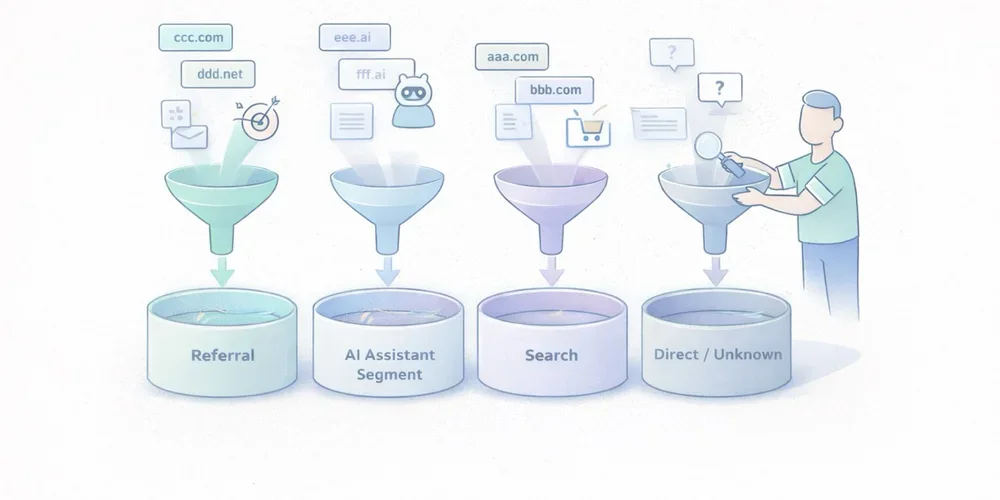
Over the last few months, more marketing teams have started asking the same question: “Are we getting AI traffic now?” The question is fair. ChatGPT, Perplexity, Claude, and other interfaces now show links to websites more often. Some teams can already see those visits in their dashboards. Others notice direct traffic going up and jump to the conclusion that “AI tools are sending direct traffic.” That reading mixes together several very different realities. Some traffic from AI assistants is measurable as normal referral traffic. Some of it ends up in direct or unknown because no usable referrer is passed along. Another part never appears in your analytics at all because there was no click. And when Google blends AI experiences into Search, the line gets even blurrier. In other words, AI traffic is neither a perfectly clean new channel nor a pure illusion. It is a mixed set of behaviors that needs to be read carefully. The goal is not to measure everything perfectly. The goal is simpler and more useful: separate what is truly attributable, document the gray area, and avoid building a story on top of fragile numbers. AI traffic is not one technical source The first thing to clarify is simple: “AI traffic” is not a single analytics category. In practice, teams usually mix together at least four different cases. 1. Assistants that send a real referrer Some ChatGPT, Perplexity, or Claude experiences show links to web sources. When a user clicks from an interface that passes usable source information, your analytics tool may see a referring domain. This is the easiest part to measure. It behaves like regular referral traffic:a visit arrives with an identifiable source domain; a landing page is viewed; the visitor may convert, bounce, or continue browsing.This case alone is enough to justify a dedicated segment. Plausible, for example, documented a strong increase in referral traffic from ChatGPT, Perplexity, Claude, and Phind in 2024. That is not a universal benchmark, but it is a useful signal: AI assistants can send visible, usable traffic. 2. Assistants or apps that do not pass clean source data Not every click is passed through cleanly. Fathom’s documentation explicitly notes that “Direct/unknown” traffic can come from direct visits, email, apps, or any situation where no referrer was passed, and that no analytics platform can control this. This is where many teams get the story wrong. A rise in direct traffic does not prove that AI assistants caused it. But the reverse is also true: some traffic from AI assistants may get absorbed into direct or unknown if the technical context does not pass usable source information. 3. AI answers that cite you without sending a click This is a critical point. Your content can be cited, summarized, or used as a source in an assistant answer without producing a visit to your site. When that happens, your web analytics sees nothing. You may have gained visibility. You did not gain a session. Treating those two things as the same will quickly distort your analysis. 4. AI experiences embedded inside traditional search Google is a special case. Google presents AI Overviews and AI Mode as Search features that can show links to websites and that do not require separate SEO tactics beyond the usual fundamentals. For measurement, that means something straightforward: anything driven by AI will not necessarily appear as a cleanly separated channel, especially when the experience remains embedded in an existing search environment. So avoid overly binary logic such as:“standalone assistant = AI traffic”; “search engine = standard SEO traffic.”In reality, the line is becoming more porous. What you can actually measure today The good news is that you can already measure several useful things without building an oversized setup. Visible referring domains This is the foundation. If your analytics tool exposes referrers or sources, you can identify visits attributed to domains tied to AI assistants. Depending on your stack, that may happen through:a Referrers report; a Sources report; a custom segment; a dedicated channel group.Google Analytics 4 even includes an explicit example of a custom channel group called “AI assistants,” with matching rules for assistants such as ChatGPT, Gemini, Copilot, Claude, and Perplexity. That matters. It shows that in 2026, even Google Analytics treats this as a real analysis use case, not a niche curiosity. Landing pages that capture those visits Volume alone is rarely helpful. The more useful question is: which pages attract this traffic? If three articles, two product pages, and one comparison page capture most visits from AI assistants, you already have a practical reading:which assets are being cited or surfaced; which topics are emerging; which pages function as entry points; which pages deserve improvement.That is often more useful than a single session count. Conversions and intent signals If your tool tracks goals or events, you can go further:demo requests; newsletter signups; meetings booked; trial starts; purchases; clicks on pricing or strategic CTAs.At that point, you are no longer just measuring curiosity. You are measuring traffic quality. That is where an “AI assistants” segment becomes valuable. Not because it sounds trendy, but because it lets you compare:volume; engagement rate; visit depth; conversion.UTM campaigns when you control distribution yourself There is also a simpler case: links that you distribute. If you publish something in a newsletter, a document, a partnership page, or a directory, and you want to observe how your own distribution performs, UTM parameters remain useful. But do not assume AI assistants will preserve your tracking conventions in every context. UTM tags are excellent for measuring links you intentionally distribute. They are much less reliable for mapping every citation or click generated by third-party AI systems. What you will not measure cleanly This is often the most important part of the conversation. Good measurement also means accepting limits. You will not see mentions without clicks If an assistant summarizes your content, uses your ideas, or cites your page without sending a visit, your web analytics will remain silent. That does not mean your content had no role. It just means web session data is not the right sensor for that kind of visibility. You will not always separate AI traffic from direct traffic When a visit arrives without a usable referrer, you enter a gray zone. That gray zone may include:real direct traffic; email traffic; messaging apps; app traffic; browsers or contexts that strip source data; potentially some traffic originating from AI assistants.The only serious posture is to treat that as uncertainty, not as a hidden truth waiting to be renamed. You will not perfectly isolate AI-powered search experiences When an AI experience remains embedded inside an existing search environment, isolated attribution becomes harder. Google explains its AI features in Search as part of the broader web search experience, with the same core SEO fundamentals still applying. For marketing teams, the practical implication is simple: not every visit influenced by AI will appear as a distinct AI source in your reports. You should not confuse citation, visit, and revenue Being cited in an assistant, receiving a click, getting an engaged session, and generating a conversion are four different things. A useful dashboard needs to keep those levels separate. Otherwise, it becomes very easy to move from a modest observation, “we are seeing some visits from ChatGPT and Perplexity,” to a much bigger story, “AI is becoming our next major acquisition channel.” The cleanest way to measure this traffic The goal is not to build a perfect system. The goal is to create a simple, stable, reusable reading framework. 1. Create a dedicated AI assistant segment or channel Start with a short list of sources you can actually observe. For example:ChatGPT / OpenAI; Perplexity; Claude / Anthropic; optionally Copilot or Gemini if they are already visible in your data.Be conservative. Do not add ten hypothetical domains that never show up. 2. Analyze landing pages first Before commenting on volume, look at:which pages receive those visits; whether those pages are old or recent; whether they answer comparative, practical, or explanatory queries; whether they work well as entry pages.This is often where the useful insight lives. 3. Compare traffic quality, not just traffic size Low-volume but high-intent traffic can matter much more than a visible but shallow spike. At a minimum, compare:whatever engagement metric your tool provides; visit depth; key conversions; CTA clicks; exit pages.4. Keep an eye on direct or unknown as a separate gray zone You should not merge direct traffic into AI traffic. But ignoring it completely would also be naive. The better approach is to document it as a possible gray zone. If visible AI referrers increase and direct traffic rises on the same landing pages, that may support a hypothesis. It is still not proof. 5. Document your reading rules This small step makes a big difference in teams. Write down:which domains are included in the AI segment; what is not measured; what falls into direct or unknown; which conversions are tracked; how often the segment is reviewed.A good dashboard is not enough on its own. You also need an interpretation rulebook. The most common mistakes Calling every direct traffic increase “AI traffic” This is probably the most common mistake. Direct traffic is an imperfect bucket. It can contain many things. Assigning it a single cause without evidence weakens the entire analysis. Creating an overly broad AI channel from day one If you group together any domain that vaguely sounds AI-related, you create a noisy segment. A narrower but cleaner segment is usually more useful than a wide and doubtful one. Focusing on volume before conversion Getting 500 weak visits from an AI interface matters less than getting 30 visits to a comparison page that converts. Mixing classic SEO, AI assistants, and branded traffic without a method The right move is not to force a false opposition. It is to separate what is observable, what is comparable, and what remains hypothetical. What to remember Traffic from AI assistants is real. It is not imaginary. But it also does not arrive as a single, clean, perfectly attributable source. Some of it appears as visible referral traffic. Some of it gets lost in direct or unknown. Some of it never generates a session because no click happens. And some of it lives inside search environments where AI and classic search are harder to separate. The best working approach comes down to four simple rules:isolate the referrers you can actually see; measure landing pages and conversions, not just sessions; treat direct as a gray zone, not as hidden certainty; clearly document what your AI segment includes, and what it does not.That framework is less dramatic than a promise of total attribution. It is also much more useful. FAQ Should traffic from ChatGPT always be classified as direct traffic? No. When a usable referrer is passed, it can be measured as referral traffic or grouped into a dedicated segment. But some visits may still end up as direct or unknown depending on the technical context. Can I measure citations without clicks from AI assistants? Not with standard web analytics. Without a session or a click, your audience analytics tool sees nothing. Should I create a separate AI channel in GA4? Yes, if you are starting to see referring domains tied to AI assistants. GA4 documentation explicitly includes this use case in its custom channel group guidance. Should AI traffic be treated as a major new acquisition channel right away? Not automatically. First look at landing pages, traffic quality, and conversions before making that leap. Can I perfectly separate classic Google Search from Google’s AI experiences? Not always. When AI is embedded inside a broader search experience, isolated attribution becomes harder. SourcesOpenAI Help Center, ChatGPT search : https://help.openai.com/en/articles/9237897-chatgpt-search Claude Help Center, Using Research on Claude : https://support.claude.com/en/articles/11088861-using-research-on-claude Perplexity Help Center, How does Perplexity work? : https://www.perplexity.ai/help-center/en/articles/10352895-how-does-perplexity-work Google Analytics Help, Custom channel groups : https://support.google.com/analytics/answer/13051316 Google Search Central, AI features and your website : https://developers.google.com/search/docs/appearance/ai-features Fathom Analytics Docs, Dashboard explained : https://usefathom.com/docs/start/dashboard Plausible Analytics, Breaking down our AI traffic surge : https://plausible.io/blog/ai-referral-traffic-and-optimization
- 20 Apr, 2026
A minimal analytics tracking plan for SMBs: 12 events are enough to run a website
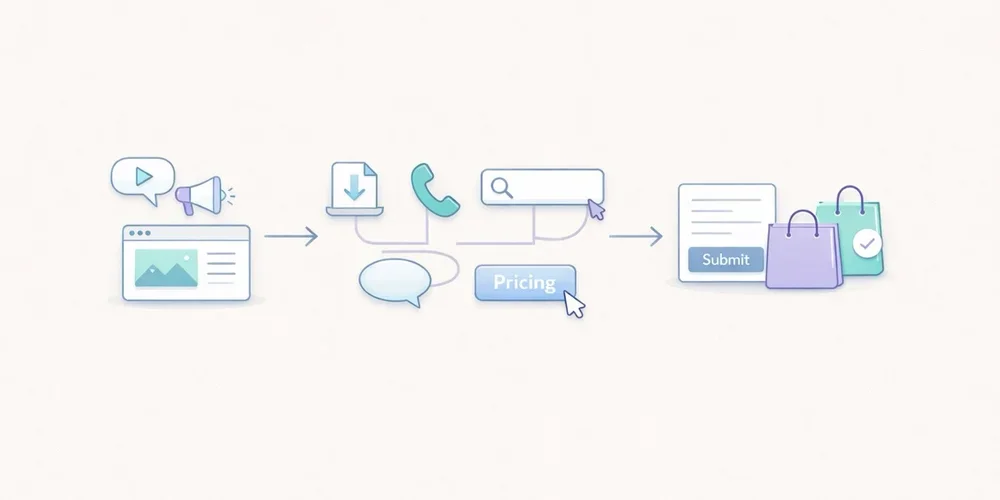
For years, many teams approached analytics tracking as an endless checklist. Track everything, name everything, enrich everything, and hope that one day someone will actually use the data. In practice, that usually creates the opposite result. The tracking plan grows too wide, the event list becomes messy, parameters get harder to read, and the dashboard stops helping people make decisions. The tool collects more, but the team understands less. For an SMB, a B2B website, a lead generation site, or a small SaaS property, the right logic is usually much simpler: measure less, but measure what helps you act. That is what a minimal tracking plan is for. It does not try to describe every micro-interaction. It tries to answer a few useful questions:where traffic comes from; which pages attract attention; which pieces of content create intent; which actions suggest progress; which actions count as real conversions.This article offers a practical framework with 12 events at most. It is not a universal truth. It is a robust starting point for teams that want analytics to stay readable, governable, and useful. A tracking plan is not a technical inventory, it is a decision framework The first mistake is to start from the tool. You open the documentation, discover dozens of recommended events, and then try to squeeze all of them into the site. That is the wrong direction. A good tracking plan starts with the decisions the team needs to make. For example:Which pages actually support acquisition? Which content drives lead generation? Which calls to action work? Where do visitors drop off? Which signals deserve a monthly review, and which ones are just curiosity?Until those questions are clear, adding more events does not help much. Google Analytics 4 explicitly separates automatically collected events, recommended events, and custom events. The key point is not that many options exist. The key point is that a team does not need all of those options to get useful analytics. The same is true with tools such as Matomo and Plausible. They can track actions beyond pageviews. That capability is valuable. It becomes counterproductive when it pushes teams to document every movement on the site. What a minimal tracking plan should cover For SMBs, a lean tracking plan should cover five areas. 1. Core audience reading Before adding events, you still need the basics:pageviews; landing pages; sources or referrers; campaigns when they are actively used; main conversions.In other words, event tracking should not compensate for a weak audience dashboard. If your reporting does not already explain which pages attract qualified traffic, twenty extra events will not fix that. 2. Intent signals Not every visitor converts right away. You need a few intermediate signals: a strategic CTA click, a file download, internal search, a demo request, the start of signup, and similar actions. These signals help you read progression. They should not become an artificial funnel for its own sake. 3. Real conversions A minimal plan should identify what actually matters for the site:form submissions; booked meetings; trial starts; confirmed purchases; validated signups.If an action does not influence any decision, it probably does not need to exist as an event. 4. Obvious friction points The goal is not to replay every session. The goal is to see where intent gets lost. Repeated internal searches, clicks to pricing with no follow-up action, or checkout starts without completed purchases can already be enough to reveal a problem. 5. Tracking governance A tracking plan without governance drifts quickly. You should know:why the event exists; who asked for it; where it fires; which parameters are actually useful; when it can be removed.This is often the difference between a clean setup and an accumulative one. The 12 events that are enough in most cases Here is a simple model. Not every team will need all 12. Many can start with 6 to 8. 1. form_submit This is the most universal event. It covers contact forms, quote requests, demo forms, and inbound lead forms. Why track it: it captures explicit intent. Useful parameters:form_name page_type2. demo_request If your B2B site offers demos, it is worth distinguishing that action from a generic form. It often reflects stronger intent. Why track it: it separates general contact from more qualified demand. Useful parameter:placement3. newsletter_signup This is usually secondary compared to commercial intent, but it can still be a strong content signal. Why track it: it measures a lighter conversion that is useful for content teams. Useful parameters:placement content_type4. account_signup For SaaS products or member areas, the start of signup nearly always deserves dedicated tracking. Why track it: it shows the move from visit to account creation. Useful parameters:plan_type placement5. trial_start If a trial exists, it should be tracked separately from a simple signup. Volume may be lower, but the signal is much closer to revenue. Why track it: it brings analytics closer to the real pipeline. Useful parameter:plan_type6. purchase_complete For ecommerce sites or SaaS products with direct subscription, this is the most important end-state event. Why track it: it anchors the setup in real conversion rather than vague intent. Useful parameters:plan_type billing_cycle7. phone_click On many local business, consulting, services, and B2B sites, the phone is still a conversion path. Why track it: not every conversion goes through a form. Useful parameter:placement8. email_click The same applies to mailto links. On some sites, this matters more than another decorative click on a product page. Why track it: it shows direct contact intent. Useful parameter:placement9. file_download White papers, brochures, product sheets, or PDF documentation can indicate serious intent, as long as you stay selective. Why track it: it helps identify the assets that generate tangible engagement. Useful parameters:file_name content_type10. outbound_click Not every outbound click deserves tracking. But some external links are strategic: Calendly, payment platforms, partner portals, marketplaces, or core documentation. Why track it: it explains useful exits from your site. Useful parameters:destination_type placement11. search_submit If your site includes internal search, it is often one of the most revealing signals. Visitors are telling you what they are looking for. Why track it: it reveals the gap between site architecture and user intent. Useful parameters:query_group results_stateImportant: avoid sending raw search terms if that creates unnecessarily sensitive collection. Grouping or aggregation is often the better choice. 12. checkout_start or pricing_cta_click The twelfth event depends on the type of website. For ecommerce: track checkout_start. For B2B sites without direct purchase: track pricing_cta_click or another major commercial CTA. Why track it: it captures the shift from interest to active intent. Useful parameters:placement offer_typeThe real discipline: limit parameters A bad tracking plan does not only contain too many events. It also contains too many properties attached to each event. A simple rule works well here: only keep parameters that change how you read performance. For example:placement can help compare a CTA in the header and footer; plan_type can help separate free, starter, and pro; form_name can help if several forms exist.By contrast, many parameters create little value:the exact button text; the full URL when it is already visible elsewhere; casing variations and naming inconsistencies; redundant details that mostly complicate analysis.Plausible, for example, lets you attach custom properties to events. That is useful. But technical possibility is not the same as analytical necessity. The more you enrich, the more you have to read and maintain later. A simple naming convention beats a complex framework For a minimal plan, the following convention is enough:event names in English; clear action verbs; no spaces; no near-duplicates; stable meaning over time.Good examples:form_submit trial_start file_download phone_clickAvoid names like:CTA Final Hero Demo contactFormSuccessNew btn_click_v2 conversion_importantThe rule is simple: the name should still make sense six months later, even to someone who was not part of the original implementation. What not to track first A minimal plan also means accepting what not to measure. Do not start by tracking:every scroll; every navigation click; every accordion open; every hover; every visual button variation; every video interaction if nobody uses that data; every micro-step of a long form unless a proven problem exists.This data can feel reassuring because it looks detailed. In reality, it often creates noise. The recommended implementation order To avoid turning tracking into an endless project, deploy in three waves. Wave 1: main conversions Start with:form_submit demo_request purchase_complete trial_startNot every team will have all four, but every team should start with the events closest to value. Wave 2: intent signals Then add:phone_click email_click file_download checkout_start or pricing_cta_clickThat is often enough to read the useful middle of the journey. Wave 3: orientation signals Only then, add if needed:search_submit newsletter_signup account_signup outbound_clickThis sequence keeps tracking under control. First document what supports decision-making, then what improves interpretation. A simple example of a minimal tracking table This documentation format is enough for most SMBs:Event Trigger Why track it Parametersform_submit successful form submission measure inbound leads form_name, page_typedemo_request demo click or confirmed request isolate strong commercial intent placementnewsletter_signup confirmed signup measure content-driven conversions placement, content_typeaccount_signup signup started or completed read visit → account progression plan_type, placementtrial_start trial activated track the signal closest to revenue plan_typepurchase_complete purchase or subscription confirmed measure the final conversion plan_type, billing_cyclephone_click click on phone link capture non-form conversions placementemail_click click on mailto link follow direct contact intent placementfile_download file download triggered measure interest in key assets file_name, content_typeoutbound_click click to a strategic external domain understand useful exits destination_type, placementsearch_submit internal search submitted read user intent query_group, results_statecheckout_start or pricing_cta_click checkout started or key pricing CTA clicked identify the shift to action placement, offer_typePrivacy matters, even in a minimal setup This point matters. A minimal tracking plan is not automatically a legally simple one. The CNIL makes clear that audience measurement can, under certain conditions, fall within a specific regime, but the analysis still depends on purposes, configuration, and actual data use. Once you move into broader marketing use cases, acquisition logic, or richer reuse, the compliance analysis changes. In practical terms, that means two things:keep the tracking plan proportionate; clearly separate useful audience measurement from broader marketing needs.In other words, a good tracking plan is not just lean. It is also explainable. What to keep in mind For SMBs, a good tracking plan is not trying to impress anyone. It is trying to remain usable. In most cases, 12 events are more than enough, and often 6 to 8 are enough to start well. The key is not to build an ambitious taxonomy. The key is to answer a few simple questions every month:what attracts qualified traffic; what creates clear intent; what actually converts; where progress gets lost; which data the team truly understands and uses.If your tracking plan becomes more complex than your decisions, it is probably already too heavy. FAQ Should we implement all 12 events on day one? No. Most teams should start with the 4 to 8 events closest to real conversions, then expand only when a clear use case appears. Why keep event names in English on a non-English site? Because it often makes maintenance, technical consistency, and future transcreation easier. The important thing is not the language itself, but stable naming. Is a button click enough to count as a conversion? Not always. A click can be a useful intent signal, but it does not replace a real conversion such as a submitted form, an activated trial, or a confirmed purchase. Can campaigns and UTM data fit in a minimal setup? Yes, but acquisition reporting and event tracking are not the same thing. Campaign data can be useful, but it does not justify an inflated event taxonomy on its own. How do we know an event should be removed? If nobody looks at it, if it drives no decision, if it duplicates another signal, or if nobody on the team can explain why it exists, it probably deserves to go. SourcesCNIL, Cookies: solutions for audience measurement tools: https://www.cnil.fr/fr/cookies-solutions-pour-les-outils-de-mesure-daudience CNIL, Recommendation on cookies and other trackers, consolidated 2026 edition: https://www.cnil.fr/sites/default/files/2026-01/recommandation_cookies_consolidee.pdf Google Analytics, Analytics - Recommended events: https://developers.google.com/analytics/devguides/collection/ga4/reference/events Google Analytics, Set up events: https://developers.google.com/analytics/devguides/collection/ga4/events Google Analytics, Set up event parameters: https://developers.google.com/analytics/devguides/collection/ga4/event-parameters Matomo, JavaScript Tracking Client Guide: https://developer.matomo.org/guides/tracking-javascript-guide Matomo, Event Tracking User Guide: https://matomo.org/guide/reports/event-tracking/ Plausible, Custom event goals: https://plausible.io/docs/custom-event-goals Plausible, Custom properties for events: https://plausible.io/docs/custom-props/for-custom-events Plausible, Goal conversions: https://plausible.io/docs/goal-conversions