Category: Technical
All blog posts in this category.
The Persistent Myth: Do You Actually Need Google Analytics for SEO?
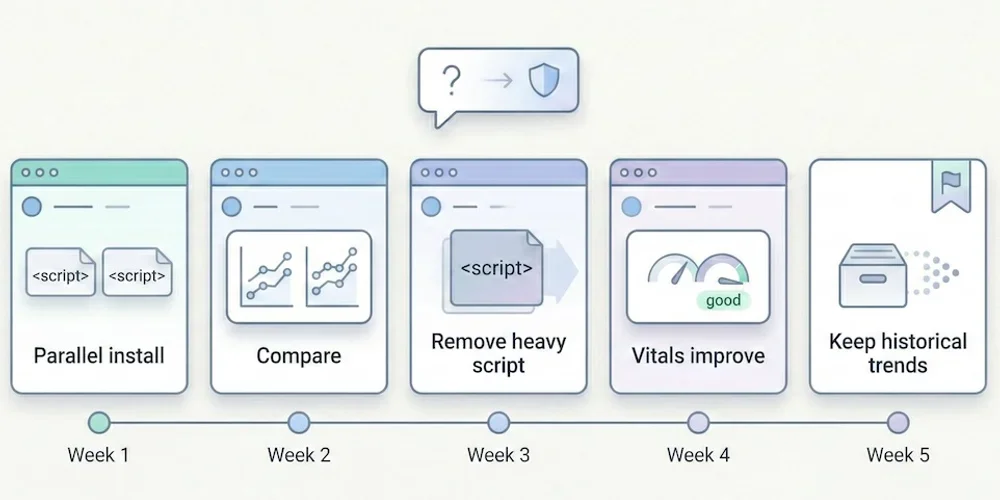
It's the first question we hear whenever we mention alternatives to Google Analytics: "But if I remove the Google script from my site, will Google punish me? Will I lose my rankings?" The short answer is: No. The longer answer is that you're probably confusing two tools with very different roles — and that, paradoxically, removing Google Analytics could actually improve your rankings. Here's why, with sources.1. The Fundamental Confusion: Analytics ≠ Search Console There are two major tools in Google's ecosystem for website owners. Many people confuse them, which keeps the myth alive. Google Search Console (GSC): Your Line to Google This is the tool for communicating with the search engine. It tells you:How Google sees your site (indexing status, crawl errors). Which keywords you rank for. How many clicks and impressions you get. Whether your site has technical issues (mobile, Core Web Vitals).This one is essential for SEO. It's free, lightweight (no script to install on your site), and it's the only reliable source of data on your actual search rankings. Good news: Search Console works independently of Google Analytics. You can use one without the other. Google Analytics (GA4): An On-Site Behavior Observer GA4 watches what visitors do after they arrive on your site. It doesn't help improve your search rankings. Its role is to measure engagement, journeys, and conversions — useful marketing information that has no impact on the search algorithm.2. Google Has Confirmed It: Analytics Is Not a Ranking Factor This isn't speculation. Google has said it explicitly, multiple times. John Mueller, Search Advocate at Google (one of the official spokespeople for the Search team), has clearly stated that using Google Analytics is not a ranking factor. He has addressed this question on Twitter/X and during Google Search Central sessions, confirming that Google Search and Google Analytics are separate products and that one doesn't influence the other. → Source: Google Search Central – How Search ranking works Gary Illyes, also a Google Search analyst, reinforced this point by explaining that the search engine doesn't use Google Analytics data for ranking, notably because not all sites install it and doing so would create an unfair bias. In other words: removing the Google Analytics script from your site sends no "negative signal" to Google. The search engine doesn't know (and doesn't care) which analytics tool you use.3. The Paradox: GA4 Can Add Weight to Your SEO Stack It is counterintuitive, but a heavy analytics script can degrade page performance, and performance can matter for SEO experience. Here's how. 3.1 Script Weight Google (the search engine) favors fast websites. Core Web Vitals — a set of web performance metrics — have been a confirmed ranking factor since 2021. The GA4 script is not always lightweight. The gtag.js tag can load multiple JavaScript libraries depending on configuration: advertising tracking, consent management and advanced collection. Public measurements put the order of magnitude around 45 KB compressed, plus network requests to collection servers. For comparison, here are indicative orders of magnitude. Real script size varies with options, caching and measurement method.Solution Script size (compressed) Ratio vs GA4GA4 (gtag.js) ~45 KB BaselineMatomo ~20 KB 2× lighterSimple Analytics ~6 KB 7× lighterFathom ~2 KB 22× lighterPlausible ~1 KB 45× lighterPirsch <1 KB 50× lighterAn independent audit by Bejamas measured the concrete impact of third-party scripts on web performance and showed that analytics scripts are among the heaviest contributors to main-thread blocking time (Total Blocking Time, one of the Core Web Vitals). → Source: Bejamas – How Popular Scripts Slow Down Your Website 3.2 The Concrete Impact on Core Web Vitals When a heavy script loads, it impacts three key metrics:LCP (Largest Contentful Paint): the time before the main content is visible. A heavy script delays rendering. INP (Interaction to Next Paint): responsiveness to clicks. A script that monopolizes the main thread degrades interactivity. CLS (Cumulative Layout Shift): visual stability. Some late-loading scripts cause layout shifts.Switching from a heavy script to a light script will not single-handedly turn a slow site into a fast one. But on an already optimized site, reducing third-party JavaScript can contribute to better Core Web Vitals. The real effect should be measured on the page, with your other scripts and network conditions. → Source: Google – Core Web Vitals & Page Experience 3.3 Slower Sites = Fewer Conversions Beyond pure SEO, speed directly impacts conversion rates. Google has published data showing that when mobile page load time goes from 1 to 3 seconds, the probability of bounce increases by 32%. Each additional second makes it worse. → Source: Think with Google – Mobile Speed Benchmarks Bottom line: switching to a lightweight analytics tool can improve load time, which supports user experience, Core Web Vitals and sometimes conversion.4. The Winning Duo for SEO in 2026 To run your search strategy effectively without the bloat, here's the ideal setup: Google Search Console (Essential — and Free) This is your source of truth for SEO. Use it to:Monitor your positions and clicks in search results. Identify which keywords bring traffic (and which ones you're gaining on). Detect indexing errors and technical issues. Track your Core Web Vitals over time.No analytics tool, no matter how powerful, can replace this data: only Google knows which keywords you actually rank for. A Frugal Analytics Tool (For Conversion Tracking) Search Console tells you where the traffic comes from, but it doesn't tell you what happens next. To know whether your SEO visitors convert into customers, you need an on-site measurement tool — but it doesn't need to be complex. The 5 essential KPIs are enough: visitors, sources, top pages, key events, conversions. A frugal analytics tool gives you those answers in seconds, without weighing down your site. What You Gain with This DuoA better technical baseline: a potentially faster site thanks to a lighter script stack. Complete SEO data: rankings (via GSC) + conversions (via frugal analytics). Simpler compliance work: a minimal audience-measurement setup is easier to document and review than a broad tracking stack. Use the CNIL audience-measurement criteria as a reference when assessing your own configuration. Time saved: two simple interfaces instead of one bloated platform.5. Real-World Examples: Who Dropped GA4 and What Happened? Several public cases document migrations from Google Analytics to lighter solutions without an obvious SEO decline. These are not universal proof: content quality, domain authority, technical health and seasonality still dominate SEO outcomes. Basecamp and Hugging Face publicly adopted Plausible as a replacement for Google Analytics. These examples mainly show that a site can measure conversions without depending on GA4. They should not be treated as a guaranteed SEO outcome for every site. The explanation is logical: Google ranks sites based on content quality, authority (backlinks), technical health (speed, mobile-friendliness), and user experience. None of these criteria depend on the brand of your visitor counter.6. How to Switch: A Practical Migration Path If you're ready to make the move, here's a low-risk approach that minimizes disruption. Week 1: Install the new tool alongside GA4 Choose a frugal analytics tool (see our comparison guide for help choosing). Install its tracking script on your site — it's typically a single line of code. Keep GA4 running simultaneously. This gives you a parallel data period to compare. Weeks 2-4: Compare the data Over 3-4 weeks, compare key metrics between GA4 and the new tool. You'll likely notice the frugal tool reports more visitors — because it doesn't depend on cookie consent. Traffic sources and top pages should align closely. Conversions should match if you've configured events properly. Week 5: Remove GA4 Once you're confident the new tool captures everything you need, remove the GA4 script from your site. You'll immediately see a performance improvement (check your Core Web Vitals in Search Console). Keep your GA4 account open for a few months if you want to reference historical data. What about historical data? Some tools (Plausible in particular) offer GA data import for historical continuity. The imported data is limited to aggregated metrics — no individual user profiles, which is consistent with the privacy-first approach. For most SMBs, this is more than enough to maintain trend visibility.Conclusion: Cut the Cord Without Fear Do not treat Google Analytics as an SEO requirement. Your search rankings depend first on content quality, technical health, user experience and site authority, not on the brand of your measurement tool. Lightening your site by replacing a heavy script with a simpler one can support performance and make privacy review easier to read, while keeping the data that truly matters through the Search Console + frugal analytics duo. The real risk isn't leaving GA4. It's continuing to fly blind because your tool is too complicated to actually use.FAQ: SEO and Google Analytics Does Google penalize sites that don't use Google Analytics? No. Google has confirmed multiple times that using Google Analytics is not a ranking factor. The search engine evaluates content quality, technical health (speed, mobile), authority (inbound links), and user experience — not the brand of the analytics tool installed. Is Search Console enough for SEO? For tracking SEO performance (positions, clicks, impressions, technical errors), yes. Search Console is the essential, irreplaceable tool. To go further (measuring conversions, understanding post-arrival behavior), a complementary analytics tool is useful — but it doesn't need to be GA4. What's the real impact of a heavy analytics script on SEO? GA4's script weighs approximately 45 KB compressed. Frugal solutions weigh between 1 and 6 KB. This difference impacts Core Web Vitals (LCP, INP), which have been a confirmed ranking factor since 2021. On an already-optimized site, switching from a heavy to a lightweight script can be enough to push performance scores from "needs improvement" to "good." Can I use Search Console without Google Analytics? Yes, absolutely. The two tools work independently. You can connect Search Console to some frugal solutions (Plausible and Pirsch offer this integration) to see your SEO data directly in your analytics dashboard. If GA4 doesn't help with SEO, what is it for? GA4 is a user behavior measurement and marketing attribution tool. It's designed for teams that need detailed conversion funnels, behavioral cohorts, and integrations with the Google advertising ecosystem (Google Ads). For pure SEO, it adds nothing that Search Console doesn't already provide — and its weight can actually hurt your rankings.