Category: Seo
All blog posts in this category.
Google removed FAQ rich results: should you still add FAQs to articles?
For years, many sites added FAQ blocks to the end of articles in the hope of earning a rich result in Google Search. That tactic gradually lost value, and Google made a clear change in 2026: FAQ rich results no longer appear in Search starting 7 May 2026, and the related documentation was later removed. Does that mean every FAQ should disappear? No. But FAQs should no longer be treated as a shortcut to search visibility. An FAQ can still be useful if it answers real objections, clarifies a complex topic, improves navigation or turns a long article into a more usable resource. It is less useful when it repeats the article, stacks artificial questions or exists only to occupy more SERP space. What Google changed In its Search Central changelog, Google states that the FAQ rich result feature no longer appears in Google Search starting 7 May 2026. In June, Google also removed the documentation associated with that feature. The Search Console data anomalies page also notes that the disappearance of this appearance can cause a drop in impressions associated with FAQ rich results. This matters for reporting: a fall in FAQ appearance impressions does not necessarily mean that pages lost overall organic audience. In other words, if a report shows a break in FAQ appearance data, the first hypothesis is not a penalty or a quality drop. It is likely an interface and reporting change. FAQs should no longer be written for the rich result The issue was never the FAQ format itself. The issue was the mechanical use of the format. Examples of weak practices include:repeating the title as a question; adding five generic questions with no new information; hiding keyword variants in artificial answers; writing answers that are too short to be useful; reusing the same FAQ across several articles; making markup the main purpose of the block.With FAQ rich results gone, those tactics lose their tactical justification. They remain bad for the reader experience. Good reasons to keep an FAQ An FAQ remains relevant when it has a clear editorial function. Clarifying limits On privacy, compliance and analytics topics, an FAQ can answer questions that should not interrupt the main article. Examples:“Does cookieless mean no consent is needed?” “Is aggregated data always anonymous?” “Is a Search Console report a measure of sessions?”These answers can prevent misunderstandings without making the article heavier. Addressing objections A reader may understand the article and still have a practical objection: cost, complexity, DPO involvement, loss of data or reporting impact. A good FAQ addresses these objections directly. Improving navigation In a long guide, an FAQ can act as a shortcut. It helps a busy reader find the answer to a common question quickly. Making the article more reusable A well-written FAQ makes an article easier to quote, share or turn into internal guidance. It can also feed a knowledge base or sales enablement brief without changing the core content. When to remove or rewrite an FAQ Remove the FAQ if every answer repeats an existing section. It should not become a second conclusion. Rewrite it if the questions are disguised keywords. A useful question sounds like a real reader hesitation, not a search query with a question mark. Merge it if several questions receive the same answer. That is often a sign that the article needs a better summary section, not an FAQ block. Keep it if it adds precision, caution or action. In privacy-first content, FAQs are especially useful for avoiding overly broad compliance claims. FAQ structured data: what now? The end of a rich result does not mean all structured data is useless everywhere. But for FAQs, the goal should no longer be to win an appearance that Google Search has removed. A practical rule:visible content should remain written for readers; markup should not promise a display that no longer exists; teams should avoid maintaining code only for a retired feature; changes should be tested on a sample before a large cleanup.If your CMS or theme automatically adds FAQ markup, check whether it still creates technical debt: testing errors, inconsistencies between visible text and markup, maintenance overhead, or internal reports that no longer matter. How to adapt SEO reporting Teams that tracked FAQ impressions should change their dashboards. Keep tracking:organic clicks by page; total web impressions; average position, interpreted carefully; main queries; conversions or useful actions on site; performance of articles that contain FAQs, independently from the old appearance.Remove or annotate:targets for FAQ rich result impressions; unannotated 2025/2026 comparisons; reports attributing a drop in FAQ appearance to content decline; automatic recommendations such as “add an FAQ to win more space in Google”.When a display format disappears, reports should be annotated, especially when non-SEO teams read the dashboard. FAQs in generative search Google says SEO best practices remain relevant for its generative AI features. Helpful, original and non-commodity content remains the foundation. Google also says there is no special markup to add for appearing in generative AI features in Search. This reinforces a simple idea: FAQs should not be treated as a visibility hack. They should make content clearer, more verifiable and more useful. A well-written FAQ can improve understanding of a complex topic. An artificial FAQ does not become more valuable in a generative interface than it was in classic search results. A page-by-page decision method For each article with a FAQ, ask five questions:Does the FAQ answer questions the article body does not address clearly? Do the answers add nuance, limits or action? Are the questions phrased like real reader questions? Does the block improve mobile reading? Is maintaining the markup still justified?If the answer is no to three or more questions, the FAQ should be removed or rewritten. Conclusion The end of FAQ rich results is not the end of editorial FAQs. It ends a bad incentive: adding FAQ blocks only to take up more space in Google. For analytics, SEO and privacy content, FAQs remain useful when they serve understanding. They should clarify, reduce misunderstandings, answer objections and make the article more actionable. The right decision is not to keep or remove every FAQ. The right decision is to treat FAQs as an editorial component, not a SERP shortcut. SourcesGoogle Search Central - Latest documentation updates Google Search Central - Search Console data anomalies Google Search Central - A new resource for optimizing for generative AI in Google Search Google Search Central - AI features and your website

Search Console and generative AI: how to read the new reports without overinterpreting impressions
Google Search Console is becoming more useful for understanding visibility in generative search experiences. In June 2026, Google announced new reports dedicated to how pages appear in generative AI features in Search, such as AI Overviews and AI Mode, as well as some generative AI features in Discover. For SEO teams, this matters. It does not, however, turn Search Console into an attribution tool. An impression in a generative feature does not mean that someone visited your site, read your content, or identified you as the main source. It is a visibility signal. It becomes useful when it is interpreted carefully, compared with actual clicks, and connected to sessions measured on your site. The goal is not to create a new vanity metric. The goal is to understand what this visibility means, what it does not mean, and how to include it in SEO and analytics reporting without blurring the measurement layers. What changed in Search Console On 3 June 2026, Google announced new Search Console performance reports dedicated to generative AI. The reports are designed to help site owners understand how their pages appear in Google Search generative AI features. Google also states that this data remains included in the overall performance reports, while the new view isolates generative visibility. Google rolled the reports out worldwide on 31 August 2026. Their absence should therefore be investigated as an access, configuration or reporting issue rather than treated as the normal initial rollout state. The reports can show:impressions for URLs appearing in generative AI features; the pages involved; countries; devices, where available for Search; dates, with several time granularities; Search Console dates use Pacific Time.These fields are useful, but they do not replace classic Search Console or analytics metrics. They add a layer: visibility inside an interface where the answer is often summarised before a click happens. AI impression, click and session are different signals A frequent mistake is to merge three separate levels of measurement. An AI impression means that one of your URLs appeared in a generative feature according to Google’s reporting methodology. It is a signal of presence in the search interface. A click means that a user selected a link to your site. It is a potential transition from Google to your site. An analytics session means that a visit was observed on your site by your analytics tool, according to its own collection, filtering and deduplication rules. These signals can move differently. A page can gain impressions in AI Overviews without gaining clicks. A page can receive more clicks from Google while analytics sessions do not increase as expected because referrers, redirects, parameters or filters distort the view. Conversely, a drop in sessions does not automatically mean a drop in search visibility. The useful approach is to keep the three levels separate, then reconcile them only when there is a clear diagnostic question. How Google counts AI Mode and AI Overviews Search Console documentation reminds site owners that counting rules vary by feature. For AI Mode, clicks, impressions and position are recorded using the usual Search Console methodology. If a user asks a follow-up question in AI Mode, that follow-up is counted as a new query. For AI Overviews, standard Search Console impression rules apply. The visibility-after-scrolling or expansion rule applies only to the independent widgets for which Google documents it. Links in the same AI Overview may also share the same position in reporting. These details matter. They explain why average position should not be read like a classic organic ranking. Appearing in a generative block is not the same format as a blue link, a carousel, a featured snippet or a local result. What not to conclude too quickly The first trap is to call every generative impression “AI traffic”. Until there is a click, it is not traffic to your site. It is visibility in a search interface. The second trap is to compare generative impressions and classic web impressions as if they belonged to the same inventory. The spaces are different, the displays are different, and user journeys do not create the same click-through behaviour. The third trap is to isolate a single indicator. More impressions can be good if they involve strategic pages. They are less useful if they relate to low-intent queries, irrelevant countries or pages that do not support the business. The fourth trap is to ignore measurement incidents. Search Console has a data anomalies page. It should be checked before attributing a curve break to an SEO or product change. A simple method for reading the report Start with a reference period. Avoid drawing conclusions from one isolated week, especially if the report has just appeared or volumes are low. A four-to-eight-week window is more useful when enough data is available. Then separate pages into three groups:acquisition pages, such as articles, comparisons and guides; conversion pages, such as product, pricing or demo pages; support or brand pages, which often respond to already-qualified queries.For each group, compare generative impressions, Search Console clicks and organic sessions measured on your site. The diagnostic is useful only if you can state a clear hypothesis. Examples:AI impressions increase, but clicks stay flat: your content is visible in the answer, but not necessarily driving site visits; clicks increase, but sessions do not: check referrers, redirects, parameters and analytics filters; impressions drop on a few pages only: check queries, country, device and content changes; all impressions drop suddenly: check Search Console anomalies first, then investigate SEO hypotheses.How to report it monthly In a monthly report for leadership or marketing teams, avoid a single line called “Google AI traffic”. It mixes too many realities. A clearer structure is:Google generative visibility: Search Console impressions in AI features, when available. Google organic traffic: Search Console clicks and analytics sessions. Traffic from external assistants or conversational engines: sessions with identifiable source or referrer, when your analytics tool observes them. Useful actions: demo requests, signups, email clicks, downloads or key events.This separation reduces overinterpretation. It also helps explain why a brand may be displayed more often without necessarily receiving more visits. Useful content actions Generative reports do not rewrite SEO fundamentals. Google states that SEO best practices remain relevant for appearing in generative AI features. Helpful, original, precise and non-commodity content remains more defensible than pages written only to fill a query pattern. In practice, teams can:strengthen pages that answer a real business question; document sources and update dates; clarify definitions, limits and use cases; avoid generic paragraphs that could be replaced by any competitor; connect Search Console to web analytics without merging the metrics.For a privacy-first analytics team, the key is readability. Measuring visibility in AI interfaces is useful only if it supports a decision: improving a page, correcting a diagnostic, adapting a report, or explaining why sessions do not grow at the same pace as impressions. Checklist before making a claim Before announcing a rise or drop linked to generative AI, check:that the report is available for the site; that the period is long enough; that the pages are strategically relevant; that impressions, clicks and sessions are separated; that countries and devices match the target market; that no known data anomaly explains the variation; that analytics attributes organic sessions correctly; that variations are put in context with content changes, seasonality and demand.Conclusion The new Search Console reports for generative AI are useful. They provide a clearer view into a part of Google Search that was previously difficult to isolate. But they should not be treated as automatic proof of traffic, authority or conversion. The right reading is to treat them as a visibility signal, then carefully connect them to clicks and sessions. As search becomes more fragmented, teams need less slogan-driven reporting and more contextual measurement. FAQ Does the Search Console AI report measure visits? No. It primarily reports search performance signals such as impressions and clicks. A visit should be confirmed in analytics when a user actually lands on the site. Does a drop in AI impressions mean SEO visibility declined? Not always. A change may come from real visibility, interface changes or a logging issue. The August 2026 anomaly is a reminder to check official notes before making a claim. Should AI visibility have a separate monthly report? At first, it is usually better to add a dedicated section to the existing SEO report. A separate report only makes sense when the volume and decisions attached to the signal become material. SourcesGoogle Search Central - Introducing Search Generative AI performance reports in Search Console Google Search Central - What are impressions, position, and clicks? Google Search Central - A new resource for optimizing for generative AI in Google Search Google Search Central - Data anomalies in Search Console
The Persistent Myth: Do You Actually Need Google Analytics for SEO?
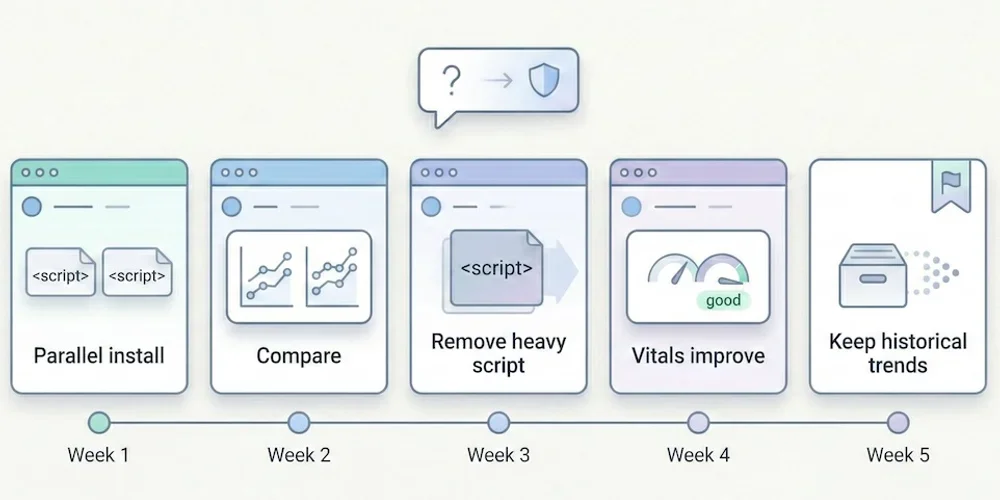
It's the first question we hear whenever we mention alternatives to Google Analytics: "But if I remove the Google script from my site, will Google punish me? Will I lose my rankings?" The short answer is: No. The longer answer is that you're probably confusing two tools with very different roles — and that, paradoxically, removing Google Analytics could actually improve your rankings. Here's why, with sources.1. The Fundamental Confusion: Analytics ≠ Search Console There are two major tools in Google's ecosystem for website owners. Many people confuse them, which keeps the myth alive. Google Search Console (GSC): Your Line to Google This is the tool for communicating with the search engine. It tells you:How Google sees your site (indexing status, crawl errors). Which keywords you rank for. How many clicks and impressions you get. Whether your site has technical issues (mobile, Core Web Vitals).This one is essential for SEO. It's free, lightweight (no script to install on your site), and it's the only reliable source of data on your actual search rankings. Good news: Search Console works independently of Google Analytics. You can use one without the other. Google Analytics (GA4): An On-Site Behavior Observer GA4 watches what visitors do after they arrive on your site. It doesn't help improve your search rankings. Its role is to measure engagement, journeys, and conversions — useful marketing information that has no impact on the search algorithm.2. Google Has Confirmed It: Analytics Is Not a Ranking Factor This isn't speculation. Google has said it explicitly, multiple times. John Mueller, Search Advocate at Google (one of the official spokespeople for the Search team), has clearly stated that using Google Analytics is not a ranking factor. He has addressed this question on Twitter/X and during Google Search Central sessions, confirming that Google Search and Google Analytics are separate products and that one doesn't influence the other. → Source: Google Search Central – How Search ranking works Gary Illyes, also a Google Search analyst, reinforced this point by explaining that the search engine doesn't use Google Analytics data for ranking, notably because not all sites install it and doing so would create an unfair bias. In other words: removing the Google Analytics script from your site sends no "negative signal" to Google. The search engine doesn't know (and doesn't care) which analytics tool you use.3. The Paradox: GA4 Can Add Weight to Your SEO Stack It is counterintuitive, but a heavy analytics script can degrade page performance, and performance can matter for SEO experience. Here's how. 3.1 Script Weight Google (the search engine) favors fast websites. Core Web Vitals — a set of web performance metrics — have been a confirmed ranking factor since 2021. The GA4 script is not always lightweight. The gtag.js tag can load multiple JavaScript libraries depending on configuration: advertising tracking, consent management and advanced collection. Public measurements put the order of magnitude around 45 KB compressed, plus network requests to collection servers. For comparison, here are indicative orders of magnitude. Real script size varies with options, caching and measurement method.Solution Script size (compressed) Ratio vs GA4GA4 (gtag.js) ~45 KB BaselineMatomo ~20 KB 2× lighterSimple Analytics ~6 KB 7× lighterFathom ~2 KB 22× lighterPlausible ~1 KB 45× lighterPirsch <1 KB 50× lighterAn independent audit by Bejamas measured the concrete impact of third-party scripts on web performance and showed that analytics scripts are among the heaviest contributors to main-thread blocking time (Total Blocking Time, one of the Core Web Vitals). → Source: Bejamas – How Popular Scripts Slow Down Your Website 3.2 The Concrete Impact on Core Web Vitals When a heavy script loads, it impacts three key metrics:LCP (Largest Contentful Paint): the time before the main content is visible. A heavy script delays rendering. INP (Interaction to Next Paint): responsiveness to clicks. A script that monopolizes the main thread degrades interactivity. CLS (Cumulative Layout Shift): visual stability. Some late-loading scripts cause layout shifts.Switching from a heavy script to a light script will not single-handedly turn a slow site into a fast one. But on an already optimized site, reducing third-party JavaScript can contribute to better Core Web Vitals. The real effect should be measured on the page, with your other scripts and network conditions. → Source: Google – Core Web Vitals & Page Experience 3.3 Slower Sites = Fewer Conversions Beyond pure SEO, speed directly impacts conversion rates. Google has published data showing that when mobile page load time goes from 1 to 3 seconds, the probability of bounce increases by 32%. Each additional second makes it worse. → Source: Think with Google – Mobile Speed Benchmarks Bottom line: switching to a lightweight analytics tool can improve load time, which supports user experience, Core Web Vitals and sometimes conversion.4. The Winning Duo for SEO in 2026 To run your search strategy effectively without the bloat, here's the ideal setup: Google Search Console (Essential — and Free) This is your source of truth for SEO. Use it to:Monitor your positions and clicks in search results. Identify which keywords bring traffic (and which ones you're gaining on). Detect indexing errors and technical issues. Track your Core Web Vitals over time.No analytics tool, no matter how powerful, can replace this data: only Google knows which keywords you actually rank for. A Frugal Analytics Tool (For Conversion Tracking) Search Console tells you where the traffic comes from, but it doesn't tell you what happens next. To know whether your SEO visitors convert into customers, you need an on-site measurement tool — but it doesn't need to be complex. The 5 essential KPIs are enough: visitors, sources, top pages, key events, conversions. A frugal analytics tool gives you those answers in seconds, without weighing down your site. What You Gain with This DuoA better technical baseline: a potentially faster site thanks to a lighter script stack. Complete SEO data: rankings (via GSC) + conversions (via frugal analytics). Simpler compliance work: a minimal audience-measurement setup is easier to document and review than a broad tracking stack. Use the CNIL audience-measurement criteria as a reference when assessing your own configuration. Time saved: two simple interfaces instead of one bloated platform.5. Real-World Examples: Who Dropped GA4 and What Happened? Several public cases document migrations from Google Analytics to lighter solutions without an obvious SEO decline. These are not universal proof: content quality, domain authority, technical health and seasonality still dominate SEO outcomes. Basecamp and Hugging Face publicly adopted Plausible as a replacement for Google Analytics. These examples mainly show that a site can measure conversions without depending on GA4. They should not be treated as a guaranteed SEO outcome for every site. The explanation is logical: Google ranks sites based on content quality, authority (backlinks), technical health (speed, mobile-friendliness), and user experience. None of these criteria depend on the brand of your visitor counter.6. How to Switch: A Practical Migration Path If you're ready to make the move, here's a low-risk approach that minimizes disruption. Week 1: Install the new tool alongside GA4 Choose a frugal analytics tool (see our comparison guide for help choosing). Install its tracking script on your site — it's typically a single line of code. Keep GA4 running simultaneously. This gives you a parallel data period to compare. Weeks 2-4: Compare the data Over 3-4 weeks, compare key metrics between GA4 and the new tool. You'll likely notice the frugal tool reports more visitors — because it doesn't depend on cookie consent. Traffic sources and top pages should align closely. Conversions should match if you've configured events properly. Week 5: Remove GA4 Once you're confident the new tool captures everything you need, remove the GA4 script from your site. You'll immediately see a performance improvement (check your Core Web Vitals in Search Console). Keep your GA4 account open for a few months if you want to reference historical data. What about historical data? Some tools (Plausible in particular) offer GA data import for historical continuity. The imported data is limited to aggregated metrics — no individual user profiles, which is consistent with the privacy-first approach. For most SMBs, this is more than enough to maintain trend visibility.Conclusion: Cut the Cord Without Fear Do not treat Google Analytics as an SEO requirement. Your search rankings depend first on content quality, technical health, user experience and site authority, not on the brand of your measurement tool. Lightening your site by replacing a heavy script with a simpler one can support performance and make privacy review easier to read, while keeping the data that truly matters through the Search Console + frugal analytics duo. The real risk isn't leaving GA4. It's continuing to fly blind because your tool is too complicated to actually use.FAQ: SEO and Google Analytics Does Google penalize sites that don't use Google Analytics? No. Google has confirmed multiple times that using Google Analytics is not a ranking factor. The search engine evaluates content quality, technical health (speed, mobile), authority (inbound links), and user experience — not the brand of the analytics tool installed. Is Search Console enough for SEO? For tracking SEO performance (positions, clicks, impressions, technical errors), yes. Search Console is the essential, irreplaceable tool. To go further (measuring conversions, understanding post-arrival behavior), a complementary analytics tool is useful — but it doesn't need to be GA4. What's the real impact of a heavy analytics script on SEO? GA4's script weighs approximately 45 KB compressed. Frugal solutions weigh between 1 and 6 KB. This difference impacts Core Web Vitals (LCP, INP), which have been a confirmed ranking factor since 2021. On an already-optimized site, switching from a heavy to a lightweight script can be enough to push performance scores from "needs improvement" to "good." Can I use Search Console without Google Analytics? Yes, absolutely. The two tools work independently. You can connect Search Console to some frugal solutions (Plausible and Pirsch offer this integration) to see your SEO data directly in your analytics dashboard. If GA4 doesn't help with SEO, what is it for? GA4 is a user behavior measurement and marketing attribution tool. It's designed for teams that need detailed conversion funnels, behavioral cohorts, and integrations with the Google advertising ecosystem (Google Ads). For pure SEO, it adds nothing that Search Console doesn't already provide — and its weight can actually hurt your rankings.