Tag: Ai traffic
All blog posts with this tag.
- 28 Feb, 2026
AI traffic: how to measure visits that ChatGPT, Perplexity and Claude send to your website
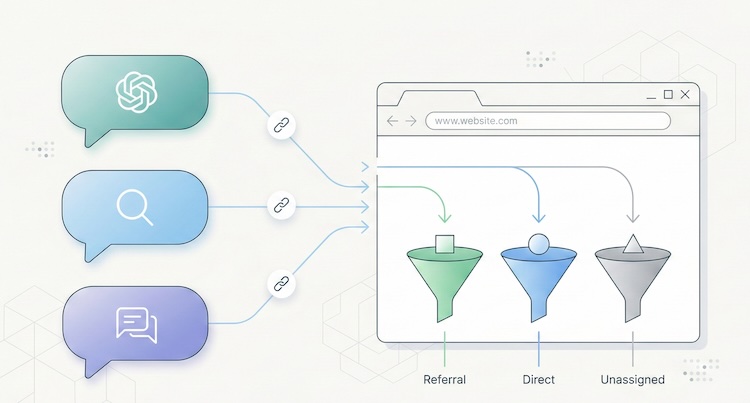
Something has shifted in the way people find your website. And chances are, you have no idea it's happening. Since late 2024, conversational AI platforms have moved beyond answering questions. They now cite sources, insert links, and send real visitors to real websites. ChatGPT, Perplexity, Claude, Gemini, Copilot: these tools are becoming a genuine discovery channel, one that rivals traditional search engines in the quality of traffic it delivers. The catch? Most analytics tools don't separate this traffic. It gets lumped into "referral," blends into "direct," or vanishes from reports entirely. You may already have visitors arriving through a ChatGPT recommendation, and your dashboard won't show it. This article gives you the full playbook: how to spot AI traffic, why it matters, and what to do about it. A new discovery channel, growing fast The raw numbers are still modest. But the trajectory is hard to ignore. A study by SE Ranking covering nearly 64,000 websites across 250 countries (January-April 2025) found that ChatGPT alone accounts for 78% of all AI referral traffic worldwide. Perplexity comes in at roughly 15%, Gemini at 6.4%. Claude and DeepSeek share the remainder at under 1% each, though both show compelling growth curves. (Source: SE Ranking, "AI Traffic in 2025") A separate analysis by Conductor, reported by Search Engine Land, confirms this hierarchy across 13,770 domains and 3.3 billion sessions: AI traffic averages about 1% of total site visits, with ChatGPT generating 87% of it. (Source: Search Engine Land, Nov. 2025) One percent sounds negligible. Two things make it anything but. The growth rate is staggering. Between January and April 2025, ChatGPT's share of global internet traffic doubled, from 0.08% to 0.16%. Year-over-year growth in AI referral traffic exceeds 500% in some segments. And Gartner projects a 25% decline in traditional search volume by late 2026, driven by conversational AI agents. The traffic quality is exceptional. Visitors arriving from AI platforms spend an average of 9 to 10 minutes per session on the sites they visit, compared to 3 to 4 minutes for organic search. SE Ranking found that Claude-referred sessions in the EU average a remarkable 67 minutes, suggesting extraordinarily deep engagement. AI referral traffic converts at roughly 1.5x the rate of social traffic, according to aggregated industry data. The logic is straightforward: a user who clicks a link inside an AI response has already asked a specific question, received context, and chosen to visit your site from among the cited sources. Their intent is pre-qualified. They know why they're coming. Why your analytics can't see it If AI traffic is this valuable, why doesn't it show up clearly in your reports? Three technical issues create this blind spot. The missing referrer problem When someone clicks a link in Perplexity from a web browser, the HTTP Referer header typically passes perplexity.ai as the source. Your analytics tool can then classify the visit as a referral from Perplexity. But this mechanism frequently fails. According to SparkToro, 60% of AI-driven sessions lack a usable referrer header. The reasons are varied: mobile apps (ChatGPT on iOS, Copilot in Windows) open links in internal webviews that don't pass referrer data. Some AI agents prefetch or preview pages without triggering the analytics script. And ChatGPT's built-in Atlas browser, launched in late 2025, behaves differently from standard browsers altogether. (Source: MarTech, Nov. 2025) The result: a significant portion of AI traffic falls into the "direct" or "unassigned" bucket in your analytics, invisible and unattributed. GA4's default classification Google Analytics 4 treats AI traffic as "referral," the same category as a link from Facebook, a forum, or a directory listing. There is no dedicated "AI" channel in GA4's default setup. Google has signaled plans to add one, but implementation hasn't materialized yet. In practice, if you open your acquisition report in GA4 without custom configuration, ChatGPT traffic is buried among dozens of other referral sources. For a site receiving hundreds of different referrers, spotting chatgpt.com or perplexity.ai requires knowing what to look for. The bot-vs-human confusion AI platforms interact with your site in two fundamentally different ways. The first is referral traffic: a human clicks a link in an AI response and lands on your page. This is real traffic with a real visitor. The second is crawling: AI platform bots (GPTBot for OpenAI, PerplexityBot, ClaudeBot, and others) visit your site to index content and feed their models. This crawl traffic is not useful audience data. It's data harvesting. GA4 automatically filters known bots, but the list isn't comprehensive. Some newer AI bots slip through, while some legitimate human visitors from AI tools get incorrectly filtered. Cloudflare has observed crawl-to-referral ratios as high as 700:1 for Perplexity, which gives a sense of how much harvesting activity exists relative to actual human visits. (Source: Digiday, Dec. 2025) How to identify AI traffic in your tools Two approaches work, depending on what you're using. In GA4: create a dedicated "AI Traffic" channel The recommended method is to build a custom channel group that aggregates all known AI sources. Here's the process:In GA4, go to Admin > Data Settings > Channel Groups. Click the default channel group, then "Copy" to create a new one. Add a channel called "AI Traffic." Set the rule: Match type = "matches regex", then paste this pattern:(chatgpt\.com|chat\.openai\.com|perplexity\.ai|claude\.ai|gemini\.google\.com|copilot\.microsoft\.com|deepseek\.com|meta\.ai)Drag your "AI Traffic" channel above the default "Referral" channel in the priority order. This is critical: GA4 evaluates rules top-down, and if "AI Traffic" sits below "Referral," visits will be classified as referral before reaching your rule.This setup only applies to new data (no retroactive effect). Allow a few days before results appear. For a one-time analysis of historical data, create an Explore report with a filter on "Session source" using the same regex. (Source: MarTech, Nov. 2025) In a lightweight analytics tool (Plausible, Fathom, etc.) This is where a well-designed simple tool outperforms a complex one. In Plausible, the "Sources" report displays every identified referrer directly. If chatgpt.com or perplexity.ai appears as a source, you see it instantly, without setup, without regex, without channel groups. Click the source to filter the entire dashboard by that origin and analyze entry pages, time on site, and triggered events. Plausible documented its own experience: in 2024, the Plausible blog saw a 2,200% surge in AI referral traffic within months, all identifiable from their standard dashboard with zero configuration. (Source: Plausible, Dec. 2024) This is a textbook case where the frugal analytics philosophy pays off: when a tool is designed to surface essential data without layers of configuration, emerging signals become visible immediately. A tool like GA4, which requires technical expertise for every new traffic source, creates a systematic delay in trend detection. For a detailed breakdown of how these tools compare, see our Plausible vs Fathom vs Simple Analytics comparison. AI referral traffic vs AI crawling: two different things A common mistake is conflating referral traffic (humans clicking) with crawling (bots scraping). They deserve separate attention because they raise different questions. AI referral traffic is an opportunity. It represents a qualified, pre-informed visitor arriving with intent. Measuring it lets you optimize landing pages, adapt content, and understand how AI platforms perceive your site. AI crawling is a governance question. Bots like GPTBot, PerplexityBot, and ClaudeBot visit your site to train their models or answer user queries in real time. Some do so aggressively: Cloudflare found that GoogleBot's crawl volume (which also feeds Gemini) dwarfs that of all other AI bots combined. You can control crawling through your robots.txt file: User-agent: GPTBot Disallow: /User-agent: PerplexityBot Disallow: /User-agent: ClaudeBot Disallow: /But beware the paradox: blocking the crawl can reduce your referral traffic. If an AI can't index your content, it can't recommend it to users. This is a trade-off to make deliberately. An emerging approach uses an llms.txt file (a Markdown file placed at your site's root) to guide AI platforms toward the content you want to make accessible, without blocking all crawling. Anthropic (the company behind Claude) uses this mechanism on its own site. How to get cited by AI platforms Understanding AI traffic also means understanding what triggers it. AI platforms don't cite sites randomly. Several factors drive citations. Content structure matters. Pages with clear heading hierarchies (H2, H3, lists) that directly answer specific questions are roughly 40% more likely to be cited, according to analysis from Superprompt. Structured FAQ sections are particularly effective: they match the question-and-answer format of AI interactions exactly. Freshness is a strong signal. Unlike Google, which tends to favor established, older content, AI platforms prefer recently updated material. Pages updated within the last 30 days receive roughly 3x more AI citations on average. Original data attracts citations. Data tables, proprietary statistics, and exclusive benchmarks get cited about 4x more than generic content. This is another argument for precise, data-driven KPIs over vanity metrics. Traditional SEO remains the foundation. Multiple converging studies suggest that 77% of AI optimization stems directly from strong conventional SEO. Sites ranking in Google's top 10 are significantly more likely to be cited by LLMs. SEO doesn't depend on Google Analytics, but it remains the bedrock on which AI visibility is built. What this means for choosing an analytics tool AI traffic exposes a structural weakness in complex analytics platforms: their inability to surface an emerging signal without prior configuration. With GA4, you need to create a channel group, write a regex, update it regularly (new AI tools launch every month), and accept that the data won't be retroactive. It's doable, but it demands technical expertise that most small business owners and freelancers simply don't have. With a well-designed lightweight analytics tool, AI referrers appear naturally in the sources report, right alongside Google, LinkedIn, or Twitter. No setup, no regex, no blind spots. That's the core principle of analytical sobriety: collect less data, but make every data point immediately readable. AI traffic is not a passing phenomenon. It's the early stage of a structural shift in how people discover content online. The sites measuring it today will have a competitive edge tomorrow, not because the volume is enormous, but because the quality of this traffic makes it a powerful conversion lever. The question is no longer whether AI platforms send traffic to your site. It's whether your measurement tool shows it to you.Frequently asked questions What percentage of my traffic comes from AI? On average, about 1% of a site's total traffic originates from AI platforms (ChatGPT, Perplexity, Gemini, etc.), according to Conductor's November 2025 study of 13,770 domains. This figure can be higher for low-traffic sites or niche B2B properties. Critically, that 1% only reflects identifiable traffic: SparkToro found that 60% of AI sessions lack a referrer header and fall into "direct," meaning actual AI traffic is likely 2 to 3 times higher than what your dashboard shows. How do I see ChatGPT traffic in Google Analytics 4? GA4 doesn't yet have a native "AI" channel. You need to create a custom channel group: go to Admin > Data Settings > Channel Groups, add an "AI Traffic" channel with a regex rule covering AI domains (chatgpt.com, perplexity.ai, claude.ai, gemini.google.com, copilot.microsoft.com). Place it above the "Referral" channel in the hierarchy. Data will only be collected from the date you create the channel. Should I block AI bots with robots.txt? It's a trade-off. Blocking AI bots (GPTBot, PerplexityBot, ClaudeBot) via robots.txt prevents your content from being indexed by these platforms, which may reduce citations and referral traffic. On the other hand, not blocking means your content feeds AI model training, raising intellectual property and consent questions. A middle-ground approach uses an llms.txt file to guide AI platforms toward the content you want them to access. Can cookieless analytics detect AI traffic? Yes, and often better than GA4. Cookieless tools like Plausible, Fathom, or Simple Analytics display AI referrers directly in their sources report, with no configuration needed. The absence of setup layers (channel groups, regex, filters) means new traffic sources are visible immediately. It's a structural advantage of the frugal approach for detecting emerging signals. How do I optimize my content to get cited by ChatGPT or Perplexity? Five key levers: structure content with clear headings (H2/H3) and FAQ sections; keep content fresh (AI platforms favor recency); produce original data (tables, statistics, benchmarks); maintain strong traditional SEO (sites ranking well in Google are cited more by AI); and consider an llms.txt file to make your structured content easily accessible to AI crawlers. Pages that directly answer specific questions in a clear format consistently earn the most citations.Data verified February 2026. AI traffic market shares are evolving rapidly. This article will be updated every six months.