Tag: Ai traffic
All blog posts with this tag.
- 27 Apr, 2026
AI assistant traffic is not just direct traffic: how to measure ChatGPT, Perplexity, and Claude without fooling yourself
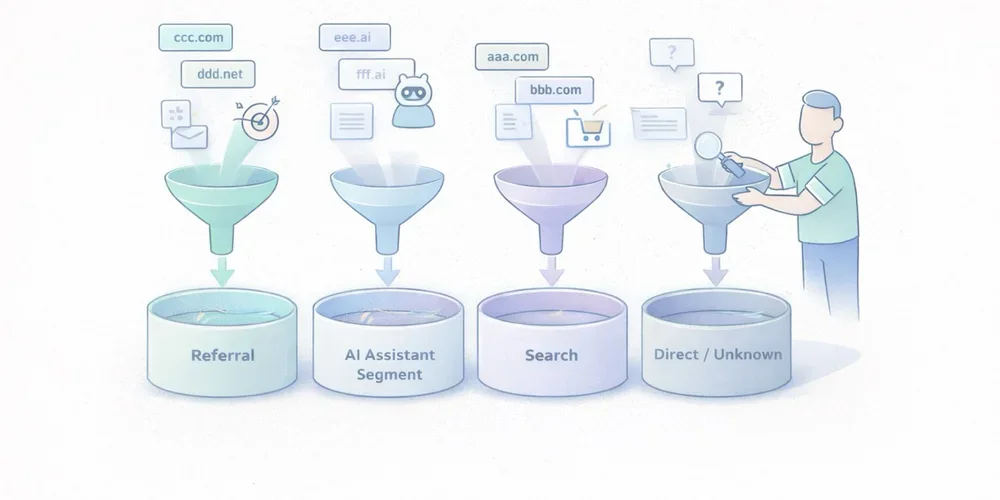
Over the last few months, more marketing teams have started asking the same question: “Are we getting AI traffic now?” The question is fair. ChatGPT, Perplexity, Claude, and other interfaces now show links to websites more often. Some teams can already see those visits in their dashboards. Others notice direct traffic going up and jump to the conclusion that “AI tools are sending direct traffic.” That reading mixes together several very different realities. Some traffic from AI assistants is measurable as normal referral traffic. Some of it ends up in direct or unknown because no usable referrer is passed along. Another part never appears in your analytics at all because there was no click. And when Google blends AI experiences into Search, the line gets even blurrier. In other words, AI traffic is neither a perfectly clean new channel nor a pure illusion. It is a mixed set of behaviors that needs to be read carefully. The goal is not to measure everything perfectly. The goal is simpler and more useful: separate what is truly attributable, document the gray area, and avoid building a story on top of fragile numbers. AI traffic is not one technical source The first thing to clarify is simple: “AI traffic” is not a single analytics category. In practice, teams usually mix together at least four different cases. 1. Assistants that send a real referrer Some ChatGPT, Perplexity, or Claude experiences show links to web sources. When a user clicks from an interface that passes usable source information, your analytics tool may see a referring domain. This is the easiest part to measure. It behaves like regular referral traffic:a visit arrives with an identifiable source domain; a landing page is viewed; the visitor may convert, bounce, or continue browsing.This case alone is enough to justify a dedicated segment. Plausible, for example, documented a strong increase in referral traffic from ChatGPT, Perplexity, Claude, and Phind in 2024. That is not a universal benchmark, but it is a useful signal: AI assistants can send visible, usable traffic. 2. Assistants or apps that do not pass clean source data Not every click is passed through cleanly. Fathom’s documentation explicitly notes that “Direct/unknown” traffic can come from direct visits, email, apps, or any situation where no referrer was passed, and that no analytics platform can control this. This is where many teams get the story wrong. A rise in direct traffic does not prove that AI assistants caused it. But the reverse is also true: some traffic from AI assistants may get absorbed into direct or unknown if the technical context does not pass usable source information. 3. AI answers that cite you without sending a click This is a critical point. Your content can be cited, summarized, or used as a source in an assistant answer without producing a visit to your site. When that happens, your web analytics sees nothing. You may have gained visibility. You did not gain a session. Treating those two things as the same will quickly distort your analysis. 4. AI experiences embedded inside traditional search Google is a special case. Google presents AI Overviews and AI Mode as Search features that can show links to websites and that do not require separate SEO tactics beyond the usual fundamentals. For measurement, that means something straightforward: anything driven by AI will not necessarily appear as a cleanly separated channel, especially when the experience remains embedded in an existing search environment. So avoid overly binary logic such as:“standalone assistant = AI traffic”; “search engine = standard SEO traffic.”In reality, the line is becoming more porous. What you can actually measure today The good news is that you can already measure several useful things without building an oversized setup. Visible referring domains This is the foundation. If your analytics tool exposes referrers or sources, you can identify visits attributed to domains tied to AI assistants. Depending on your stack, that may happen through:a Referrers report; a Sources report; a custom segment; a dedicated channel group.Google Analytics 4 even includes an explicit example of a custom channel group called “AI assistants,” with matching rules for assistants such as ChatGPT, Gemini, Copilot, Claude, and Perplexity. That matters. It shows that in 2026, even Google Analytics treats this as a real analysis use case, not a niche curiosity. Landing pages that capture those visits Volume alone is rarely helpful. The more useful question is: which pages attract this traffic? If three articles, two product pages, and one comparison page capture most visits from AI assistants, you already have a practical reading:which assets are being cited or surfaced; which topics are emerging; which pages function as entry points; which pages deserve improvement.That is often more useful than a single session count. Conversions and intent signals If your tool tracks goals or events, you can go further:demo requests; newsletter signups; meetings booked; trial starts; purchases; clicks on pricing or strategic CTAs.At that point, you are no longer just measuring curiosity. You are measuring traffic quality. That is where an “AI assistants” segment becomes valuable. Not because it sounds trendy, but because it lets you compare:volume; engagement rate; visit depth; conversion.UTM campaigns when you control distribution yourself There is also a simpler case: links that you distribute. If you publish something in a newsletter, a document, a partnership page, or a directory, and you want to observe how your own distribution performs, UTM parameters remain useful. But do not assume AI assistants will preserve your tracking conventions in every context. UTM tags are excellent for measuring links you intentionally distribute. They are much less reliable for mapping every citation or click generated by third-party AI systems. What you will not measure cleanly This is often the most important part of the conversation. Good measurement also means accepting limits. You will not see mentions without clicks If an assistant summarizes your content, uses your ideas, or cites your page without sending a visit, your web analytics will remain silent. That does not mean your content had no role. It just means web session data is not the right sensor for that kind of visibility. You will not always separate AI traffic from direct traffic When a visit arrives without a usable referrer, you enter a gray zone. That gray zone may include:real direct traffic; email traffic; messaging apps; app traffic; browsers or contexts that strip source data; potentially some traffic originating from AI assistants.The only serious posture is to treat that as uncertainty, not as a hidden truth waiting to be renamed. You will not perfectly isolate AI-powered search experiences When an AI experience remains embedded inside an existing search environment, isolated attribution becomes harder. Google explains its AI features in Search as part of the broader web search experience, with the same core SEO fundamentals still applying. For marketing teams, the practical implication is simple: not every visit influenced by AI will appear as a distinct AI source in your reports. You should not confuse citation, visit, and revenue Being cited in an assistant, receiving a click, getting an engaged session, and generating a conversion are four different things. A useful dashboard needs to keep those levels separate. Otherwise, it becomes very easy to move from a modest observation, “we are seeing some visits from ChatGPT and Perplexity,” to a much bigger story, “AI is becoming our next major acquisition channel.” The cleanest way to measure this traffic The goal is not to build a perfect system. The goal is to create a simple, stable, reusable reading framework. 1. Create a dedicated AI assistant segment or channel Start with a short list of sources you can actually observe. For example:ChatGPT / OpenAI; Perplexity; Claude / Anthropic; optionally Copilot or Gemini if they are already visible in your data.Be conservative. Do not add ten hypothetical domains that never show up. 2. Analyze landing pages first Before commenting on volume, look at:which pages receive those visits; whether those pages are old or recent; whether they answer comparative, practical, or explanatory queries; whether they work well as entry pages.This is often where the useful insight lives. 3. Compare traffic quality, not just traffic size Low-volume but high-intent traffic can matter much more than a visible but shallow spike. At a minimum, compare:whatever engagement metric your tool provides; visit depth; key conversions; CTA clicks; exit pages.4. Keep an eye on direct or unknown as a separate gray zone You should not merge direct traffic into AI traffic. But ignoring it completely would also be naive. The better approach is to document it as a possible gray zone. If visible AI referrers increase and direct traffic rises on the same landing pages, that may support a hypothesis. It is still not proof. 5. Document your reading rules This small step makes a big difference in teams. Write down:which domains are included in the AI segment; what is not measured; what falls into direct or unknown; which conversions are tracked; how often the segment is reviewed.A good dashboard is not enough on its own. You also need an interpretation rulebook. The most common mistakes Calling every direct traffic increase “AI traffic” This is probably the most common mistake. Direct traffic is an imperfect bucket. It can contain many things. Assigning it a single cause without evidence weakens the entire analysis. Creating an overly broad AI channel from day one If you group together any domain that vaguely sounds AI-related, you create a noisy segment. A narrower but cleaner segment is usually more useful than a wide and doubtful one. Focusing on volume before conversion Getting 500 weak visits from an AI interface matters less than getting 30 visits to a comparison page that converts. Mixing classic SEO, AI assistants, and branded traffic without a method The right move is not to force a false opposition. It is to separate what is observable, what is comparable, and what remains hypothetical. What to remember Traffic from AI assistants is real. It is not imaginary. But it also does not arrive as a single, clean, perfectly attributable source. Some of it appears as visible referral traffic. Some of it gets lost in direct or unknown. Some of it never generates a session because no click happens. And some of it lives inside search environments where AI and classic search are harder to separate. The best working approach comes down to four simple rules:isolate the referrers you can actually see; measure landing pages and conversions, not just sessions; treat direct as a gray zone, not as hidden certainty; clearly document what your AI segment includes, and what it does not.That framework is less dramatic than a promise of total attribution. It is also much more useful. FAQ Should traffic from ChatGPT always be classified as direct traffic? No. When a usable referrer is passed, it can be measured as referral traffic or grouped into a dedicated segment. But some visits may still end up as direct or unknown depending on the technical context. Can I measure citations without clicks from AI assistants? Not with standard web analytics. Without a session or a click, your audience analytics tool sees nothing. Should I create a separate AI channel in GA4? Yes, if you are starting to see referring domains tied to AI assistants. GA4 documentation explicitly includes this use case in its custom channel group guidance. Should AI traffic be treated as a major new acquisition channel right away? Not automatically. First look at landing pages, traffic quality, and conversions before making that leap. Can I perfectly separate classic Google Search from Google’s AI experiences? Not always. When AI is embedded inside a broader search experience, isolated attribution becomes harder. SourcesOpenAI Help Center, ChatGPT search : https://help.openai.com/en/articles/9237897-chatgpt-search Claude Help Center, Using Research on Claude : https://support.claude.com/en/articles/11088861-using-research-on-claude Perplexity Help Center, How does Perplexity work? : https://www.perplexity.ai/help-center/en/articles/10352895-how-does-perplexity-work Google Analytics Help, Custom channel groups : https://support.google.com/analytics/answer/13051316 Google Search Central, AI features and your website : https://developers.google.com/search/docs/appearance/ai-features Fathom Analytics Docs, Dashboard explained : https://usefathom.com/docs/start/dashboard Plausible Analytics, Breaking down our AI traffic surge : https://plausible.io/blog/ai-referral-traffic-and-optimization
- 02 Feb, 2026
AI traffic: how to measure visits that ChatGPT, Perplexity and Claude send to your website
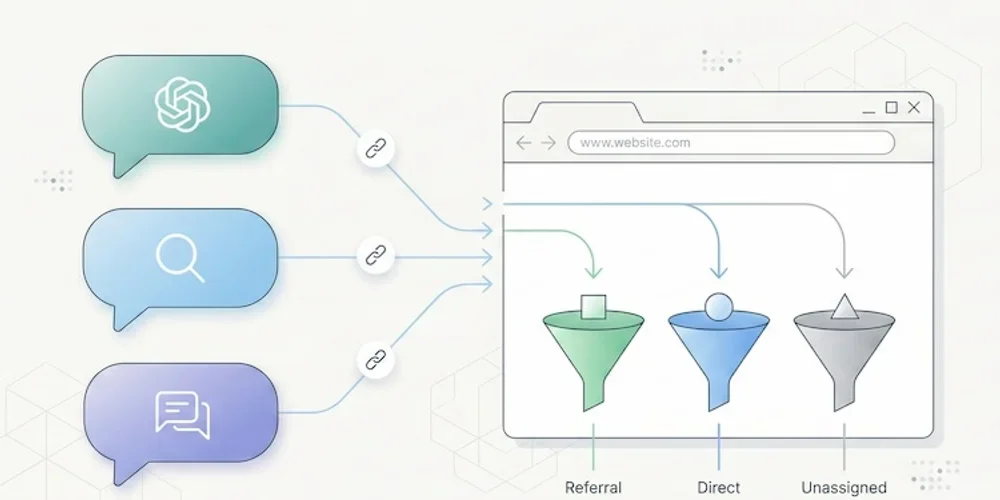
Something has shifted in the way people find your website. And chances are, you have no idea it's happening. Since late 2024, conversational AI platforms have moved beyond answering questions. They now cite sources, insert links, and send real visitors to real websites. ChatGPT, Perplexity, Claude, Gemini, Copilot: these tools are becoming a genuine discovery channel, one that rivals traditional search engines in the quality of traffic it delivers. The catch? Most analytics tools don't separate this traffic. It gets lumped into "referral," blends into "direct," or vanishes from reports entirely. You may already have visitors arriving through a ChatGPT recommendation, and your dashboard won't show it. This article gives you the full playbook: how to spot AI traffic, why it matters, and what to do about it. A new discovery channel, growing fast The raw numbers are still modest. But the trajectory is hard to ignore. A study by SE Ranking covering nearly 64,000 websites across 250 countries (January-April 2025) found that ChatGPT alone accounts for 78% of all AI referral traffic worldwide. Perplexity comes in at roughly 15%, Gemini at 6.4%. Claude and DeepSeek share the remainder at under 1% each, though both show compelling growth curves. (Source: SE Ranking, "AI Traffic in 2025") A separate analysis by Conductor, reported by Search Engine Land, confirms this hierarchy across 13,770 domains and 3.3 billion sessions: AI traffic averages about 1% of total site visits, with ChatGPT generating 87% of it. (Source: Search Engine Land, Nov. 2025) One percent sounds negligible. Two things make it anything but. Growth is strong, but still uneven. Between January and April 2025, ChatGPT's share of global internet traffic doubled in SE Ranking's study, from 0.08% to 0.16%. Some industry analyses also show strong year-over-year growth in AI referral traffic. These figures still need to be read by sector: they do not automatically make AI the first acquisition channel for every site. Traffic quality can be interesting. Visitors arriving from AI platforms spend an average of 9 to 10 minutes per session in SE Ranking's study, compared to 3 to 4 minutes for organic search. Claude-referred sessions in that dataset reached a very high average duration in the EU. These are signals to inspect, not a conversion guarantee: each team should verify landing pages, useful events, and conversions in its own data. The logic is straightforward: a user who clicks a link inside an AI response has already asked a specific question, received context, and chosen to visit your site from among the cited sources. Their intent is pre-qualified. They know why they're coming. Why your analytics can't see it If AI traffic is this valuable, why doesn't it show up clearly in your reports? Three technical issues create this blind spot. The missing referrer problem When someone clicks a link in Perplexity from a web browser, the HTTP Referer header typically passes perplexity.ai as the source. Your analytics tool can then classify the visit as a referral from Perplexity. But this mechanism does not always work. Depending on the context, some sessions from AI tools may not pass a usable referrer. The reasons vary: mobile apps (ChatGPT on iOS, Copilot in Windows) may open links in internal webviews, some AI agents prefetch or preview pages without triggering the analytics script, and AI browsers such as Perplexity Comet or ChatGPT Atlas do not all pass signals the same way. (Source: MarTech, Nov. 2025) The result: a significant portion of AI traffic falls into the "direct" or "unassigned" bucket in your analytics, invisible and unattributed. GA4's default classification Google Analytics 4 can classify visits from AI assistants as "referral," the same category as a link from Facebook, a forum, or a directory listing. In the setups observed when this article was first written, teams still needed their own grouping to isolate this traffic. Always verify the current GA4 interface before documenting the procedure. In practice, if you open your acquisition report in GA4 without custom configuration, ChatGPT traffic is buried among dozens of other referral sources. For a site receiving hundreds of different referrers, spotting chatgpt.com or perplexity.ai requires knowing what to look for. The bot-vs-human confusion AI platforms interact with your site in two fundamentally different ways. The first is referral traffic: a human clicks a link in an AI response and lands on your page. This is real traffic with a real visitor. The second is crawling: AI platform bots (GPTBot for OpenAI, PerplexityBot, ClaudeBot, and others) visit your site to index content and feed their models. This crawl traffic is not useful audience data. It's data harvesting. GA4 automatically filters known bots, but the list isn't comprehensive. Some newer AI bots slip through, while some legitimate human visitors from AI tools get incorrectly filtered. Cloudflare has observed crawl-to-referral ratios as high as 700:1 for Perplexity, which gives a sense of how much harvesting activity exists relative to actual human visits. (Source: Digiday, Dec. 2025) How to identify AI traffic in your tools Two approaches work, depending on what you're using. In GA4: create a dedicated "AI Traffic" channel The recommended method is to build a custom channel group that aggregates all known AI sources. Here's the process:In GA4, go to Admin > Data Settings > Channel Groups. Click the default channel group, then "Copy" to create a new one. Add a channel called "AI Traffic." Set the rule: Match type = "matches regex", then paste this pattern:(chatgpt\.com|chat\.openai\.com|perplexity\.ai|claude\.ai|gemini\.google\.com|copilot\.microsoft\.com|deepseek\.com|meta\.ai)Drag your "AI Traffic" channel above the default "Referral" channel in the priority order. This is critical: GA4 evaluates rules top-down, and if "AI Traffic" sits below "Referral," visits will be classified as referral before reaching your rule.This setup only applies to new data (no retroactive effect). Allow a few days before results appear. For a one-time analysis of historical data, create an Explore report with a filter on "Session source" using the same regex. (Source: MarTech, Nov. 2025) In a lightweight analytics tool (Plausible, Fathom, etc.) This is where a well-designed simple tool can help. In Plausible, the "Sources" report displays every identified referrer directly. If chatgpt.com or perplexity.ai appears as a source, you can inspect it without creating a custom channel first. Click the source to filter the dashboard by that origin and analyze entry pages, time on site, and triggered events. Plausible documented its own experience: in 2024, the Plausible blog saw a 2,200% surge in AI referral traffic within months, all identifiable from their standard dashboard with zero configuration. (Source: Plausible, Dec. 2024) This is a textbook case where the frugal analytics philosophy helps: when a tool is designed to surface essential data without layers of configuration, emerging signals are easier to inspect. A tool like GA4 remains powerful, but it often requires dedicated configuration to isolate a new family of sources. For a broader view of analytics tool families, see our Google Analytics, Matomo, and frugal analytics comparison. AI referral traffic vs AI crawling: two different things A common mistake is conflating referral traffic (humans clicking) with crawling (bots scraping). They deserve separate attention because they raise different questions. AI referral traffic is an opportunity. It represents a qualified, pre-informed visitor arriving with intent. Measuring it lets you optimize landing pages, adapt content, and understand how AI platforms perceive your site. AI crawling is a governance question. Bots like GPTBot, PerplexityBot, and ClaudeBot visit your site to train their models or answer user queries in real time. Some do so aggressively: Cloudflare found that GoogleBot's crawl volume (which also feeds Gemini) dwarfs that of all other AI bots combined. You can control crawling through your robots.txt file: User-agent: GPTBot Disallow: /User-agent: PerplexityBot Disallow: /User-agent: ClaudeBot Disallow: /But beware the paradox: blocking the crawl can reduce your referral traffic. If an AI can't index your content, it can't recommend it to users. This is a trade-off to make deliberately. An emerging approach uses an llms.txt file (a Markdown file placed at your site's root) to guide AI platforms toward the content you want to make accessible, without blocking all crawling. Anthropic (the company behind Claude) uses this mechanism on its own site. How to get cited by AI platforms Understanding AI traffic also means understanding what triggers it. AI platforms don't cite sites randomly. Several factors drive citations. Content structure matters. Analyses cited by Superprompt suggest that pages with clear heading hierarchies (H2, H3, lists) and direct answers are easier for AI systems to reuse. Structured FAQ sections are particularly useful because they match the question-and-answer format of AI interactions. Freshness can help. Recently updated content is often easier to use in answers that need current information. The effect still depends on topic, domain authority and how the AI platform retrieves sources. Original data attracts citations. Data tables, proprietary statistics and exclusive benchmarks can be easier to cite than generic content. This is another argument for precise, data-driven KPIs over vanity metrics. Traditional SEO remains the foundation. Several market studies connect AI visibility with conventional SEO signals: structure, authority, freshness and editorial clarity still matter. SEO doesn't depend on Google Analytics, but it remains part of the foundation for AI visibility. What this means for choosing an analytics tool AI traffic exposes an operational limit in complex analytics platforms: emerging signals often need prior configuration before they are easy to read. With GA4, you need to create a channel group, write a regex, update it regularly (new AI tools launch every month), and accept that the data won't be retroactive. It's doable, but it demands technical expertise that most small business owners and freelancers simply don't have. With a well-designed lightweight analytics tool, AI referrers can appear directly in the sources report, right alongside Google, LinkedIn, or Twitter, when the referrer is actually transmitted. That does not remove webview, direct or prefetch limits, but it makes visible signals easier to read. That's the core principle of analytical sobriety: collect less data, but make every data point immediately readable. AI traffic is not something to ignore. It is one signal of a change in how some people discover content online. Sites that measure it today will mostly have a clearer read on emerging sources, without overstating a volume that often remains small. The question is no longer whether AI platforms send traffic to your site. It's whether your measurement tool shows it to you.Frequently asked questions What percentage of my traffic comes from AI? Late-2025 studies still place identifiable AI traffic at a small share of total traffic, with large variations by sector. That only reflects identifiable traffic: when an AI session lacks a usable referrer, it can fall into "direct" and remain difficult to attribute. How do I see ChatGPT traffic in Google Analytics 4? If your GA4 interface does not yet provide an AI channel that fits your needs, create a custom channel group: go to Admin > Data Settings > Channel Groups, add an "AI Traffic" channel with a regex rule covering AI domains (chatgpt.com, perplexity.ai, claude.ai, gemini.google.com, copilot.microsoft.com). Place it above the "Referral" channel in the hierarchy. Data will only be collected from the date you create the channel. Should I block AI bots with robots.txt? It's a trade-off. Blocking AI bots (GPTBot, PerplexityBot, ClaudeBot) via robots.txt prevents your content from being indexed by these platforms, which may reduce citations and referral traffic. On the other hand, not blocking means your content feeds AI model training, raising intellectual property and consent questions. A middle-ground approach uses an llms.txt file to guide AI platforms toward the content you want them to access. Can cookieless analytics detect AI traffic? Yes, when a usable referrer is transmitted. Cookieless tools like Plausible, Fathom, or Simple Analytics can display those referrers directly in their sources report without a dedicated channel group. That is often easier to inspect, but it does not solve referrer, direct or prefetch limits. How do I optimize my content to get cited by ChatGPT or Perplexity? Five levers are worth testing: structure content with clear headings (H2/H3) and FAQ sections; keep content fresh when the topic requires it; produce original data (tables, statistics, benchmarks); maintain strong traditional SEO; and consider an llms.txt file to make structured content easier for AI crawlers to access. Effects vary by platform and topic, so document your assumptions before turning them into an editorial rule.Sources and figures were checked for the initial February 2026 publication. AI traffic shares and GA4 classifications evolve quickly: verify the current interface and documentation before turning this into an internal rule. Sources Sources checked on May 10, 2026.SE Ranking, "AI Traffic in 2025: Comparing ChatGPT, Perplexity & Other Top Platforms" Search Engine Land, "AI sends 1% of website traffic — and most of it is from ChatGPT" MarTech, "How GA4 records traffic from Perplexity Comet and ChatGPT Atlas" Plausible Analytics, "Breaking down our 2.2K% surge in AI traffic"