Tag: Conversion
All blog posts with this tag.

- 20 Jul, 2026
Acquisition pages: seven signals to track without building an analytics maze
An acquisition page does not need fifty metrics to be managed well. It needs to answer a short chain of questions:are the right people arriving? do they understand the proposition? do they move toward the intended action? do they complete it? are the resulting leads or sales useful? does the page work properly? is the measurement reliable enough to support a decision?This chain prevents two common mistakes. One is judging a page only by traffic volume. The other is adding behavioural events without connecting them to a business decision. For an SME or B2B SaaS team, seven signals are usually enough for a sound diagnosis. Define the page's job before its metrics Not every acquisition page has the same objective. A page may aim to:generate demo requests; start trials; collect quote requests; sell a product; deliver a resource; register attendees; move visitors to pricing; qualify a need before a sales conversation.Its primary KPI follows from that job. An educational content page should not be judged like a demo page. An awareness campaign should not be read like high-intent search. Document four elements first:Element QuestionAudience Who is the page for?Promise Which specific problem does it solve?Source Which channel or campaign brings visitors?Action What useful action should follow the visit?This short brief becomes the reference point when the numbers change. Signal 1: qualified entries by source The first signal is not raw session volume. It is the distribution of entries by source, campaign and intent. Two hundred visits from a precise query may be more useful than two thousand loosely targeted visits. Conversely, low volume does not prove quality if none of the visitors belong to the intended segment. Review at least:visits or sessions starting on the page; source and medium; campaign; identified ad or link content; organic query where Search Console provides it; country or commercial region when genuinely relevant; direct traffic, interpreted cautiously.GA4's Landing page report associates the first pageview in a session with metrics such as sessions and key events. It can also use Session source / medium as a secondary dimension. Search Console complements this view for Google Search with clicks, impressions, CTR, position, queries and pages. The tools do not measure the same thing. Search Console describes visibility and clicks in Google results. Analytics describes activity observed after arrival, within its collection limits. Their totals should not be expected to match visitor by visitor. For campaigns, a stable UTM convention matters more than a sophisticated dashboard. Our guide to UTMs, referrers and direct traffic explains how inconsistent labels fragment reports. Signal 1: Decision question Is the page attracting the audience its message was designed for? Signal 2: intent-to-message fit A page can receive relevant traffic and still fail because its promise does not match the reason behind the click. Compare:the ad copy; the keyword or query; the newsletter link; the visible headline; the supporting proof; the requested action.Someone clicking “compare analytics tools for multiple websites” should encounter that topic immediately. Opening with generic digital-transformation language creates a gap even when the design is polished. No single rate captures this signal. Use several clues:conversion by source or campaign; primary CTA clicks; movement toward the expected section; very fast exits, interpreted cautiously; feedback from sales or support; focused user tests.Engagement time can flag an anomaly, but it is not proof of interest. A long duration may mean close reading or confusion. A short duration may mean abandonment or an immediate answer. Signal 2: Decision question Does the visitor clearly find the promise that brought them to the page? Signal 3: primary call-to-action activity The primary CTA is the first observable commitment toward the objective. Track an action that matters, such as:clicking Request a demo; opening a form; moving to pricing; adding to cart; starting a trial; confirming a download; scheduling a meeting.Do not label every click as a conversion. Accordion opens, tab clicks and scroll depth can support diagnosis, but they do not carry the same intent as a commercial action. A useful measurement sequence is usually:page entry; primary CTA click; form or flow start; successful completion.This separates a messaging weakness from a form problem. If few visitors click, investigate what happens before the CTA. If many click but few finish, inspect the next step. A minimal analytics tracking plan helps keep those definitions stable. Signal 3: Decision question Does a sufficient share of qualified visitors choose to continue? Signal 4: conversion completion The final conversion is the action the business considers useful. It must be unambiguous. Examples include:an accepted form submission; a confirmed appointment; an account creation; a completed payment; an activated trial; a delivered download.Always name the denominator. “Eight per cent conversion” is meaningless without knowing whether it refers to visitors, sessions, form opens or CTA clicks. For a form, measure at least:opens; starts; errors; abandonment; successful completion.Do not send field values to analytics. Form content may contain names, email addresses, phone numbers, free text and other personal data. The business system needs the content. Analytics usually only needs a technical or functional status. Signal 4: Decision question Where does the journey lose people who already expressed intent? Signal 5: post-conversion quality A page can achieve a strong conversion rate and create poor commercial outcomes. For B2B teams, the decisive signal often appears after the form:fit with the target profile; a request genuinely related to the product; an attended meeting; an opportunity created; continued sales progression; revenue or value created; spam and off-target demand.Connect acquisition to the CRM with proportionate granularity. You do not always need to send personal CRM data back into analytics. An aggregate table by campaign, source or landing page may be enough to answer which entries produce useful demand. Agree on a short sales classification:qualified; unqualified; duplicate; spam; outside market; no next step; opportunity.This prevents marketing from optimizing only for form volume. Signal 5: Decision question Does the page create useful outcomes rather than submissions alone? Signal 6: technical performance and errors A slow or unstable page can damage the experience before the message is evaluated. Core Web Vitals provide three field indicators:LCP for main-content loading; INP for interaction responsiveness; CLS for visual stability.Complement them with operational checks:JavaScript errors; forms that cannot submit; blocked resources; mobile CTAs hidden by layout; incorrect redirects; a 404 after submission; missing or duplicated tracking; consent logic applied incorrectly; abnormal server response time.Do not confuse correlation with causation. A technical improvement may accompany a conversion increase without being its only cause. Use performance data to identify differences by device, release and period. Signal 6: Decision question Is a technical constraint preventing part of the audience from progressing? Signal 7: measurement health The seventh signal concerns the data itself. Before interpreting a change, verify:event volume relative to visits; duplicated tags; consent changes; missing or inconsistent campaign parameters; redirects that lose parameters; sensitive values in URLs; form changes; releases during the period; time-zone differences; internal filters and exclusions.A 30 per cent increase may come from a successful campaign, a duplicated event or a changed definition. Document measurement changes before assigning a business cause. Our guide to privacy-first URL parameter filtering helps prevent identifiers and sensitive values from entering reports. Signal 7: Decision question Does the observed change describe the market, or a change in the measurement system? A minimal dashboard A landing-page dashboard can use this structure:Block Primary measure Useful breakdownAudience Qualified entries Source, campaign, deviceMessage CTA clicks / entries Source, variantJourney Starts and completions Step, deviceOutcome Useful conversions Campaign, segmentQuality Qualified leads Source, pageTechnical Vitals and errors Device, releaseMeasurement Documented anomalies Date, deploymentLimit comparisons to segments that can lead to action. A filter that changes no decision adds complexity without improving control. Review cadence Weekly Check:traffic breaks; form errors; misattributed campaigns; extreme changes; mobile problems; performance incidents.Monthly Review:source quality; conversion trends; lead quality; pages and campaigns to improve; tested hypotheses; decisions made.Put the conclusion into the monthly web report rather than sending a separate export from each tool. Metrics not to over-interpret Bounce rate Its definition varies by tool and context. A short visit to a page that answers a question immediately is not necessarily a failure. Scroll depth It may show how far content was traversed, but not what was understood. It is useful for comparing variants, not for proving intent. Time on page It combines attention, confusion, abandoned tabs and measurement constraints. Heatmaps They can help form a hypothesis, but they do not replace conversion data or user research. They also involve more detailed collection that should be assessed separately. Click volume It only matters when the action matches an explicit objective and the event is not emitted more than once. Conclusion An acquisition page should be managed as a chain, not as a ranking of metrics. The seven useful signals are:qualified entries; intent-to-message fit; CTA activity; conversion completion; post-conversion quality; technical performance; measurement health.Start with this structure. Add a metric only when it answers a question the team is prepared to act on. FAQ What is the primary KPI for a landing page? It is the useful action defined for that page: a qualified request, trial, purchase, meeting or another explicit result. Traffic and engagement mostly explain that result. Should scroll depth be measured? Only when it tests a specific hypothesis, such as whether an important proof point is rarely reached. Scroll should not be treated as a conversion. Why do GA4 and Search Console show different figures? They measure different stages and scopes. Search Console measures appearances and clicks in Google Search. GA4 measures sessions or events observed on the site, according to its setup and consent choices. How can a landing page be connected to revenue? Preserve source, campaign and landing-page context in the CRM or a controlled attribution table, then analyse aggregate cohorts. Avoid sending unnecessary personal CRM data back to analytics. How many events should be tracked? For most B2B pages, four levels are enough: entry, CTA click, journey start and success. Add diagnostic events only when they address a known problem. Sources Sources checked on June 21, 2026.Google Analytics, Landing page report Google Search Console, Performance report web.dev, Web Vitals Google Analytics, collect campaign data with custom URLs CNIL, cookies and other trackers
- 09 Feb, 2026
Why trust is becoming a growth constraint, not a privacy slogan
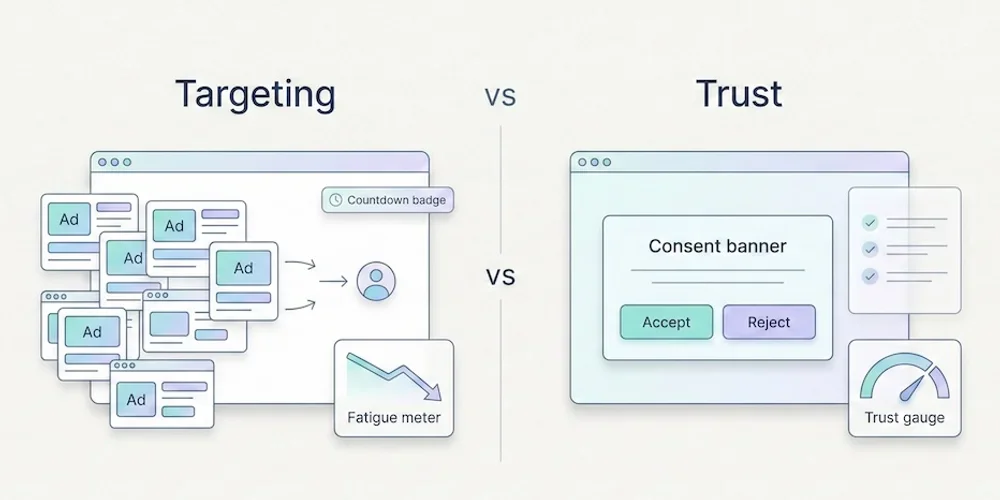
Privacy-first marketing should not be sold as a moral badge or a guaranteed conversion lift. The stronger argument is more pragmatic: trust is becoming part of the buying experience, and intrusive data practices can create friction that teams do not always measure. For European SMEs, B2B SaaS teams and agencies, this matters because growth depends on repeated interactions. A buyer may discover you through content, compare you over several visits, ask colleagues, read docs and return later. If every interaction feels extractive, the relationship weakens before sales even starts. What trust changes operationally Trust does not mean collecting no data. It means collecting data with a clear purpose, explaining it plainly and avoiding silent escalation from measurement to targeting. In practice, trust changes five workflows:analytics: measure what the team actually uses; forms: ask only for fields needed at that stage; advertising: separate measurement from retargeting; content: answer real buyer questions instead of hiding value behind gates; reporting: explain limits instead of pretending every number is perfect.Why targeting can become expensive Targeting can be useful when it is transparent, proportionate and aligned with user expectations. It becomes expensive when it drives:consent friction; duplicated tags; heavier pages; lower trust in forms and demos; noisy attribution debates; extra legal and vendor review.These costs rarely appear in ad-platform dashboards. They show up as longer sales cycles, more implementation work and weaker confidence in the numbers. A practical trust checklist Before adding a new tracking or targeting feature, ask:What decision will this data support? Can we answer the same question with less data? Will the visitor understand why this happens? Does this belong in baseline analytics or an explicit enriched setup? Who will review whether the data is still useful in three months?If the team cannot answer, delay the feature. Where Pomelo fits Pomelo should not promise that privacy-first automatically increases conversion. It should promise a better operating model: cookieless by default, minimal collection, Strict first, Extended by configuration, and reporting that makes data limits visible. That is enough. Teams do not need another vague trust slogan. They need a product that helps them govern measurement choices without slowing down every launch. SourcesCisco, 2025 Data Privacy Benchmark Study, April 2, 2025: https://investor.cisco.com/news/news-details/2025/Ciscos-2025-Data-Privacy-Benchmark-Study-Privacy-landscape-grows-increasingly-complex-in-the-age-of-AI/default.aspx Cisco, 2025 Data Privacy Benchmark Study PDF: https://www.cisco.com/c/dam/en_us/about/doing_business/trust-center/docs/cisco-privacy-benchmark-study-2025.pdf Edelman, 2025 Trust Barometer: https://www.edelman.com/trust/2025/trust-barometer Edelman, 2025 Brand Trust special report: https://www.edelman.com/trust/trust-barometer
- 12 Jan, 2026
The "Less is More" Method: 5 Metrics Are All You Need to Run a Profitable Website
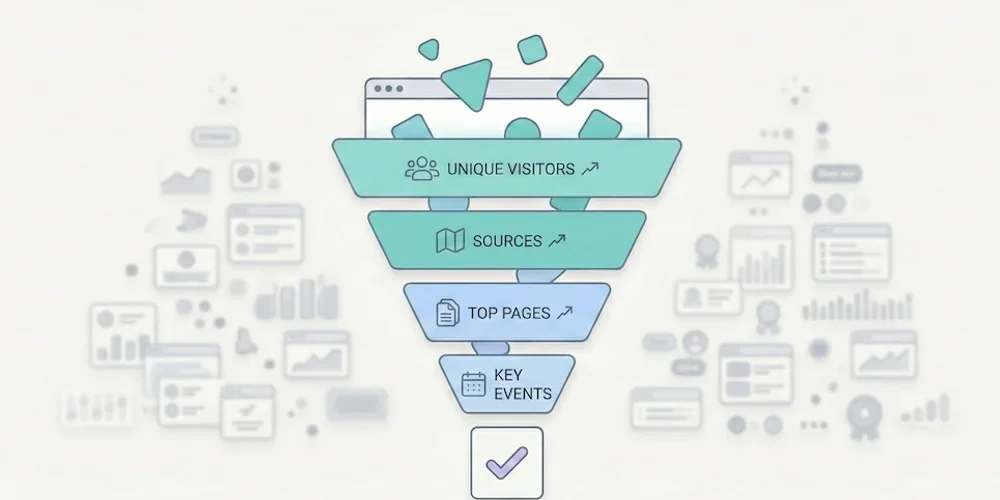
Opening your web analytics tool often feels like popping the hood of a modern car without being a mechanic: you can see it's complex, you hope everything's working, but you have no idea what to touch. That's normal. According to Eurostat, 44% of Europeans lack basic digital skills. It's not your fault if you can't make sense of your traffic reports — it's because the tools are designed for experts, not for business owners. → Source: Eurostat – Digital skills of individuals The good news? To grow your business, you don't need to become an expert. You just need to apply the Pareto principle: ignore 80% of the noise and focus on the 20% of metrics that impact your revenue.1. Why Measuring Everything Means Measuring Nothing The classic SMB mistake is thinking: "I'll record everything just in case." The result is a "Christmas tree" dashboard: bounce rate, average session duration, pages per visit, user flows, predefined events, real-time reports… When everything blinks, nothing matters. We've detailed this phenomenon in our article on data obesity: information overload produces paralysis, not decisions. Choice overload applies to metrics too. To adopt a frugal approach, filter your data with one question: "If this number changed tomorrow, would I change how I work?"If the answer is no → it's noise. Remove it from your dashboard. If the answer is yes → it's a KPI (Key Performance Indicator). Keep it.When you apply this filter rigorously, nearly every SMB arrives at the same 5 metrics. No more, no less.2. The Only 5 Metrics You Need Here's the ideal setup for a brochure site, a blog, or a small online store. These 5 KPIs cover the entire visitor journey: from discovery to conversion. KPI 1 — Unique Visitors (Your Real Audience) The number of distinct people who visited your site over a given period (not clicks, not "sessions" — people).The business question: "Is my audience growing? Are more people finding me?" Reading frequency: Weekly. Compare week over week to see the trend, not day by day (daily fluctuations are noise). The trap: Don't confuse "unique visitors" and "pageviews." If one person visits 10 pages, that's 1 visitor and 10 pageviews. It's the visitor count that measures your actual reach.KPI 2 — Traffic Sources (Where Do They Come From?) How your audience breaks down by channel: Google (SEO), social media, direct access, email, paid ads, referrals.The business question: "Where should I invest my time and money?" Why it's critical: According to Eurostat, 60% of EU businesses are on social media, but many are flying blind. This metric tells you whether the hours spent on LinkedIn, Instagram, or TikTok are actually paying off — or if SEO is doing the real work. The trap: Make sure your campaigns are tagged with UTMs. Without UTMs, traffic from your newsletters, social posts, or ad campaigns gets bucketed into "Direct" or "Referral," which corrupts your analysis.→ Source: Eurostat – Social media use by enterprises KPI 3 — Top 5 Pages (What Actually Interests People) Your 5 most visited pages, ranked by unique visitors.The business question: "What topics attract my prospects?" What you often discover: The "Service A" page (the one you spent weeks on) never gets read, while an old blog post or FAQ page attracts everyone. These surprises are gold: they tell you what your market actually wants to know. How to act: If a page attracts lots of traffic but doesn't convert, add a clear call-to-action. If a page converts well but has little traffic, invest in promotion (SEO, social, paid).KPI 4 — Key Events (Engagement) The concrete actions visitors take: clicking "Call," downloading a PDF, watching a video, adding to cart.The business question: "Is my site engaging, or are people just passing through?" Why this beats "engagement rate": GA4's automatic metrics (engagement rate, session duration) are ambiguous and hard to interpret. An explicit event ("clicked the Quote button") is crystal clear and directly tied to business value. How to set up: Most frugal analytics tools let you define custom events in a few clicks, with no Tag Manager required. Identify the 3-5 actions that matter on your site and track only those.KPI 5 — Conversions (The Bottom Line) The number of forms submitted, calls triggered, or sales completed. This is the only number that matters at the end of the month.The business question: "How much revenue did this site generate this week?" The trap: Many sites don't track conversions at all. The contact form sends an email, but nobody counts how many forms are submitted per week. Without this data, you can't tell whether your site is a profitable investment or a cost center. How to set up: Define a "goal" in your analytics tool (form submission, "Buy" button click, confirmation page visit). It's the most important metric and often the simplest to implement.3. The Minimalist Dashboard Here's what your weekly review should look like. One table, 5 rows, 2 minutes of reading.KPI This Week Last Week TrendUnique visitors 1,230 1,050 ✅ +17%Top source Google (62%) Google (58%) ✅ SEO growingTop page /blog/gdpr-article /services ℹ️ New content performingKey events 45 "Quote" clicks 38 ✅ +18%Conversions (forms) 12 9 ✅ +33%Reading time: 30 seconds. Possible decision: "SEO and blog content are working — keep going. Form submissions are up — no need to change the contact page." That's it. No charts to interpret, no segments to configure. If you're a freelancer or agency, this is also the perfect basis for effective client reporting.4. Quick Diagnosis: How to Act This diagnostic table covers the most common scenarios. Find your situation and apply the recommendation.Scenario Diagnosis ActionLots of visitors (#1) but few conversions (#5) Your offer isn't clear, or your form is off-putting Simplify the contact page (fewer fields). Add a visible CTA on high-traffic pages.Few visitors (#1) but high conversion rate (#5) Your site converts well, but nobody can find it Invest in acquisition: SEO (content), targeted ads, or social media. The site is ready.High social traffic (#2) but few conversions (#5) You're attracting "tourists" who aren't your target Shift your social content strategy to attract prospects, not just curious browsers. Or accept that social serves awareness, not conversion.Top page = homepage (#3) and nothing else Visitors aren't going deeper Your navigation is confusing or your internal content isn't compelling. Improve internal linking and CTAs.Many "Quote" clicks (#4) but few form submissions (#5) The form is too long or broken Test the form yourself on mobile. Reduce the number of fields. Check it works across browsers.Traffic dropped for 2 weeks Technical or seasonal issue Check Search Console (indexing errors?). Check your analytics script (still installed?). If everything's fine, it's likely seasonal — compare to the previous year.One blog post dominates the Top 5 (#3) That topic interests your market Create more content on this subject. Add a relevant CTA to that article. Offer a lead magnet (PDF, newsletter) to readers.5. Metrics to Ignore (and Why) For completeness, here are the indicators you can safely remove from your dashboard. Bounce rate. If a visitor arrives on your contact page, finds your phone number in 10 seconds, and calls, they "bounced" — but that's a total success. Bounce rate measures a technical behavior, not a business outcome. Since GA4, it's been replaced by "engagement rate," an equally ambiguous metric. Average session duration. A visitor who spends 8 minutes on your site — are they fascinated or lost? Impossible to tell without context. This metric is a classic vanity metric. Pages per session. Same problem. More pages = better engagement? Or confusing navigation? The number alone tells you nothing. Demographic data (age, gender). In many analytics stacks, these data points rely on profiling or advertising features that trigger consent and privacy review. And in the vast majority of cases, they do not change an SMB's business decisions.6. Reading Frequency: The Discipline of Simplicity Running a website shouldn't take more than 15 minutes per week.Weekly: Check your 5 KPIs. Identify one trend and one action. Monthly: Compare this month to last month. Prepare the client report if you're at an agency. Quarterly: Zoom out. Are traffic sources shifting? Are conversions trending up? Should you adjust strategy?The temptation to avoid: checking stats every day. Daily fluctuations are statistical noise. 200 visitors on Monday and 150 on Tuesday means nothing. Only the weekly or monthly trend matters.Conclusion: The Discipline of Simplicity Go back to the fundamentals. Print this list of 5 KPIs, configure your tool to show only these, and ignore the rest. If your current tool can't deliver these 5 answers in under 30 seconds, it might be time for a change. Our analytics tool comparison can help you choose. Analytics shouldn't be a chore. It's a decision tool — and like any good tool, it should be simple to use.FAQ: Essential Metrics Should I track the "Bounce Rate"? No. If a visitor arrives, finds your phone number in 10 seconds, and calls, they "bounced" technically — but it's a business success. Bounce rate doesn't distinguish a satisfied visitor from a disappointed one. Focus on conversions (KPI #5), which measure the actual result. How often should I check my stats? Once a week, 10-15 minutes maximum. Checking every day creates unnecessary anxiety over fluctuations that have no statistical significance. Trends are read over weeks, not days. Are these 5 KPIs enough for e-commerce? For a small e-commerce site (under 500 orders/month), yes. KPI #5 (Conversions) becomes "Number of sales + Revenue." For larger e-commerce with multi-channel attribution needs, you'll want additional metrics (average order value, cart abandonment rate, cost per acquisition by channel). How do I set up conversion tracking without Tag Manager? Most frugal analytics tools offer built-in event tracking: you define a CSS selector (e.g., "click on the .btn-contact button") directly in the interface, with no code or Tag Manager required. Check your tool's documentation for the exact procedure. My boss wants a report with 20 metrics. How do I convince them? Send them the 5 KPI table for 4 weeks, adding a "Recommendation of the Week" line based on these metrics alone. When they realize they make better decisions with 5 metrics than with 20, the debate is over. The ultimate test: ask them to name the 20 metrics from memory. If they can't, they don't need them.