Tag: Events
All blog posts with this tag.
- 20 Apr, 2026
A minimal analytics tracking plan for SMBs: 12 events are enough to run a website
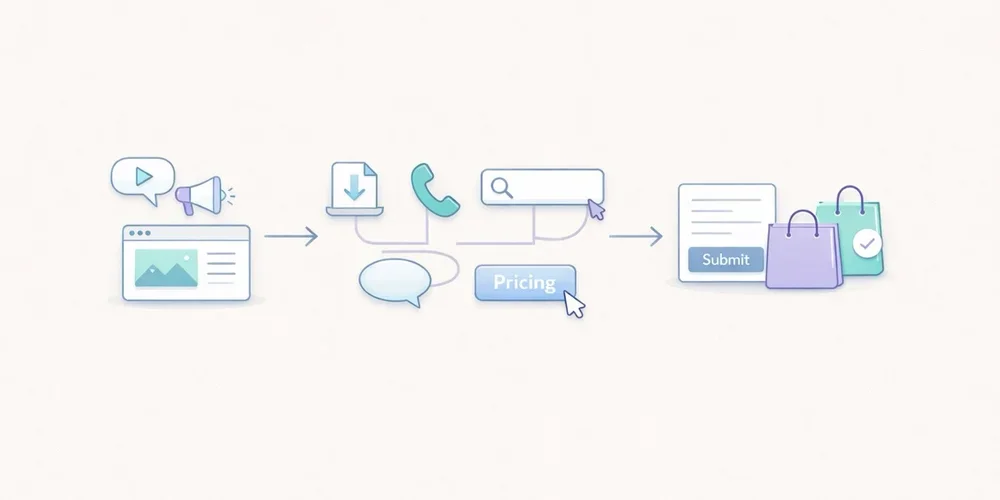
For years, many teams approached analytics tracking as an endless checklist. Track everything, name everything, enrich everything, and hope that one day someone will actually use the data. In practice, that usually creates the opposite result. The tracking plan grows too wide, the event list becomes messy, parameters get harder to read, and the dashboard stops helping people make decisions. The tool collects more, but the team understands less. For an SMB, a B2B website, a lead generation site, or a small SaaS property, the right logic is usually much simpler: measure less, but measure what helps you act. That is what a minimal tracking plan is for. It does not try to describe every micro-interaction. It tries to answer a few useful questions:where traffic comes from; which pages attract attention; which pieces of content create intent; which actions suggest progress; which actions count as real conversions.This article offers a practical framework with 12 events at most. It is not a universal truth. It is a robust starting point for teams that want analytics to stay readable, governable, and useful. A tracking plan is not a technical inventory, it is a decision framework The first mistake is to start from the tool. You open the documentation, discover dozens of recommended events, and then try to squeeze all of them into the site. That is the wrong direction. A good tracking plan starts with the decisions the team needs to make. For example:Which pages actually support acquisition? Which content drives lead generation? Which calls to action work? Where do visitors drop off? Which signals deserve a monthly review, and which ones are just curiosity?Until those questions are clear, adding more events does not help much. Google Analytics 4 explicitly separates automatically collected events, recommended events, and custom events. The key point is not that many options exist. The key point is that a team does not need all of those options to get useful analytics. The same is true with tools such as Matomo and Plausible. They can track actions beyond pageviews. That capability is valuable. It becomes counterproductive when it pushes teams to document every movement on the site. What a minimal tracking plan should cover For SMBs, a lean tracking plan should cover five areas. 1. Core audience reading Before adding events, you still need the basics:pageviews; landing pages; sources or referrers; campaigns when they are actively used; main conversions.In other words, event tracking should not compensate for a weak audience dashboard. If your reporting does not already explain which pages attract qualified traffic, twenty extra events will not fix that. 2. Intent signals Not every visitor converts right away. You need a few intermediate signals: a strategic CTA click, a file download, internal search, a demo request, the start of signup, and similar actions. These signals help you read progression. They should not become an artificial funnel for its own sake. 3. Real conversions A minimal plan should identify what actually matters for the site:form submissions; booked meetings; trial starts; confirmed purchases; validated signups.If an action does not influence any decision, it probably does not need to exist as an event. 4. Obvious friction points The goal is not to replay every session. The goal is to see where intent gets lost. Repeated internal searches, clicks to pricing with no follow-up action, or checkout starts without completed purchases can already be enough to reveal a problem. 5. Tracking governance A tracking plan without governance drifts quickly. You should know:why the event exists; who asked for it; where it fires; which parameters are actually useful; when it can be removed.This is often the difference between a clean setup and an accumulative one. The 12 events that are enough in most cases Here is a simple model. Not every team will need all 12. Many can start with 6 to 8. 1. form_submit This is the most universal event. It covers contact forms, quote requests, demo forms, and inbound lead forms. Why track it: it captures explicit intent. Useful parameters:form_name page_type2. demo_request If your B2B site offers demos, it is worth distinguishing that action from a generic form. It often reflects stronger intent. Why track it: it separates general contact from more qualified demand. Useful parameter:placement3. newsletter_signup This is usually secondary compared to commercial intent, but it can still be a strong content signal. Why track it: it measures a lighter conversion that is useful for content teams. Useful parameters:placement content_type4. account_signup For SaaS products or member areas, the start of signup nearly always deserves dedicated tracking. Why track it: it shows the move from visit to account creation. Useful parameters:plan_type placement5. trial_start If a trial exists, it should be tracked separately from a simple signup. Volume may be lower, but the signal is much closer to revenue. Why track it: it brings analytics closer to the real pipeline. Useful parameter:plan_type6. purchase_complete For ecommerce sites or SaaS products with direct subscription, this is the most important end-state event. Why track it: it anchors the setup in real conversion rather than vague intent. Useful parameters:plan_type billing_cycle7. phone_click On many local business, consulting, services, and B2B sites, the phone is still a conversion path. Why track it: not every conversion goes through a form. Useful parameter:placement8. email_click The same applies to mailto links. On some sites, this matters more than another decorative click on a product page. Why track it: it shows direct contact intent. Useful parameter:placement9. file_download White papers, brochures, product sheets, or PDF documentation can indicate serious intent, as long as you stay selective. Why track it: it helps identify the assets that generate tangible engagement. Useful parameters:file_name content_type10. outbound_click Not every outbound click deserves tracking. But some external links are strategic: Calendly, payment platforms, partner portals, marketplaces, or core documentation. Why track it: it explains useful exits from your site. Useful parameters:destination_type placement11. search_submit If your site includes internal search, it is often one of the most revealing signals. Visitors are telling you what they are looking for. Why track it: it reveals the gap between site architecture and user intent. Useful parameters:query_group results_stateImportant: avoid sending raw search terms if that creates unnecessarily sensitive collection. Grouping or aggregation is often the better choice. 12. checkout_start or pricing_cta_click The twelfth event depends on the type of website. For ecommerce: track checkout_start. For B2B sites without direct purchase: track pricing_cta_click or another major commercial CTA. Why track it: it captures the shift from interest to active intent. Useful parameters:placement offer_typeThe real discipline: limit parameters A bad tracking plan does not only contain too many events. It also contains too many properties attached to each event. A simple rule works well here: only keep parameters that change how you read performance. For example:placement can help compare a CTA in the header and footer; plan_type can help separate free, starter, and pro; form_name can help if several forms exist.By contrast, many parameters create little value:the exact button text; the full URL when it is already visible elsewhere; casing variations and naming inconsistencies; redundant details that mostly complicate analysis.Plausible, for example, lets you attach custom properties to events. That is useful. But technical possibility is not the same as analytical necessity. The more you enrich, the more you have to read and maintain later. A simple naming convention beats a complex framework For a minimal plan, the following convention is enough:event names in English; clear action verbs; no spaces; no near-duplicates; stable meaning over time.Good examples:form_submit trial_start file_download phone_clickAvoid names like:CTA Final Hero Demo contactFormSuccessNew btn_click_v2 conversion_importantThe rule is simple: the name should still make sense six months later, even to someone who was not part of the original implementation. What not to track first A minimal plan also means accepting what not to measure. Do not start by tracking:every scroll; every navigation click; every accordion open; every hover; every visual button variation; every video interaction if nobody uses that data; every micro-step of a long form unless a proven problem exists.This data can feel reassuring because it looks detailed. In reality, it often creates noise. The recommended implementation order To avoid turning tracking into an endless project, deploy in three waves. Wave 1: main conversions Start with:form_submit demo_request purchase_complete trial_startNot every team will have all four, but every team should start with the events closest to value. Wave 2: intent signals Then add:phone_click email_click file_download checkout_start or pricing_cta_clickThat is often enough to read the useful middle of the journey. Wave 3: orientation signals Only then, add if needed:search_submit newsletter_signup account_signup outbound_clickThis sequence keeps tracking under control. First document what supports decision-making, then what improves interpretation. A simple example of a minimal tracking table This documentation format is enough for most SMBs:Event Trigger Why track it Parametersform_submit successful form submission measure inbound leads form_name, page_typedemo_request demo click or confirmed request isolate strong commercial intent placementnewsletter_signup confirmed signup measure content-driven conversions placement, content_typeaccount_signup signup started or completed read visit → account progression plan_type, placementtrial_start trial activated track the signal closest to revenue plan_typepurchase_complete purchase or subscription confirmed measure the final conversion plan_type, billing_cyclephone_click click on phone link capture non-form conversions placementemail_click click on mailto link follow direct contact intent placementfile_download file download triggered measure interest in key assets file_name, content_typeoutbound_click click to a strategic external domain understand useful exits destination_type, placementsearch_submit internal search submitted read user intent query_group, results_statecheckout_start or pricing_cta_click checkout started or key pricing CTA clicked identify the shift to action placement, offer_typePrivacy matters, even in a minimal setup This point matters. A minimal tracking plan is not automatically a legally simple one. The CNIL makes clear that audience measurement can, under certain conditions, fall within a specific regime, but the analysis still depends on purposes, configuration, and actual data use. Once you move into broader marketing use cases, acquisition logic, or richer reuse, the compliance analysis changes. In practical terms, that means two things:keep the tracking plan proportionate; clearly separate useful audience measurement from broader marketing needs.In other words, a good tracking plan is not just lean. It is also explainable. What to keep in mind For SMBs, a good tracking plan is not trying to impress anyone. It is trying to remain usable. In most cases, 12 events are more than enough, and often 6 to 8 are enough to start well. The key is not to build an ambitious taxonomy. The key is to answer a few simple questions every month:what attracts qualified traffic; what creates clear intent; what actually converts; where progress gets lost; which data the team truly understands and uses.If your tracking plan becomes more complex than your decisions, it is probably already too heavy. FAQ Should we implement all 12 events on day one? No. Most teams should start with the 4 to 8 events closest to real conversions, then expand only when a clear use case appears. Why keep event names in English on a non-English site? Because it often makes maintenance, technical consistency, and future transcreation easier. The important thing is not the language itself, but stable naming. Is a button click enough to count as a conversion? Not always. A click can be a useful intent signal, but it does not replace a real conversion such as a submitted form, an activated trial, or a confirmed purchase. Can campaigns and UTM data fit in a minimal setup? Yes, but acquisition reporting and event tracking are not the same thing. Campaign data can be useful, but it does not justify an inflated event taxonomy on its own. How do we know an event should be removed? If nobody looks at it, if it drives no decision, if it duplicates another signal, or if nobody on the team can explain why it exists, it probably deserves to go. SourcesCNIL, Cookies: solutions for audience measurement tools: https://www.cnil.fr/fr/cookies-solutions-pour-les-outils-de-mesure-daudience CNIL, Recommendation on cookies and other trackers, consolidated 2026 edition: https://www.cnil.fr/sites/default/files/2026-01/recommandation_cookies_consolidee.pdf Google Analytics, Analytics - Recommended events: https://developers.google.com/analytics/devguides/collection/ga4/reference/events Google Analytics, Set up events: https://developers.google.com/analytics/devguides/collection/ga4/events Google Analytics, Set up event parameters: https://developers.google.com/analytics/devguides/collection/ga4/event-parameters Matomo, JavaScript Tracking Client Guide: https://developer.matomo.org/guides/tracking-javascript-guide Matomo, Event Tracking User Guide: https://matomo.org/guide/reports/event-tracking/ Plausible, Custom event goals: https://plausible.io/docs/custom-event-goals Plausible, Custom properties for events: https://plausible.io/docs/custom-props/for-custom-events Plausible, Goal conversions: https://plausible.io/docs/goal-conversions