- 25 May, 2026
UTM tags, referrers and direct traffic: read acquisition sources correctly
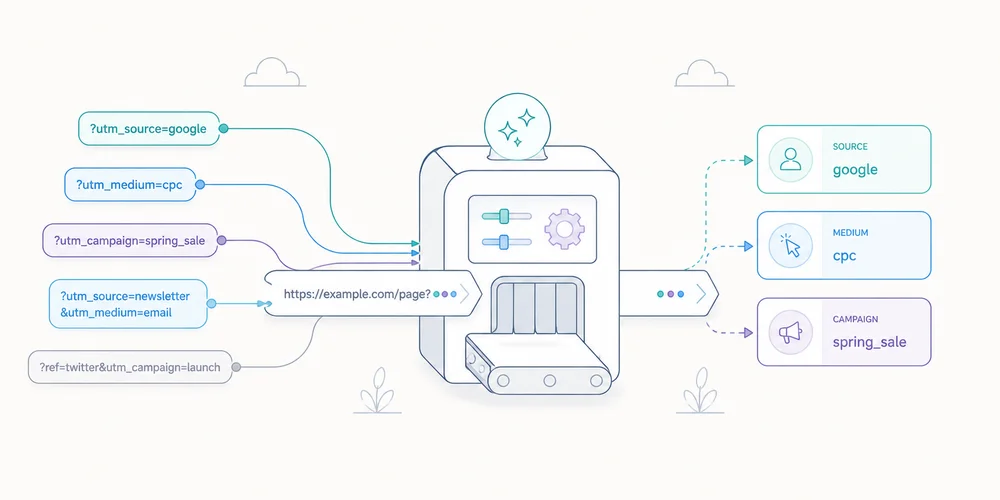
A rise in direct traffic does not necessarily mean more people typed your domain into a browser. A UTM-tagged visit does not prove that one campaign created the demand. A missing referrer does not prove that the visit had no source. These concepts appear in the same acquisition reports but describe different signals:UTM parameters are labels deliberately added to a URL; the referrer is information a browser may transmit; direct traffic is a classification used when the analytics system has no more specific usable source under its rules.Reliable reporting starts with that distinction. It also accepts that web attribution is a reconstruction from incomplete signals, not a complete history of a person's journey. UTM tags are declarations attached to a link A campaign URL might look like this: https://www.example.com/guide/?utm_source=newsletter&utm_medium=email&utm_campaign=launch_juneCommon parameters are:utm_source: the declared origin, such as linkedin, newsletter or a partner; utm_medium: the channel family, such as paid_social, email or referral; utm_campaign: the initiative name; utm_content: a creative, placement or link variant; utm_term: historically used for keywords, and best used only when there is a clear need.Google documents additional manual campaign parameters, but most small teams gain little from more dimensions. Three required fields and one optional variant are usually enough. UTM values are not detected by the browser. A person or system writes them into the link. Treat them as declared campaign metadata, with the strengths and weaknesses of any declared data. What UTM tags do well They help when the referrer is missing, generic or insufficient:newsletters; QR codes; PDF documents; email signatures; organic or paid social posts; partner campaigns; in-app links.They also distinguish two links to the same destination, such as a newsletter hero button and footer link. What they do not prove A UTM tag does not prove that the campaign caused all demand. It says that the measured visit arrived with that label. The URL may have been copied into a private channel, forwarded by a colleague, opened much later or altered by an intermediary. The visitor may have discovered the brand elsewhere first. Reports should therefore describe visits and conversions attributed under the measurement rule, not certain causality. The referrer is conditional browser information When a browser follows a link, it may send the HTTP Referer header to the destination. The historical misspelling remains part of the protocol. What is sent depends on referrer policy, protocol, browser, opening context and the source site's choices. The modern default policy, strict-origin-when-cross-origin, generally sends:the full URL for same-origin navigation; only the origin for HTTPS cross-origin navigation; no referrer when moving from HTTPS to HTTP.A site can apply a stricter policy, an app can open a webview, and redirects or privacy protections can remove the signal. Referrers are useful but never guaranteed. Referrer and UTM can coexist A visit may provide:referrer: linkedin.com; utm_source: linkedin; utm_medium: paid_social; utm_campaign: webinar_june.The analytics platform then applies its own precedence rules. GA4 exposes manual source, medium and campaign dimensions while channel groups follow documented rules that can evolve. Do not compare reports without checking scope. First-user source, session source and key-event attribution answer different questions. Direct means that no better source was assigned In everyday language, “direct” suggests a typed URL or bookmark. Those visits exist, but the channel can also contain visits whose source was lost. Common examples include:untagged links in mobile apps or messaging tools; local documents, PDFs and presentations; redirects that drop parameters; restrictive referrer policies; secure-to-insecure navigation; email campaigns without UTM tags; copied links shared in private channels; analytics deployment errors; URL cleanup before campaign parameters are read.A safer interpretation is:The platform did not assign this visit to a more specific source with the data available.A large direct share is not automatically a problem. It becomes an audit signal when it changes abruptly, concentrates on a campaign landing page, or differs unexpectedly between tools measuring the same scope. Build a controlled UTM taxonomy The main risk is not a missing tag. It is inconsistent naming that fragments reports. 1. Use a closed vocabulary for utm_medium The medium should represent a channel family. Keep a controlled list, for example: email paid_search paid_social organic_social partner affiliate display offlineDo not mix paid-social, paidsocial, cpc_social and social_paid. Platforms may treat case and spelling variants differently, and reports will often show separate rows. 2. Use source for a platform or partner Examples: linkedin google customer_newsletter partner_acme event_parisDo not put the campaign name in the source, or you lose the ability to compare the same source over time. 3. Give campaigns a readable structure A simple convention is: goal_offer_periodExamples: lead_demo_2026q2 launch_product_2026june retention_webinar_2026q3Choose one language, case and separator. Lowercase with underscores is easy to validate. 4. Reserve utm_content for useful variants Examples include:hero_button; footer_link; video_a; creative_02; partner_banner.Never use it for recipient information. 5. Centralise link generation A validated spreadsheet, small internal generator or controlled form removes most variants. Store destination URL, source, medium, campaign, optional content, owner, creation date and status. Never place personal data in UTM tags Query parameters spread across many systems. They may appear in:browser history; web-server and CDN logs; analytics tools; support tools; screenshots; copied links; some referrer data; exports and reports.Do not put an email address, name, phone number, customer ID, token or other person-level identifier in a UTM value. For example: utm_content=customer_12345 utm_campaign=renewal_alice@example.comThese values turn campaign metadata into a personal-data distribution channel. Use a category or creative variant, not a person. Your data collection summary should state which parameters are allowed, retained or removed. Five mistakes that distort reporting Using UTM tags on internal links Internal UTM tags can create new attribution or overwrite prior context depending on the platform. Use an event or internal dimension to compare navigation placements. Tagging everything without a question A tag is unnecessary when the referrer provides enough information and no variant needs to be separated. Campaign metadata should answer a decision, not simply add columns. Changing convention mid-campaign linkedin, LinkedIn and linkedin.com can become three rows. Correct naming at generation time and keep a change log. Cleaning the URL too early Removing visible parameters after capture can produce a cleaner address. Removing them before analytics reads them loses the campaign. Test execution order. Comparing tools without aligning definitions Platforms can differ in session definitions, attribution windows, source lists and precedence rules. A discrepancy is not automatic proof that one tool is broken. Diagnose a rise in direct traffic 1. Locate the change Inspect landing pages, devices, countries and time patterns. A home-page increase differs from a spike on a campaign-only page. 2. Review deployments Look for changes to redirects, routing, CMP behaviour, tag managers, analytics scripts or URL cleanup. 3. Audit live campaign links Open the actual links in emails, ads, profiles, QR codes and documents. Do not rely on the planning sheet. 4. Test the complete journey Follow the link in its real context: app, messenger, embedded browser, PDF or QR code. Inspect the collection request and final report. 5. Accept residual uncertainty Dark social and no-referrer contexts cannot be reconstructed with certainty without more intrusive tracking. Responsible analytics sometimes keeps an unknown bucket rather than manufacturing false precision. A minimal acquisition dashboard For a small B2B team, four views are often enough:visits by source and medium; landing pages by source; meaningful conversions by source; direct and unassigned trends.Add cost and revenue only when definitions and joins are reliable. An apparently precise ROAS built on incomplete identifiers may be less useful than a well-defined cost per qualified request. Review trends over several weeks. Low volumes make daily changes noisy. Conclusion UTM tags, referrers and direct traffic are not three versions of the same field. They are separate mechanisms that complement and sometimes contradict one another. A sound acquisition setup uses:a short, controlled UTM taxonomy; no personal identifiers in URLs; a realistic view of referrer limits; a cautious definition of direct; documented attribution rules; regular checks of the links actually distributed.The goal is not to eliminate all direct traffic. It is to make important campaigns readable without pretending to reconstruct every journey. FAQ What is the difference between utm_source and the referrer? utm_source is deliberately added to a link. The referrer is a signal the browser may send from the previous page. Either, both or neither may be present. Does direct traffic mean people already know the brand? Sometimes, but not exclusively. It also includes visits for which no usable source was assigned, including some apps, documents and untagged campaigns. Which UTM parameters are essential? For most teams, utm_source, utm_medium and utm_campaign are the baseline. Use utm_content for a meaningful variant and add other parameters only for a defined question. Should internal links use UTM tags? Usually not. They can disrupt attribution. Use dedicated events or dimensions for internal navigation. Can UTM parameters be removed after arrival? Yes, once they have been captured correctly. Test execution order and retain the values only according to your collection and retention policy. SourcesGoogle Analytics, Traffic-source dimensions, manual tagging and auto-tagging Google Analytics, Default channel group definitions MDN, Referer header MDN, Referrer-Policy header OWASP, Information exposure through query strings in URL CNIL, The six GDPR principles
Read article →
- 18 May, 2026
Data collection summary: document what your analytics actually collects
Installing analytics can take minutes. Explaining exactly what it collects often takes much longer. The problem is not only volume. Information is scattered across the tracking plan, vendor documentation, consent manager, source code and cloud configuration. When somebody asks, “Do we transmit the full URL?”, “Is the IP address stored?” or “How long do we keep raw events?”, no single person may have a complete answer. A data collection summary is a short operational document that brings those answers together. It describes the collection that is actually deployed, not the collection implied by a marketing page. It is not legal advice, a replacement for a record of processing activities, or a privacy notice. It is the technical layer that helps keep those documents accurate. What a data collection summary is for The document answers one question:For every data point or signal, do we know where it comes from, why it is collected, where it goes, how long it remains and who can access it?Product teams can use it to challenge new events. Marketing teams can see which dimensions genuinely exist. Engineering teams gain a reference for filtering and transformations. A DPO or legal adviser can compare technical reality with compliance records. Management can see the operational debt behind audience measurement. GDPR principles include purpose limitation, data minimisation, transparency and storage limitation. The Regulation also requires information for individuals and, where applicable, records of processing activities. A data collection summary does not create or replace these duties. It makes the underlying facts easier to establish. It is not the record of processing activities The distinction matters. A record of processing activities describes processing at a governance level: purposes, categories of people and data, recipients, transfers, retention and security measures. A data collection summary goes closer to implementation. It may state that:the page URL is stored without its query string; an IP address is used briefly for a technical operation and not retained; a user-agent is reduced to a browser family; only utm_source, utm_medium and utm_campaign are retained; a form event is emitted only after validation; raw events and aggregate reports have different retention periods.A privacy notice translates the relevant facts into language for visitors. It should not become a copy of the technical inventory, but it cannot be accurate without one.Document Main audience Detail level PurposeRecord of processing Internal compliance Processing and categories Govern and demonstrate complianceData collection summary Product and engineering Fields, flows and controls Describe the deployed collectionPrivacy notice Visitors and users Clear public information Explain relevant processingTracking plan Product, marketing and engineering Events and rules Define what should be measuredThese documents complement one another. They should not contradict one another. The ten columns that make the document useful A spreadsheet is enough. The value comes from the columns and the update discipline. 1. Data point or signal Use concrete names: page path, referrer domain, device class, form event, site ID, UTM parameter, derived country or temporary IP address. Avoid broad labels such as “technical data”. They hide design choices. 2. Example value An example removes ambiguity: /pricing/, newsletter or demo_requested. Use synthetic examples, never real personal data. 3. Source State where the signal originates: browser, server, form, CMS, CDN, analytics script or imported system. This reveals indirect collection. A platform may receive a URL or HTTP header before your tracking code transforms it. 4. Operational purpose Connect the field to a decision. “Identify entry pages that lead to a demo request” is more useful than “marketing analysis”. If a field supposedly serves every purpose, the need has probably not been defined well enough. 5. Transformation before storage Document what is removed, truncated, aggregated or derived:stripping unapproved query parameters; normalising paths; reducing the user-agent; deriving coarse geography and discarding the IP address; hashing an identifier, while recognising that hashing is not automatically anonymisation; daily or monthly aggregation.This separates what the system receives from what it keeps. 6. Destination and processors List every relevant destination: collection endpoint, raw storage, aggregate database, BI tool, export, cloud provider and analytics vendor. Record hosting regions and relevant transfers when they are documented. Do not infer a legal location from a cloud region label alone. 7. Retention Separate the layers:technical logs; raw events; pseudonymised records; aggregate statistics; backups; manual exports.A single global period is often misleading. The CNIL notes that retention should follow the purpose and remain limited to what is necessary. For audience-measurement trackers that may fall within the French consent-exemption framework, it recommends a tracker lifetime of thirteen months and a maximum of twenty-five months for collected information. Those benchmarks do not replace an assessment of the actual setup. 8. Access Describe roles rather than only names: administrators, analysts, agency, support or hosting provider. Specify whether access covers aggregate reports, raw events or exports. “Marketing has access” is not enough when a shared account can download the entire dataset. 9. Consent or configuration dependency Keep this factual:collected only after a consent signal; disabled in strict measurement mode; enabled for defined campaigns only; subject to local ePrivacy assessment; used for limited audience measurement, provided every applicable condition is met.Do not write “exempt” without documenting scope, conditions and configuration. 10. Deletion and owner Explain how the field disappears: automated deletion, scheduled job, vendor purge, manual procedure, contract termination or export deletion. Add an internal owner and a last-review date. Without ownership, the summary starts ageing at the next deployment. A minimal SaaS exampleSignal Purpose Before storage Retention AccessPage path Understand content usage Query string removed, path normalised 25 months for reports Product, marketingReferrer domain Understand visit sources Origin only when transmitted 25 months Marketingutm_source Identify a declared campaign Values normalised to a taxonomy 25 months Marketingdemo_requested Measure a B2B conversion No form content transmitted 25 months Product, aggregate sales viewIP address Security and coarse geolocation Used temporarily, not stored in the event Documented technical period Restricted operationsUser-agent Technical distribution Reduced to browser and device categories 25 months ProductThe table proves nothing by itself. It must match the observed network traffic, source code and vendor settings. Start with a real tracker audit and compare the results with your minimal tracking plan. A five-step method Step 1: start with network traffic Open browser developer tools, reload representative pages and inspect requests. Test before and after each consent choice, across several journeys and devices. Record domains, payloads, URL parameters and events. The network panel shows what leaves the browser. It may not expose every server-side transformation, but it gives you a verifiable starting point. Step 2: inspect code and configuration Review the collector, tag manager, CMP rules, environment variables and filters. Generic vendor documentation does not tell you which options your site enabled. Check adjacent capabilities too: session replay, advertising enrichment, CRM connections, user identifiers and exports. Step 3: ask vendors closed questions Request testable answers:Is the full URL received and stored? Can query parameters be removed before storage? Is the IP address logged outside the event dataset? Which backups still contain data after deletion? Does the vendor reuse data for its own purposes? Which subprocessors and transfers apply? Do exports follow the same retention policy?“Privacy-friendly” fills no column. Step 4: reconcile the documents Compare the summary with the processing record, data-processing agreement, privacy notice and consent interface. Contradictions matter more than the writing quality of each document in isolation. A common example is a notice saying that only aggregate statistics are collected while the tag manager sends a user identifier to a third party. Step 5: tie review to change Review the summary whenever you add or change:a tool; an event; a collection domain; an export; a retention period; consent behaviour; a processor; a site or property.A light quarterly review can detect silent drift. Mistakes that make the summary unreliable Copying vendor marketing Vendor documents describe a possible product. Your summary must describe your instance and configuration. Treating pseudonymisation as anonymisation A hashed or rotating identifier may still be personal data if it can distinguish or reconnect a person. Use precise terms and document re-identification risk. Forgetting URLs Full URLs can expose email addresses, order IDs, internal search terms or tokens. Even a minimal analytics tool can receive excessive data when the website places it in the address. Documenting only the dashboard The visible report is only one surface. Logs, raw events, backups, exports and integrations count too. Leaving the document ownerless An accurate but unmaintained inventory can become more dangerous than no inventory because it creates misplaced confidence. Validation checklist Before approval, verify that:every field has a specific purpose; received and stored data are distinguished; URL parameters and free-text fields were audited; retention is defined by layer; recipients and access roles are named; consent and configuration dependencies are explicit; deletion can be tested; the summary matches public and contractual documents; an owner and review date are recorded; every anonymisation claim has technical evidence.Conclusion A data collection summary is not another document for a compliance folder. It is a shared interface between product, marketing, engineering and legal work. Its value comes from precision. A team that knows exactly what it collects can remove unnecessary fields, explain the useful ones, configure tools correctly and answer questions faster. Start with one web property and its ten most important signals. Verify them in the network and code, then expand only when the deployed collection justifies it. FAQ Is a data collection summary legally required? This exact format is not prescribed by the GDPR. It can support documents and processes that are required or necessary, including processing records and transparent information for individuals. Should it be public? Not necessarily. It often contains internal technical details. Relevant information for individuals should be expressed clearly in the privacy notice or another appropriate notice. Should a non-stored IP address be listed? Yes, if it is received or used even briefly. Distinguish receipt, temporary processing, transformation and storage. Can one summary cover multiple sites? Only when their flows and configuration are genuinely identical. For multi-site operations, maintain a common baseline and document property-specific differences. How often should it be reviewed? At every material collection or destination change, plus a periodic review. Quarterly review is a practical operating rhythm for a small team, not a universal legal rule. SourcesRegulation (EU) 2016/679, including Articles 5, 13, 25 and 30 CNIL, Record of processing activities CNIL, Audience-measurement cookies and consent conditions EDPB, Guidelines 4/2019 on data protection by design and by default Chrome for Developers, Network features reference OWASP, Information exposure through query strings in URL

Website tracker audit: a practical checklist for small teams
A tracker audit is not a cookie-counting exercise followed by a screenshot. Its purpose is more practical: to understand which components communicate with which services, when they do so, why they exist and what data they transmit. That distinction matters. A site can set no HTTP cookie and still send information to third parties. Conversely, a cookie may be strictly necessary to deliver a feature requested by the visitor. The word “cookie” does not determine purpose, risk or the applicable legal rule. For a small business, B2B SaaS team or multi-site operator, the useful output is not a fifty-page report. It is a reproducible inventory connected to owners, decisions and remediation work. Keep one boundary clear from the start: a technical audit is not a legal opinion. It provides the facts needed to document the setup and support a qualified assessment. What the audit should answer By the end of the exercise, the team should be able to answer eight questions:Which scripts, pixels, SDKs and third-party resources load? Which cookies, local storage entries or identifiers are created? Which requests fire before the visitor makes a choice? What data appears in URLs, headers and request bodies? Which provider receives each data point? Which operational purpose justifies each component? How long are identifiers and collected data retained? Who can access, export or reconfigure the data?This prevents a common failure mode: reviewing the banner while never testing what the website actually does. European regulators use a technology-neutral understanding of trackers. It can include cookies, pixels, local storage and fingerprinting techniques. An empty cookie list is therefore not sufficient evidence that no tracking occurs. Build a representative test scope Testing the home page alone rarely gives a useful result. Components differ by template, journey and consent state. Your sample should cover at least:the home page; a content page; a product or service page; a pricing page; a form; a confirmation page; an authenticated area, where applicable; a page embedding video, maps, chat or booking tools; a campaign URL with UTM parameters; major language versions or domains in a multi-site setup.Test several states as well:first visit with no stored choice; reject all optional trackers; selective acceptance; accept all; returning visit with a saved choice; private browsing or a clean browser profile.Add a dedicated scenario for sensitive areas. A customer portal, healthcare form, HR page or admin interface should not be treated like an ordinary editorial page. A seven-step tracker audit 1. Start with a clean browser Use a fresh browser profile without extensions that block or rewrite requests. Open developer tools before loading the page and preserve the network log. Record:tested URL; date; browser and version; consent scenario; production or staging environment; person running the test.This makes the audit reproducible and allows a reliable before-and-after comparison. 2. Inventory loaded components In the Network panel, inspect scripts, images, fetch calls, XHR and documents. Record third-party domains and first-party-hosted files supplied by external vendors. A script served from your domain is not necessarily operated by your team. Proxies, tag managers and CDNs can obscure the functional source. For every component, capture:Field QuestionComponent Which script or service loads?Owner Which team requested it?Provider Who operates it?Purpose Measurement, support, security, advertising or media?Trigger Before choice, after acceptance or after an action?Observed data URL, referrer, IP, identifier or event?Destination Which domain and known processing region?Decision Keep, configure, defer or remove?Do not stop at the vendor name. The same company may provide products with very different data practices. 3. Inspect browser storage Review:first-party and third-party cookies; localStorage; sessionStorage; IndexedDB; service workers; application caches where relevant.For every entry, record its name, domain, lifetime, attributes and creation time. Secure, HttpOnly and SameSite are valuable security attributes, but they do not determine purpose or consent requirements by themselves. Clear site data between scenarios. Otherwise, an identifier created during the “accept” test can contaminate the “reject” test. 4. Compare behaviour before and after a choice Reload the same page in each state and compare:contacted domains; request count; created cookies; sent events; deferred scripts; calls triggered by interaction.A tag may stay silent at first load and fire after scrolling, clicking or opening a widget. Test the important interactions, not only the initial page request. For session replay, chat and personalisation tools, review masking and excluded areas. A minimal tracking plan is a useful reference point: collection should remain tied to a decision rather than the technical ability to record everything. 5. Inspect the transmitted payload Open representative requests and examine:full URL; query parameters; request body; headers; referrer; persistent identifiers; event properties.Look specifically for data that should not enter an analytics URL:email address; telephone number; name; customer ID; password-reset token; session token; free-form text; sensitive search query; case or account reference.URLs are routinely copied into logs, browser history, observability systems and support tools. Data placed in a query string can spread far beyond the analytics product. 6. Connect technical findings to governance The Network panel cannot answer every question. Review the vendor documentation and account settings:retention; hosting and subprocessors; international transfers; vendor reuse of data; sharing options; roles and access; exports; deletion; audit logs; multi-site configuration.Where a team is considering a limited audience-measurement exemption, the actual configuration matters. Under the CNIL framework, the purpose must be strictly limited to audience measurement for the publisher, and the result must be anonymous statistics without cross-site tracking or data combination. The national rules and implementation need to be assessed for the relevant country. 7. Turn the inventory into work Use four simple severity levels:Critical: sensitive data or tokens exposed, marketing tags firing after refusal, session identifiers in URLs. High: unknown provider, no internal owner, session replay on sensitive areas, uncontrolled retention. Medium: excessive lifetime, duplicate tags, unnecessary parameters, incomplete documentation. Low: naming cleanup, stale test tags, missing comments or weak evidence.Every action needs an owner, due date and validation test. “Review later” is not a workable remediation item. A 90-minute first pass A small site can complete an effective initial review in one short workshop. 20 minutes: map the scope List critical templates, expected tools and consent states. 30 minutes: observe Inspect network and storage on three to five pages in the initial, reject and accept states. 20 minutes: reconcile Compare observed domains with the consent interface, privacy notice, tag manager and vendor contracts. 20 minutes: decide Remove ownerless components, open high-priority tickets and schedule deeper tests. This does not replace a full assessment, but it often finds the most expensive issues: forgotten scripts, duplicate tags, personal data in URLs and premature firing. Common audit mistakes Treating a scanner as a conclusion Automated tools help discover domains and cookies. They cannot always determine purpose, event context or contractual configuration. Their findings need manual verification. Testing only “accept all” The reject state is often the most informative test because it shows whether the visitor’s choice is actually enforced. Ignoring first-party requests A request sent to your own domain may still be proxied elsewhere or contain data that should not be collected. Auditing production once A new tag-manager rule, CMS plugin or marketing integration can change collection without a visible interface change. Lightweight quarterly reviews and pre-launch checks are more useful than one large annual exercise. Producing a table with no owner An inventory without decisions, owners or dates becomes stale quickly. Governance turns the audit into actual risk reduction. The minimum evidence package Keep four items:the component inventory; key evidence, such as screenshots or network exports; a decision log with rationale; remediation tasks and retest results.Version the document. For multi-site teams, add a “web property” column and distinguish global components from local exceptions. Conclusion The goal is not to declare the site perfect. It is to explain what was observed at a given date, why each component exists and how gaps are being resolved. FAQ Does a cookieless site still need a tracker audit? Yes. Pixels, network calls, local storage and identification techniques can operate without HTTP cookies. The audit must focus on data flows and purposes, not only cookies. Are automated scanning tools enough? No. They accelerate discovery but do not replace manual checks of trigger conditions, payloads, account settings and internal ownership. Must every page be tested? Not necessarily. Select a representative sample of templates, integrations, journeys and consent states, then test sensitive areas more deeply. How often should the audit be repeated? After material stack changes, before sensitive launches and on a cadence that matches the rate of change. For a small team, a lightweight quarterly review is often more realistic than a large yearly audit. Does a technical audit prove GDPR compliance? No. It documents technical facts. Compliance also depends on purposes, legal bases, contracts, transparency, individual rights and applicable national ePrivacy rules. Sources Sources checked on June 21, 2026.CNIL, Cookies and trackers: what does the law say? CNIL, Cookies and audience measurement solutions CNIL, public consultation on session replay, February 25, 2026 EDPB, Guidelines 2/2023 on the technical scope of Article 5(3) of the ePrivacy Directive Chrome for Developers, Network panel reference OWASP, Information exposure through query strings in URL
- 04 May, 2026
Session replay and CNIL: what teams should verify after the 2026 consultation
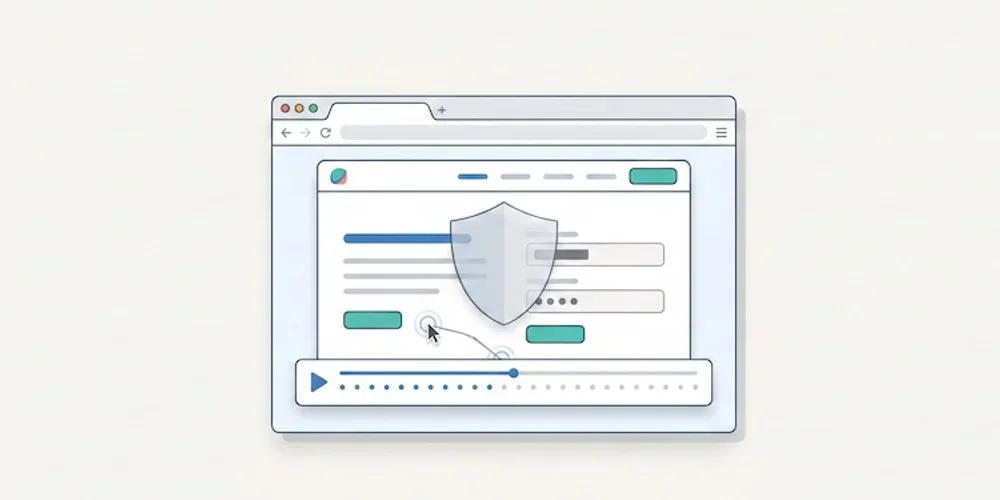
On February 25, 2026, the CNIL opened a public consultation on a draft recommendation for session replay tools. The consultation period ended on April 22, 2026. As of this article's publication date, teams should treat the draft as a strong warning signal while monitoring the final recommendation. Session replay tools are not ordinary audience-measurement tools. They can record detailed interactions: scrolling, clicks, form behavior, interface hesitations and sometimes typed content if masking is incomplete. That level of detail creates a different risk profile from aggregated traffic statistics. The practical consequence is simple: product, marketing and support teams should not activate session replay as a casual dashboard add-on. It needs a documented purpose, minimization settings, masking, access control, retention limits and a clear decision on when recording is allowed. What makes session replay sensitive Session replay can help diagnose UX issues, broken forms or confusing flows. But the same recording can reveal personal data, sensitive fields, account context or unexpected behavior. A misconfigured tool can collect more than the team intended. That is why the CNIL draft focuses on proportionality and safeguards. The useful question is not whether a vendor is popular. It is whether your configuration actually limits what is captured, who can view it and how long it remains available. A launch checklist for teams Before enabling session replay, review these points:define the exact purpose: UX debugging, support investigation, quality assurance or another documented need; disable recording by default on sensitive pages and authenticated areas unless there is a validated reason; mask form fields, free-text inputs, account data and any field that can contain personal or sensitive information; limit the share of sessions recorded instead of recording every visit; restrict access to named roles and audit who can view recordings; set a short retention period and delete recordings after the operational need ends; document the tool, provider, transfers and retention in your privacy materials; verify that the recording state follows your consent and preference-management setup; keep a rollback procedure to disable recording quickly if a leak or spike is detected.How this differs from Pomelo's core analytics Pomelo's launch positioning is deliberately different. The default analytics model is cookieless, minimal and report-oriented. It is designed to answer operational questions with aggregate data, not to replay individual user journeys. That distinction matters. Session replay can be useful in a narrow debugging workflow, but it should not be confused with privacy-first audience measurement. For most SME, SaaS and multi-site teams, the baseline analytics stack should remain lighter than a recording tool. What to do now If you already use Hotjar, Microsoft Clarity, FullStory or a similar tool, run a short audit before launch:list every page where recording is active; inspect the last 20 recordings for accidental personal data capture; review masking rules with a non-technical stakeholder; confirm retention and access controls; decide whether the tool is still needed permanently or only during limited research windows.If the team cannot explain why recordings are necessary, it is safer to disable them until the purpose and safeguards are documented. Sources Sources checked on May 9, 2026.CNIL, Session replay consultation, February 25, 2026 CNIL, Cookies and audience measurement solutions Hotjar, Privacy and security Microsoft Clarity, Privacy overview
- 27 Apr, 2026
AI assistant traffic is not just direct traffic: how to measure ChatGPT, Perplexity, and Claude without fooling yourself
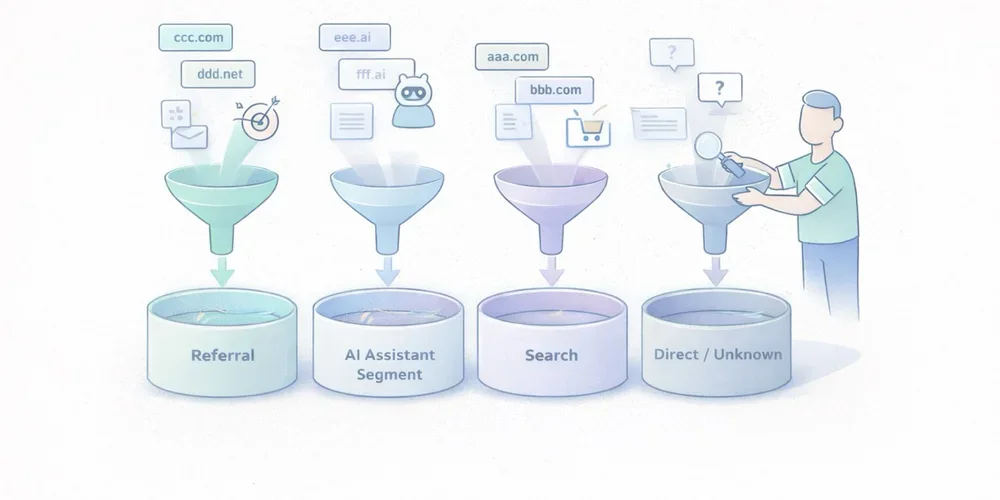
Over the last few months, more marketing teams have started asking the same question: “Are we getting AI traffic now?” The question is fair. ChatGPT, Perplexity, Claude, and other interfaces now show links to websites more often. Some teams can already see those visits in their dashboards. Others notice direct traffic going up and jump to the conclusion that “AI tools are sending direct traffic.” That reading mixes together several very different realities. Some traffic from AI assistants is measurable as normal referral traffic. Some of it ends up in direct or unknown because no usable referrer is passed along. Another part never appears in your analytics at all because there was no click. And when Google blends AI experiences into Search, the line gets even blurrier. In other words, AI traffic is neither a perfectly clean new channel nor a pure illusion. It is a mixed set of behaviors that needs to be read carefully. The goal is not to measure everything perfectly. The goal is simpler and more useful: separate what is truly attributable, document the gray area, and avoid building a story on top of fragile numbers. AI traffic is not one technical source The first thing to clarify is simple: “AI traffic” is not a single analytics category. In practice, teams usually mix together at least four different cases. 1. Assistants that send a real referrer Some ChatGPT, Perplexity, or Claude experiences show links to web sources. When a user clicks from an interface that passes usable source information, your analytics tool may see a referring domain. This is the easiest part to measure. It behaves like regular referral traffic:a visit arrives with an identifiable source domain; a landing page is viewed; the visitor may convert, bounce, or continue browsing.This case alone is enough to justify a dedicated segment. Plausible, for example, documented a strong increase in referral traffic from ChatGPT, Perplexity, Claude, and Phind in 2024. That is not a universal benchmark, but it is a useful signal: AI assistants can send visible, usable traffic. 2. Assistants or apps that do not pass clean source data Not every click is passed through cleanly. Fathom’s documentation explicitly notes that “Direct/unknown” traffic can come from direct visits, email, apps, or any situation where no referrer was passed, and that no analytics platform can control this. This is where many teams get the story wrong. A rise in direct traffic does not prove that AI assistants caused it. But the reverse is also true: some traffic from AI assistants may get absorbed into direct or unknown if the technical context does not pass usable source information. 3. AI answers that cite you without sending a click This is a critical point. Your content can be cited, summarized, or used as a source in an assistant answer without producing a visit to your site. When that happens, your web analytics sees nothing. You may have gained visibility. You did not gain a session. Treating those two things as the same will quickly distort your analysis. 4. AI experiences embedded inside traditional search Google is a special case. Google presents AI Overviews and AI Mode as Search features that can show links to websites and that do not require separate SEO tactics beyond the usual fundamentals. For measurement, that means something straightforward: anything driven by AI will not necessarily appear as a cleanly separated channel, especially when the experience remains embedded in an existing search environment. So avoid overly binary logic such as:“standalone assistant = AI traffic”; “search engine = standard SEO traffic.”In reality, the line is becoming more porous. What you can actually measure today The good news is that you can already measure several useful things without building an oversized setup. Visible referring domains This is the foundation. If your analytics tool exposes referrers or sources, you can identify visits attributed to domains tied to AI assistants. Depending on your stack, that may happen through:a Referrers report; a Sources report; a custom segment; a dedicated channel group.Google Analytics 4 even includes an explicit example of a custom channel group called “AI assistants,” with matching rules for assistants such as ChatGPT, Gemini, Copilot, Claude, and Perplexity. That matters. It shows that in 2026, even Google Analytics treats this as a real analysis use case, not a niche curiosity. Landing pages that capture those visits Volume alone is rarely helpful. The more useful question is: which pages attract this traffic? If three articles, two product pages, and one comparison page capture most visits from AI assistants, you already have a practical reading:which assets are being cited or surfaced; which topics are emerging; which pages function as entry points; which pages deserve improvement.That is often more useful than a single session count. Conversions and intent signals If your tool tracks goals or events, you can go further:demo requests; newsletter signups; meetings booked; trial starts; purchases; clicks on pricing or strategic CTAs.At that point, you are no longer just measuring curiosity. You are measuring traffic quality. That is where an “AI assistants” segment becomes valuable. Not because it sounds trendy, but because it lets you compare:volume; engagement rate; visit depth; conversion.UTM campaigns when you control distribution yourself There is also a simpler case: links that you distribute. If you publish something in a newsletter, a document, a partnership page, or a directory, and you want to observe how your own distribution performs, UTM parameters remain useful. But do not assume AI assistants will preserve your tracking conventions in every context. UTM tags are excellent for measuring links you intentionally distribute. They are much less reliable for mapping every citation or click generated by third-party AI systems. What you will not measure cleanly This is often the most important part of the conversation. Good measurement also means accepting limits. You will not see mentions without clicks If an assistant summarizes your content, uses your ideas, or cites your page without sending a visit, your web analytics will remain silent. That does not mean your content had no role. It just means web session data is not the right sensor for that kind of visibility. You will not always separate AI traffic from direct traffic When a visit arrives without a usable referrer, you enter a gray zone. That gray zone may include:real direct traffic; email traffic; messaging apps; app traffic; browsers or contexts that strip source data; potentially some traffic originating from AI assistants.The only serious posture is to treat that as uncertainty, not as a hidden truth waiting to be renamed. You will not perfectly isolate AI-powered search experiences When an AI experience remains embedded inside an existing search environment, isolated attribution becomes harder. Google explains its AI features in Search as part of the broader web search experience, with the same core SEO fundamentals still applying. For marketing teams, the practical implication is simple: not every visit influenced by AI will appear as a distinct AI source in your reports. You should not confuse citation, visit, and revenue Being cited in an assistant, receiving a click, getting an engaged session, and generating a conversion are four different things. A useful dashboard needs to keep those levels separate. Otherwise, it becomes very easy to move from a modest observation, “we are seeing some visits from ChatGPT and Perplexity,” to a much bigger story, “AI is becoming our next major acquisition channel.” The cleanest way to measure this traffic The goal is not to build a perfect system. The goal is to create a simple, stable, reusable reading framework. 1. Create a dedicated AI assistant segment or channel Start with a short list of sources you can actually observe. For example:ChatGPT / OpenAI; Perplexity; Claude / Anthropic; optionally Copilot or Gemini if they are already visible in your data.Be conservative. Do not add ten hypothetical domains that never show up. 2. Analyze landing pages first Before commenting on volume, look at:which pages receive those visits; whether those pages are old or recent; whether they answer comparative, practical, or explanatory queries; whether they work well as entry pages.This is often where the useful insight lives. 3. Compare traffic quality, not just traffic size Low-volume but high-intent traffic can matter much more than a visible but shallow spike. At a minimum, compare:whatever engagement metric your tool provides; visit depth; key conversions; CTA clicks; exit pages.4. Keep an eye on direct or unknown as a separate gray zone You should not merge direct traffic into AI traffic. But ignoring it completely would also be naive. The better approach is to document it as a possible gray zone. If visible AI referrers increase and direct traffic rises on the same landing pages, that may support a hypothesis. It is still not proof. 5. Document your reading rules This small step makes a big difference in teams. Write down:which domains are included in the AI segment; what is not measured; what falls into direct or unknown; which conversions are tracked; how often the segment is reviewed.A good dashboard is not enough on its own. You also need an interpretation rulebook. The most common mistakes Calling every direct traffic increase “AI traffic” This is probably the most common mistake. Direct traffic is an imperfect bucket. It can contain many things. Assigning it a single cause without evidence weakens the entire analysis. Creating an overly broad AI channel from day one If you group together any domain that vaguely sounds AI-related, you create a noisy segment. A narrower but cleaner segment is usually more useful than a wide and doubtful one. Focusing on volume before conversion Getting 500 weak visits from an AI interface matters less than getting 30 visits to a comparison page that converts. Mixing classic SEO, AI assistants, and branded traffic without a method The right move is not to force a false opposition. It is to separate what is observable, what is comparable, and what remains hypothetical. What to remember Traffic from AI assistants is real. It is not imaginary. But it also does not arrive as a single, clean, perfectly attributable source. Some of it appears as visible referral traffic. Some of it gets lost in direct or unknown. Some of it never generates a session because no click happens. And some of it lives inside search environments where AI and classic search are harder to separate. The best working approach comes down to four simple rules:isolate the referrers you can actually see; measure landing pages and conversions, not just sessions; treat direct as a gray zone, not as hidden certainty; clearly document what your AI segment includes, and what it does not.That framework is less dramatic than a promise of total attribution. It is also much more useful. FAQ Should traffic from ChatGPT always be classified as direct traffic? No. When a usable referrer is passed, it can be measured as referral traffic or grouped into a dedicated segment. But some visits may still end up as direct or unknown depending on the technical context. Can I measure citations without clicks from AI assistants? Not with standard web analytics. Without a session or a click, your audience analytics tool sees nothing. Should I create a separate AI channel in GA4? Yes, if you are starting to see referring domains tied to AI assistants. GA4 documentation explicitly includes this use case in its custom channel group guidance. Should AI traffic be treated as a major new acquisition channel right away? Not automatically. First look at landing pages, traffic quality, and conversions before making that leap. Can I perfectly separate classic Google Search from Google’s AI experiences? Not always. When AI is embedded inside a broader search experience, isolated attribution becomes harder. SourcesOpenAI Help Center, ChatGPT search : https://help.openai.com/en/articles/9237897-chatgpt-search Claude Help Center, Using Research on Claude : https://support.claude.com/en/articles/11088861-using-research-on-claude Perplexity Help Center, How does Perplexity work? : https://www.perplexity.ai/help-center/en/articles/10352895-how-does-perplexity-work Google Analytics Help, Custom channel groups : https://support.google.com/analytics/answer/13051316 Google Search Central, AI features and your website : https://developers.google.com/search/docs/appearance/ai-features Fathom Analytics Docs, Dashboard explained : https://usefathom.com/docs/start/dashboard Plausible Analytics, Breaking down our AI traffic surge : https://plausible.io/blog/ai-referral-traffic-and-optimization