
- 24 Aug, 2026
Email tracking pixels: what marketing teams should fix after the CNIL recommendation
An email tracking pixel often looks harmless. It is tiny, invisible, enabled by default in many email platforms, and it feeds a familiar metric: the open rate. But that simple metric can hide a compliance decision. A pixel may reveal that a specific address loaded a message, when it happened, and sometimes technical context associated with that request. The event can then feed a CRM profile, a campaign report, a lead score or an automation workflow. This is not always just campaign statistics. In many setups, it is tracking. In April 2026, the French data protection authority, CNIL, published its final recommendation on tracking pixels in emails. For marketing, CRM, growth and communications teams, the useful question is no longer: “Should we keep open rates?” The useful question is: what purpose does the pixel serve, what data does it collect, for which recipients, and on what basis? This article gives teams a practical way to review email measurement without abandoning useful reporting altogether. Why this changed in 2026 CNIL published its final recommendation on tracking pixels in emails on 14 April 2026, after a public consultation. The recommendation applies to private and public organisations using such pixels, and to the technical providers involved in that ecosystem. It clarifies three areas:the role of each actor, especially senders and providers; when consent is required; when a pixel may be exempt, under strict conditions.CNIL also introduced a progressive approach for email addresses collected before publication. Senders could continue using certain pixels if recipients received clear information within a period that should not, in principle, exceed three months from 14 April 2026, and if no objection was received after recipients had an easy way to object. At the time of publication of this article, that period has passed. For teams that have not reviewed their emails, this is no longer a theoretical issue. Tool settings, email templates and real purposes should be checked. What an email tracking pixel actually measures A tracking pixel is usually a tiny image loaded from a remote server when an email is opened. The image URL may contain an identifier tied to a recipient, campaign, message or variant. When the email client loads the image, it sends a request. Depending on the platform configuration, that request may reveal or record:that a message was opened or loaded; the date or time of the opening; a recipient or message identifier; the campaign or segment; technical data transmitted with the request; sometimes approximate location or email-client-related information, depending on the processing performed.The important point is that the pixel is not automatically an abstract performance metric. In many configurations, it first creates an individual signal, and that signal is later aggregated into a report. Teams should also be careful with the business interpretation. An “open” does not necessarily mean a person read the message. Images may be blocked, preloaded, proxied or loaded in ways specific to the email client. Open rate can still help with broad trends, but it should not be treated as a reliable measure of individual attention. The starting point: define the purpose The risky shortcut is to classify pixels by platform: “our email tool does this, so it must be standard.” CNIL’s framework pushes teams to start with purpose instead. The same technical mechanism can serve several goals:measuring campaign audience; personalising future messages; scoring a prospect; triggering a sales alert; cleaning an inactive list; improving deliverability; authenticating the user for a requested service.Those goals do not all lead to the same analysis. Article 82 of the French Data Protection Act governs operations that access information stored in terminal equipment or store information there. It is built around consent, with exceptions where the operation exclusively enables or facilitates electronic communication, or where it is strictly necessary to provide an online communication service expressly requested by the user. In practice, two questions must be separated:Does the pixel require consent under tracker rules? Does the related personal data processing also comply with the GDPR, including legal basis, information, retention and rights?Tracker consent and the GDPR legal basis are connected, but they are not the same thing. A sender may be allowed to send a commercial email in certain situations, yet that does not automatically permit the use of a tracking pixel under the rules for trackers. Uses that usually require consent Individualised marketing uses are the most sensitive. This is the case when the pixel reveals that a person opened a message and that signal changes the profile, score, segment or next step in the journey. Typical examples include:showing in the CRM that a contact opened an email; triggering a follow-up after an open; prioritising a lead because they opened several messages; personalising a newsletter based on previous opens; measuring a recipient’s interest in a category of offers; producing contact-level or account-level reporting.These uses go beyond deliverability. They aim to understand, influence or personalise the relationship with a person. They should be treated as tracking purposes in their own right. Mixed-purpose pixels deserve particular attention. One pixel can pursue both an exempt purpose and a purpose subject to consent. But the purpose that requires consent can only be activated after valid consent has been collected. It is not healthy to place a pixel “just in case” and decide later how it will be used. Deliverability may be exempt, but only narrowly The recommendation recognises a possible exemption for certain individual deliverability measurements. The operational idea is to identify recipients who no longer open emails so the sender can reduce frequency, stop sending or clean the list. This can protect sender reputation and avoid repeatedly contacting people who appear inactive. But the exemption is narrow. It does not make open rate a freely available metric. To stay within this framework, the pixel must be limited to the deliverability purpose and linked to a service requested by the recipient. CNIL also stresses data minimisation. In principle, the central data point for that goal is the date of the last opening. Collecting IP address, user-agent or other additional data, then deleting or anonymising it quickly, does not bring the use into the exemption if that data was not necessary from the start. For marketing teams, the lesson is simple: excessive data does not become necessary because it is deleted quickly. Not all newsletters are the same The word “newsletter” covers very different situations. A newsletter expressly requested by the user may, in some cases, be linked to a service requested by that user. A pixel used only for deliverability may then benefit from the exemption, if all other conditions are met. By contrast, a communication sent under the exception for similar products or services does not automatically become a service requested by the user. In that situation, a deliverability pixel should not be treated as automatically exempt. Teams should examine the source of the list, the subscription method, the promise made at sign-up, and the actual purposes of the pixel. A personalised newsletter raises another issue. If the pixel directly contributes to personalising content or frequency, consent may be linked to the subscription when the information is clear and the purposes are sufficiently connected. This should not become a vague formula such as “we improve your experience.” The recipient must understand what they accept. Transactional emails, cart reminders and regulatory messages Transactional emails often have a more favourable analysis, but not without limits. An order confirmation, subscription confirmation, invoice, password reset or legal notice may be linked to a service requested by the user. A pixel limited to a compatible purpose, such as deliverability or user authentication, can therefore be analysed within the exemption framework. But the message content matters. If an email presents itself as transactional while including a strong promotional element, the analysis changes. CNIL gives cart reminders as an example: their purpose is essentially promotional, since they encourage the recipient to complete a purchase, so they cannot benefit from the transactional-email exemption. The right approach is to classify templates one by one: confirmation, invoice, onboarding, newsletter, prospecting, reminder, support, security, product notification. A single global rule for “all emails” will almost always be too rough. Tracking links should not be ignored The recommendation directly addresses pixels in emails. Tracking links are not directly covered by that specific recommendation, but CNIL notes that similar principles should be considered. A tracking link may contain a recipient, campaign or segment identifier. When clicked, it can associate an action with a person. Depending on the technique, it may also involve operations covered by Article 82. For acquisition teams, the practical distinction is useful:UTM parameters describe a campaign or channel; person-level identifiers in links track a recipient.Pomelo’s guide to UTM tags, referrers and direct traffic explains how to tag campaigns without confusing attribution with individual tracking. The guide to privacy-first URL parameter filtering completes the picture: an email address, customer ID or token should not flow through URLs measured by web analytics. How to audit your email platform The audit should start with real emails, not only global platform settings. List your message categories: newsletter, nurturing, prospecting, transactional, support, security, product, events. For each category, record whether open tracking is enabled, whether clicks are tracked, whether data syncs to the CRM, and whether automations use those signals. Then ask five questions. 1. What purpose is being pursued? Write one understandable sentence: “reduce sending frequency for inactive recipients,” “measure overall newsletter performance,” “trigger a sales follow-up,” or “personalise content.” If the purpose is vague, the configuration is probably vague too. 2. What data is collected? Do not stop at “opened or not opened.” Check identifiers, timestamps, IP address, user-agent, campaign data, CRM tags, exports and provider logs. 3. Is the data necessary? For deliverability, CNIL indicates that the date of the last opening is, in principle, the central data point. If the tool collects more, the sender should justify that need or disable excessive collection. 4. Is the choice understandable and easy to withdraw? When consent is required, the recipient must understand the scope of their choice. They must also be able to withdraw consent as easily as they gave it. A preference centre may group several choices, but it must not make rights harder to exercise. 5. What happens after withdrawal? Because an email already sent cannot be removed from the recipient’s inbox, the sender must have a mechanism to ignore pixel requests associated with withdrawn consent. Previously collected data should also be deleted if no other legal basis justifies keeping it. A simple decision matrixUse case Conservative reading Recommended actionGlobal open rate for a newsletter Possible only if the initial collection is lawful and the data is effectively anonymised or aggregated Check the source collection, then report only aggregated metricsInactive-list cleaning for an expressly requested newsletter Deliverability exemption may be possible Limit data, document the purpose, provide information and objection mechanismsCRM scoring based on opens Individual tracking Collect valid consent and document the processingSales alert after an open Sensitive individual tracking Avoid by default or collect explicit and clear consentOrder confirmation with no promotion Requested service Assess a deliverability or user-authentication exemption, without marketing reuseCart reminder Promotional communication Do not treat as an exempt transactional emailSecure unsubscribe link May be strictly necessary Keep the link limited to that purposeThis matrix is not legal advice, but it helps teams remove the most common grey areas. What if you did not inform existing lists before 14 July 2026? For addresses collected before 14 April 2026, CNIL provided a transition period. In principle, clear information enabling objection had to be sent within three months, meaning before 14 July 2026. CNIL’s FAQ notes that a longer period may be justified in certain situations, such as database size or deliverability issues, but those difficulties must be objectively documented. If no information was sent and there is no strong documented justification, the sender should apply the recommendation. That means collecting consent where the pixel requires it, or stopping the use of pixels that require consent. The safest operational response is often progressive: disable unnecessary pixels, keep only strictly justified measurements, and rebuild preferences cleanly at the next collection or subscription point. Keep useful reporting without tracking every open Reducing pixels does not mean giving up email marketing measurement. Post-click measurement is often more useful than open tracking. A click to an acquisition page, a qualified visit, a demo request, a registration or a download usually says more about intent than an image load. To do this well, tag links with non-identifying campaign parameters and read results in web analytics. UTM values should describe the campaign, channel and possibly variant, not the person. A URL such as utm_source=newsletter&utm_medium=email&utm_campaign=product_update is useful. A URL containing an email address or customer ID creates privacy debt. This is also where a clean separation between tools helps. The email platform manages sending, preferences and channel-specific obligations. Web analytics measures what happens after the click with limited and documented collection. Pomelo’s data collection summary can help explain what the analytics tool receives and what it does not receive. Pomelo follows that logic: measure useful web signals without turning every marketing interaction into person-level tracking. But no analytics tool can, by itself, make an email platform configuration compliant. The two scopes should be audited separately. Correction checklist for marketing teams Before the next campaign, review these points:identify all email templates containing a pixel; separate opens, clicks, personalisation, scoring, deliverability and security; disable pixels with no clear purpose; check whether the emails were actually requested by the recipient; limit data collected for deliverability; avoid IP address, user-agent and other additional data when unnecessary; separate aggregate statistics from individual signals; provide a simple withdrawal or objection mechanism; ensure pixels already sent are no longer exploited after withdrawal; update the privacy notice and, where needed, the preference centre; document platform settings and retained choices; check contracts and roles with providers.The analytics privacy notice offers a useful method for avoiding overly broad wording. The same principle applies here: do not promise “anonymous” or “purely statistical” measurement if the tool first processes signals tied to a person. Conclusion CNIL’s recommendation does not say that all email measurement is forbidden. It imposes clearer discipline: name the purposes, limit the data, separate deliverability from individualised marketing, and give people real control where consent is required. Open rate can still exist in some reports. But it should be placed where it belongs: a fragile metric, sometimes useful in aggregate, rarely sufficient to steer a campaign alone, and legally sensitive when it relies on individual tracking. For marketing teams, the fix is not only to change one checkbox in Mailchimp, Brevo, HubSpot or another platform. It is to rebuild email measurement so it is more limited, more explicit and more coherent with the rest of the analytics stack. FAQ Are email tracking pixels always subject to consent? No. Some pixels may be exempt, especially for tightly defined deliverability or user-authentication purposes. But individualised marketing, scoring, personalisation and sales alerts usually require a consent analysis. Can a global open rate be calculated from aggregated data? It can be calculated from lawfully collected data that is then effectively anonymised or aggregated. This does not remove the need to analyse the initial pixel collection. Downstream aggregation does not fix excessive or unauthorised collection. Can an expressly requested newsletter use a deliverability pixel? Yes, it may be possible if the newsletter is a service requested by the user and the pixel is limited to deliverability. The sender should limit the data and avoid reusing that signal for scoring or uncovered personalisation. Are tracking links covered? The recommendation directly covers pixels in emails. Tracking links are not directly covered by that text, but they should be analysed using the same principles: purpose, transparency, possible consent and minimisation. What should we do first if pixels are enabled everywhere? Start by disabling uses with no clear purpose, then separate deliverability, aggregate measurement and individual tracking. After that, update information, preferences, consent evidence and tool settings. SourcesCNIL, Tracking pixels in emails: CNIL publishes recommendations to better protect privacy, 14 April 2026 CNIL, Q&A - recommendation on tracking pixels in emails, 22 July 2026 Légifrance, Article 82 of the French Data Protection Act EDPB, Guidelines 2/2023 on Technical Scope of Art. 5(3) of ePrivacy Directive, final version, 16 October 2024 CNIL, Cookies and other trackers topic page
Read article →
- 27 Jul, 2026
Analytics migration: a checklist for changing tools without rebuilding tracking debt
Changing analytics tools can look simple: replace a script, wait a few days and compare the charts. That is rarely enough. A migration changes several layers at once:collected data; metric definitions; consent behaviour; events and conversions; website and workspace structure; access; retention; reports; decision-making habits.The main risk is not losing a chart. It is carrying old tracking debt into a new tool, then reading a methodological change as a business change. This checklist offers a twelve-step migration process for SMEs, B2B SaaS companies and multi-site teams. 1. Define why the migration is happening Write down the reason for the change. Examples include:reducing collection complexity; documenting data more clearly; improving readability across teams; reducing cost; controlling hosting or retention; simplifying consent governance; managing several sites consistently; replacing a discontinued or unsuitable tool.Turn the reason into acceptance criteria.Objective Verifiable criterionSimplify The monthly report uses five stable indicatorsReduce collection Every collected field has a documented purposeGovern multiple sites Access and naming are consistentControl cost Total cost is known for expected volumeClarify consent The actual configuration is documented and testedImprove quality Critical events pass an acceptance testWithout criteria, the project ends when the script runs. With criteria, it ends when the team can make decisions confidently again. Use the analytics governance scorecard to formalise this stage. 2. Inventory the current system before removing anything Create a technical and editorial inventory. Scripts and collection points List:scripts loaded by the site; tag-manager tags; advertising pixels; server-side collection; CMS plugins; mobile SDKs; backend events; CRM, support, payment and email integrations; consent settings; proxies and collection domains.Data and reports List:pageviews; events; conversions; custom dimensions; audiences; segments; funnels; recurring reports; exports; alerts; dashboards; API consumers; report recipients.Responsibilities For each component, record:owner; purpose; destination; collection condition to review; retention; access; dependencies; decision: keep, transform or remove.This inventory becomes the basis of the analytics data collection summary. It often reveals tags that nobody uses. 3. Freeze definitions before rebuilding Two tools may use the same words for different metrics. Visitor, user, session, engagement, bounce, conversion and source can depend on:time windows; identification methods; session rules; filters; consent; bot processing; time zones; attribution; received events.Create a migration dictionary:Business concept Previous definition New definition DecisionVisit Current session rule New tool's rule Compare trendsLead Form event Accepted submission StandardiseSource Calculated channel Referrer/UTM Document gapConversion Historical list Priority goals ReduceInternal traffic IP filter New rule RetestDo not force false equivalence. A documented break in the series is safer than artificially aligned numbers. 4. Reduce the tracking plan A migration is an opportunity to remove, not only copy. Classify existing events into four groups:decision events, required for a KPI or action; diagnostic events, useful for explaining a problem; operational events, required by an integration; orphan events, collected without an identifiable use.Remove orphans. Consolidate variants that describe the same action. Choose stable names and a clear property set. A critical event should specify:name; trigger; page or context; permitted parameters; example; owner; related KPI; success test.A minimal analytics tracking plan provides a practical baseline. 5. Inspect collection and URLs Before installing the new tool, review what it will actually receive. URLs can contain:UTM parameters; campaign IDs; internal search terms; email addresses; tokens; order references; customer IDs; form values; technical fragments.Define an allowlist or removal strategy. Keep acquisition parameters where necessary, but remove sensitive or purely technical values before storage. The guide to privacy-first URL parameter filtering explains this control. Also inspect:referrer; IP handling; headers; user agent; event properties; server-side payloads; infrastructure logs; exports.Cookieless describes only one part of collection. The migration must document the full signal set. 6. Review consent, contracts and governance Changing tools does not automatically make a configuration exempt from consent. Review:purposes; trackers or terminal access; collected data; enrichment; third-party disclosure; provider reuse; transfers outside the EEA; subprocessors; retention; objection mechanisms where relevant; user information; consent-manager configuration.The CNIL describes strict conditions for limited audience-measurement configurations. It also states that a solution should not be presented as officially certified or approved by the authority. Update:the processing register; privacy notice; tracker inventory; data-processing agreement; access and deletion procedures; internal documentation.The assessment follows the real configuration, not the provider name alone. 7. Build a pilot environment Avoid replacing every site at once. Choose:a representative site; one acquisition page; one form; a few critical events; enough traffic to observe behaviour; a period without a major redesign.Install the new tool as a pilot. A short, controlled parallel-measurement period may be useful, but two active systems can mean two scripts, two collections and two consent configurations. The goal is not identical totals. It is to verify that:expected pages appear; events fire once; sources are readable; filters work; conversions correspond to real success; time zones and domains are correct; access is controlled; sensitive data is absent.8. Use an acceptance-test plan A compact matrix is enough.Test Expected result Evidence StatusPageview One occurrence Network debug To validateSuccessful form One event after success Test ID To validateForm error No conversion Test evidence To validateUTM Readable source/campaign Test URL To validateSensitive parameter Value absent Received request To validateConsent declined Behaviour matches configuration CMP test To validateInternal traffic Excluded or identified Controlled session To validateCross-domain Coherent journey Controlled session To validateMobile CTA and form work Device tests To validateTest:normal and private browsing; mobile and desktop; accepted and declined consent; ad blockers where relevant; redirects; subdomains; languages; successful and failed forms; test campaigns.Store evidence with date, version and owner. 9. Decide what to do with history Historical data does not always need to be imported into the new tool. There are three options. Keep the previous tool read-only This is often simplest where contract, security and cost allow it. Restrict access and set a deletion date. Export an aggregate history Keep the indicators needed for future comparison:monthly traffic; top pages; sources; conversions; objectives; campaign notes; measurement incidents.A documented file or controlled warehouse may be sufficient. Import into the new tool Some providers offer imports. Plausible, for example, documents a Google Analytics import. GA4 can export event data to BigQuery when the link has been configured. An import does not guarantee a perfectly comparable series. Verify:imported scope; missing dimensions; granularity; definitions; time period; duplicates; time zones; consent-related restrictions; storage cost; deletion policy.Do not retain everything merely because it exists. Apply the analytics data retention policy to migrated history. 10. Prepare cutover and rollback The cutover should be reversible. Write a runbook containing:date and time; affected sites; technical owner; business owner; scripts to enable; scripts to disable; CMP configuration; immediate checks; alert thresholds; rollback procedure; communication channel; final approval.Avoid cutover:immediately before a major launch; on Friday evening; during a major campaign; without people available to fix issues; at the same time as a redesign and CRM change.Monitor critical events daily during the first week. 11. Rebuild reports around decisions Do not reproduce every dashboard automatically. Start with:objectives; five KPIs; priority pages; sources; conversions; lead quality; incidents; actions.For multiple properties, use shared naming and separate local reporting from consolidated management. The multi-site analytics dashboard guide provides a structure. Update the monthly web report with a migration note:migration date; previous and new tools; changed definitions; non-comparable metrics; stabilisation period; known anomalies.This note protects later analysis. 12. Decommission the old tool properly The migration is not complete while the previous system remains active without a purpose. Confirm that:scripts are removed from code; tags are removed from the manager; server collection is stopped; API keys are revoked; users and access are removed; webhooks are disabled; scheduled exports are stopped; collection domains are removed; contracts are adjusted; data is deleted or archived according to policy; the register and privacy notice are updated; billing is stopped; documentation is closed.Inspect network traffic after removal. An old tag may survive in a template, plugin, unpublished container or forgotten subdomain. Differences you should accept Differences during migration are normal. They can result from:session rules; consent; blockers; bot filtering; time zones; processing delays; duplicated events in the old system; user definitions; attribution; excluded pages; server-side collection.Assess differences by scenario rather than obsessing over totals. For a critical page or conversion, verify that the trend and operational result make sense. Document structural differences and establish a new baseline after stabilisation. Final checklist Before closing the project, confirm that: objectives and acceptance criteria are written; the old system is inventoried; definitions are documented; unnecessary events are removed; URLs and parameters are filtered; consent and contracts are reviewed; the pilot is validated; critical tests are documented; the history strategy is decided; cutover has a rollback path; reports are rebuilt; the old tool is decommissioned; a new baseline is communicated.Conclusion A good analytics migration does not copy every screen. It preserves useful decisions, clarifies definitions and removes collection that no longer has a purpose. The safest sequence is:inventory; define; reduce; document; pilot; test; cut over; decommission.The expected outcome is not merely a new dashboard. It is a measurement system that is easier to understand and govern. FAQ How long should two tools run in parallel? Only long enough to validate critical scenarios and observe normal operation. The right period depends on traffic and conversion cycles. A long overlap increases complexity, cost and collection. Should the new tool show identical figures? No. Definitions, filters, consent and session rules may differ. Compare scenarios, trends and real conversions rather than demanding artificial equality. Should all historical data be imported? Not necessarily. Keep only what supports obligations, comparisons or future decisions. A documented aggregate history is often more useful than a full but poorly comparable import. How can UTM parameters be preserved? Test redirects, forms and domain changes with controlled campaign URLs. Verify that useful parameters are read before they are removed or normalised. When should the old tool be deleted? After the new setup is validated, necessary history is secured, reports are updated and no integration still depends on the previous system. Sources Sources checked on June 21, 2026.CNIL, audience measurement solutions CNIL, defining data retention periods Google Analytics, set up BigQuery Export Google Analytics, account and property structure Plausible, import stats from Google Analytics OWASP, information exposure through query strings

- 20 Jul, 2026
Acquisition pages: seven signals to track without building an analytics maze
An acquisition page does not need fifty metrics to be managed well. It needs to answer a short chain of questions:are the right people arriving? do they understand the proposition? do they move toward the intended action? do they complete it? are the resulting leads or sales useful? does the page work properly? is the measurement reliable enough to support a decision?This chain prevents two common mistakes. One is judging a page only by traffic volume. The other is adding behavioural events without connecting them to a business decision. For an SME or B2B SaaS team, seven signals are usually enough for a sound diagnosis. Define the page's job before its metrics Not every acquisition page has the same objective. A page may aim to:generate demo requests; start trials; collect quote requests; sell a product; deliver a resource; register attendees; move visitors to pricing; qualify a need before a sales conversation.Its primary KPI follows from that job. An educational content page should not be judged like a demo page. An awareness campaign should not be read like high-intent search. Document four elements first:Element QuestionAudience Who is the page for?Promise Which specific problem does it solve?Source Which channel or campaign brings visitors?Action What useful action should follow the visit?This short brief becomes the reference point when the numbers change. Signal 1: qualified entries by source The first signal is not raw session volume. It is the distribution of entries by source, campaign and intent. Two hundred visits from a precise query may be more useful than two thousand loosely targeted visits. Conversely, low volume does not prove quality if none of the visitors belong to the intended segment. Review at least:visits or sessions starting on the page; source and medium; campaign; identified ad or link content; organic query where Search Console provides it; country or commercial region when genuinely relevant; direct traffic, interpreted cautiously.GA4's Landing page report associates the first pageview in a session with metrics such as sessions and key events. It can also use Session source / medium as a secondary dimension. Search Console complements this view for Google Search with clicks, impressions, CTR, position, queries and pages. The tools do not measure the same thing. Search Console describes visibility and clicks in Google results. Analytics describes activity observed after arrival, within its collection limits. Their totals should not be expected to match visitor by visitor. For campaigns, a stable UTM convention matters more than a sophisticated dashboard. Our guide to UTMs, referrers and direct traffic explains how inconsistent labels fragment reports. Signal 1: Decision question Is the page attracting the audience its message was designed for? Signal 2: intent-to-message fit A page can receive relevant traffic and still fail because its promise does not match the reason behind the click. Compare:the ad copy; the keyword or query; the newsletter link; the visible headline; the supporting proof; the requested action.Someone clicking “compare analytics tools for multiple websites” should encounter that topic immediately. Opening with generic digital-transformation language creates a gap even when the design is polished. No single rate captures this signal. Use several clues:conversion by source or campaign; primary CTA clicks; movement toward the expected section; very fast exits, interpreted cautiously; feedback from sales or support; focused user tests.Engagement time can flag an anomaly, but it is not proof of interest. A long duration may mean close reading or confusion. A short duration may mean abandonment or an immediate answer. Signal 2: Decision question Does the visitor clearly find the promise that brought them to the page? Signal 3: primary call-to-action activity The primary CTA is the first observable commitment toward the objective. Track an action that matters, such as:clicking Request a demo; opening a form; moving to pricing; adding to cart; starting a trial; confirming a download; scheduling a meeting.Do not label every click as a conversion. Accordion opens, tab clicks and scroll depth can support diagnosis, but they do not carry the same intent as a commercial action. A useful measurement sequence is usually:page entry; primary CTA click; form or flow start; successful completion.This separates a messaging weakness from a form problem. If few visitors click, investigate what happens before the CTA. If many click but few finish, inspect the next step. A minimal analytics tracking plan helps keep those definitions stable. Signal 3: Decision question Does a sufficient share of qualified visitors choose to continue? Signal 4: conversion completion The final conversion is the action the business considers useful. It must be unambiguous. Examples include:an accepted form submission; a confirmed appointment; an account creation; a completed payment; an activated trial; a delivered download.Always name the denominator. “Eight per cent conversion” is meaningless without knowing whether it refers to visitors, sessions, form opens or CTA clicks. For a form, measure at least:opens; starts; errors; abandonment; successful completion.Do not send field values to analytics. Form content may contain names, email addresses, phone numbers, free text and other personal data. The business system needs the content. Analytics usually only needs a technical or functional status. Signal 4: Decision question Where does the journey lose people who already expressed intent? Signal 5: post-conversion quality A page can achieve a strong conversion rate and create poor commercial outcomes. For B2B teams, the decisive signal often appears after the form:fit with the target profile; a request genuinely related to the product; an attended meeting; an opportunity created; continued sales progression; revenue or value created; spam and off-target demand.Connect acquisition to the CRM with proportionate granularity. You do not always need to send personal CRM data back into analytics. An aggregate table by campaign, source or landing page may be enough to answer which entries produce useful demand. Agree on a short sales classification:qualified; unqualified; duplicate; spam; outside market; no next step; opportunity.This prevents marketing from optimizing only for form volume. Signal 5: Decision question Does the page create useful outcomes rather than submissions alone? Signal 6: technical performance and errors A slow or unstable page can damage the experience before the message is evaluated. Core Web Vitals provide three field indicators:LCP for main-content loading; INP for interaction responsiveness; CLS for visual stability.Complement them with operational checks:JavaScript errors; forms that cannot submit; blocked resources; mobile CTAs hidden by layout; incorrect redirects; a 404 after submission; missing or duplicated tracking; consent logic applied incorrectly; abnormal server response time.Do not confuse correlation with causation. A technical improvement may accompany a conversion increase without being its only cause. Use performance data to identify differences by device, release and period. Signal 6: Decision question Is a technical constraint preventing part of the audience from progressing? Signal 7: measurement health The seventh signal concerns the data itself. Before interpreting a change, verify:event volume relative to visits; duplicated tags; consent changes; missing or inconsistent campaign parameters; redirects that lose parameters; sensitive values in URLs; form changes; releases during the period; time-zone differences; internal filters and exclusions.A 30 per cent increase may come from a successful campaign, a duplicated event or a changed definition. Document measurement changes before assigning a business cause. Our guide to privacy-first URL parameter filtering helps prevent identifiers and sensitive values from entering reports. Signal 7: Decision question Does the observed change describe the market, or a change in the measurement system? A minimal dashboard A landing-page dashboard can use this structure:Block Primary measure Useful breakdownAudience Qualified entries Source, campaign, deviceMessage CTA clicks / entries Source, variantJourney Starts and completions Step, deviceOutcome Useful conversions Campaign, segmentQuality Qualified leads Source, pageTechnical Vitals and errors Device, releaseMeasurement Documented anomalies Date, deploymentLimit comparisons to segments that can lead to action. A filter that changes no decision adds complexity without improving control. Review cadence Weekly Check:traffic breaks; form errors; misattributed campaigns; extreme changes; mobile problems; performance incidents.Monthly Review:source quality; conversion trends; lead quality; pages and campaigns to improve; tested hypotheses; decisions made.Put the conclusion into the monthly web report rather than sending a separate export from each tool. Metrics not to over-interpret Bounce rate Its definition varies by tool and context. A short visit to a page that answers a question immediately is not necessarily a failure. Scroll depth It may show how far content was traversed, but not what was understood. It is useful for comparing variants, not for proving intent. Time on page It combines attention, confusion, abandoned tabs and measurement constraints. Heatmaps They can help form a hypothesis, but they do not replace conversion data or user research. They also involve more detailed collection that should be assessed separately. Click volume It only matters when the action matches an explicit objective and the event is not emitted more than once. Conclusion An acquisition page should be managed as a chain, not as a ranking of metrics. The seven useful signals are:qualified entries; intent-to-message fit; CTA activity; conversion completion; post-conversion quality; technical performance; measurement health.Start with this structure. Add a metric only when it answers a question the team is prepared to act on. FAQ What is the primary KPI for a landing page? It is the useful action defined for that page: a qualified request, trial, purchase, meeting or another explicit result. Traffic and engagement mostly explain that result. Should scroll depth be measured? Only when it tests a specific hypothesis, such as whether an important proof point is rarely reached. Scroll should not be treated as a conversion. Why do GA4 and Search Console show different figures? They measure different stages and scopes. Search Console measures appearances and clicks in Google Search. GA4 measures sessions or events observed on the site, according to its setup and consent choices. How can a landing page be connected to revenue? Preserve source, campaign and landing-page context in the CRM or a controlled attribution table, then analyse aggregate cohorts. Avoid sending unnecessary personal CRM data back to analytics. How many events should be tracked? For most B2B pages, four levels are enough: entry, CTA click, journey start and success. Add diagnostic events only when they address a known problem. Sources Sources checked on June 21, 2026.Google Analytics, Landing page report Google Search Console, Performance report web.dev, Web Vitals Google Analytics, collect campaign data with custom URLs CNIL, cookies and other trackers
- 13 Jul, 2026
Monthly web reporting: build a report leadership will actually read
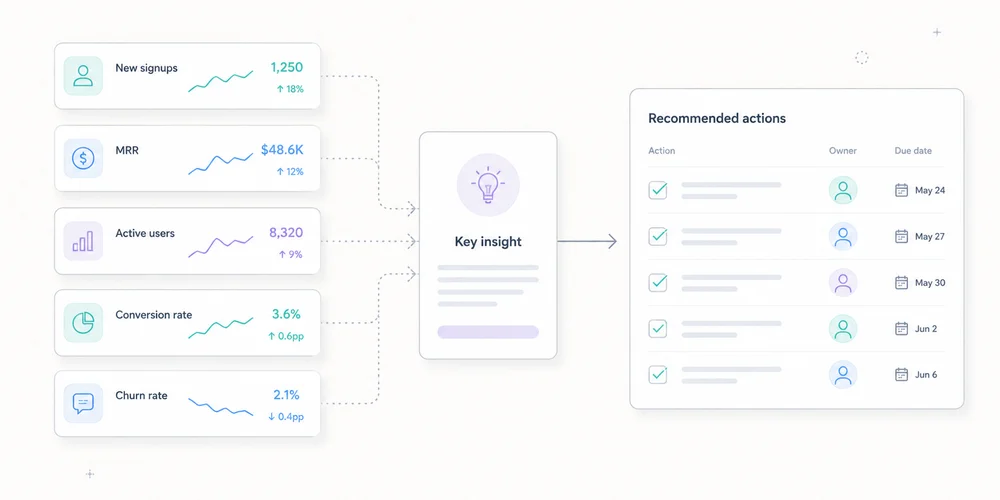
A web report can contain forty pages and produce no decision. Leadership rarely lacks charts. It lacks clear answers to five questions:What changed? Does it matter? Why do we think it changed? What action follows? Can we trust the data?Monthly reporting should be a decision document, not an archive of every available metric. A strong version has one main page, with appendices for investigation. It uses no more than five coherent indicators, contextualised changes and assigned actions. What monthly reporting is for A dashboard answers questions on demand. A monthly report establishes a shared reading at a point in time. It supports goals, detects gaps, explains known changes, records hypotheses, signals measurement limits and coordinates marketing, product, sales and engineering. It should not prove that the analytics team worked. Data volume is not decision quality. Start with the reader Leadership needs trend, target gap, business impact, risk, decision, owner and deadline. Operational teams need channel, page, campaign, event, segment, anomaly and methodology detail. Create two layers:decision summary; diagnostic appendices.The first must make sense without opening a dashboard. A seven-block format 1. One summary sentence Lead with the message, not total traffic. Example:Demo requests increased 18% on stable traffic, mainly through two organic landing pages. Lead quality still needs confirmation through the sales cycle.It contains result, comparison, likely mechanism and limitation. Avoid:The site recorded 42,847 sessions.Without a goal or comparison, the number says little. 2. Three to five KPIsMetric Month Change Target StatusQualified visits 18,240 +4% 18,000 MetDemo requests 126 +18% 120 MetVisit-to-demo rate 0.69% +0.08 pp 0.65% MetSales-accepted leads 61 +7% 70 BelowCollection incidents 2 +2 0 FixStatus follows a defined rule, not decorative colour. For B2B SaaS, the chain might be qualified audience, web conversion, sales quality, acquisition efficiency and measurement health. For content sites, use relevant organic entrances, useful engagement, product transition, signup and technical coverage. A portfolio can use the multi-site governance view as a common baseline with local metrics. 3. Significant changes Do not comment on every row. Select three to five movements above normal noise. Examples:conversions up 22% from one landing page; paid search down after budget reduction; direct traffic up on an untagged email campaign; Search Console impressions changed after a measurement or visibility shift; six hours of missing events; mobile improvement after a performance release.For each, record: Observation Magnitude Scope Hypothesis Evidence ConfidenceThis prevents correlation from becoming certainty. 4. Explanations and confidence Classify explanations:confirmed: documented deployment, budget change or outage; probable: several signals agree; possible: hypothesis to test; unknown: insufficient data.Example:Organic conversions probably increased because two pages gained both Search Console clicks and analytics entrances. Confidence: medium. Sales quality will be available after lead review.Confidence language is more honest than invented causality. 5. Decisions and actionsAction Owner Deadline Success measureApply the proof block to two product pages Content 25 July +10% conversion on tested pagesFix newsletter tagging Growth 15 July Direct share returns to normal on landing pageAudit event loss Engineering 10 July No collection gaps for 30 daysAn action without an owner is an intention. One without success criteria is a task without learning. 6. Data quality Add a visible box: Overall confidence: medium to high Known coverage: public site, excluding customer app Incidents: 6-hour loss on 12 June Changes: new CMP on 18 June Method break: qualified-lead definition changed 1 June Missing data: last 5 days of sales qualificationDo not hide quality in a footnote. Credibility improves when the report says what it does not know. 7. Appendices Appendices can cover sources, landing pages, campaigns, events, Search Console, web performance, segments, methodology, definition history and dashboard links. They support diagnosis, not the main reading. Choose five indicators Connect every KPI to a decision Ask what changes if the metric rises or falls. A metric with no possible action is probably descriptive. Define numerator and denominator A conversion rate can mean conversions per session, visitor, landing-page entry or started form. Write the formula and flag definition changes. Separate volume, efficiency and qualityvolume: demo requests; efficiency: conversion rate; quality: sales-accepted requests.Higher volume with lower quality is not automatically better. Add a reliability metric Examples include valid-event share, time without data, properties in error, consent coverage, unattributed traffic and CRM qualification delay. Measurement has its own performance. Compare the right periods Use previous month for operations, prior year for seasonality when comparable, target for relevance, and moving averages for low-volume trends. Two comparisons are usually enough: June 2026 vs May 2026 June 2026 vs monthly targetNormalise days, working days, time zone, currency, conversion definition, site scope, consent, campaigns and incidents. Use Search Console and analytics together Search Console and analytics observe different objects. Search Console reports Google search clicks and impressions under its rules. Analytics records visits or events collected on the site. Differences can result from incomplete page loads, consent, blocking, time zones, URL grouping, filters, bots and session definitions. Use triangulation:Search Console for visibility, queries and clicks; analytics for landing pages and on-site actions; CRM for quality and revenue.Do not force equality. Add web performance without overload Current Core Web Vitals cover:LCP for loading; INP for responsiveness; CLS for visual stability.Leadership reporting can show the share meeting expectations, trend, critical pages, release impact and action. Use field data where available for real-user experience, with laboratory tests for diagnosis. A one-page example Web performance, June 2026 Summary Demo requests increased 18% on stable traffic. Two organic pages explain most of the growth. Sales-accepted leads remain below target, limiting the conclusion on quality. KPIsKPI Result vs May TargetQualified visits 18,240 +4% 18,000Demos 126 +18% 120Conversion rate 0.69% +0.08 pp 0.65%Accepted leads 61 +7% 70Collection availability 99.2% -0.8 pp 100%Three facts/analytics-guide/ generated 21 demos versus 10 in May. Paid search fell 14% after budget reduction. Direct rose on an email landing page, probably because links lacked UTM tags.DecisionsApply the guide-page pattern to two product pages. Fix the newsletter link generator. Review lead qualification with sales.Data quality A six-hour collection incident affected 12 June. The latest five days of CRM qualification are incomplete. The page can be read in two minutes. Appendices answer follow-up questions. Automate preparation, not judgement Automate extraction, variation calculations, tables, freshness controls, alerts, definition snapshots and draft generation. Keep human review for selecting important facts, validating anomalies, stating hypotheses, assigning confidence and deciding actions. Automation does not know why a campaign stopped, a form changed or a lead category has different value. A monthly calendar Day 1: data checks Verify freshness, incidents, definitions and imports. Day 2: analysis Identify movements, triangulate and prepare hypotheses. Day 3: operational review Marketing, product and sales confirm known changes. Day 4: publication Send the summary with actions. Mid-month: follow-up Check decisions before the next report. The exact schedule can be faster. Keep control, analysis and validation separate. Mistakes that make reporting useless Showing everything An exhaustive report prioritises nothing. Commenting only on growth Growth can remain below target or come from low-quality channels. Hiding incidents They will surface later and undermine the whole report. Claiming attribution without evidence “The campaign caused the increase” needs more than timing. Changing KPIs every month Continuity disappears. Change metrics when strategy changes and record the transition. Reporting team activity rather than outcomes “Ten articles published” is activity. Qualified entries and conversions from content are outcomes, still requiring cautious interpretation. Conclusion A useful monthly report has seven blocks:summary; KPIs; changes; explanations and confidence; actions; data quality; appendices.It keeps leadership informed without hiding complexity. It makes uncertainty visible, connects numbers to targets and assigns every conclusion to an action. Five well-defined indicators reviewed consistently beat fifty ownerless charts. FAQ How long should a monthly report be? The main summary can fit on one page. Appendices may be longer but should remain optional for leadership. PDF or dashboard link? Use a dated summary with access to detail. A short email or document plus dashboard link often works better than an exhaustive export. How many KPIs? Three to five primary KPIs are usually enough. Keep diagnostics in appendices. How should uncertain data be presented? State the limitation, possible cause and confidence. Do not replace missing data with a confident story. Previous month or previous year? Use previous month for operations and previous year for seasonality when scopes are comparable. Target variance is often the most useful comparison. SourcesGoogle Analytics, Reports overview Google Search Console, Performance report web.dev, Web Vitals Google Analytics, Landing page report Google Analytics, Traffic-source dimensions
- 06 Jul, 2026
Analytics data retention: what to keep, for how long, and why
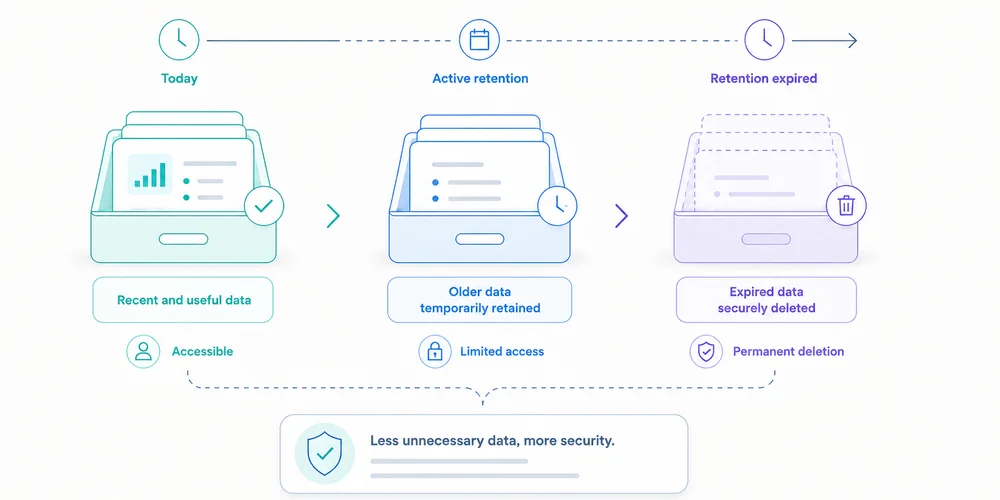
“We retain analytics data for twenty-five months.” The statement sounds precise but does not say whether it covers raw events or reports, whether visitor identifiers expire at the same time, whether collector logs follow another period, whether backups are purged, whether CSV exports remain on laptops, whether new activity resets the clock, or whether truly anonymous statistics remain longer. A useful retention policy is not one number. It describes the lifecycle of each data layer and connects every period to a purpose. The CNIL states that personal data cannot be kept indefinitely and that controllers should determine retention from the collection purpose. It distinguishes active use, intermediate archiving and, in particular cases, permanent archiving. Web analytics teams usually need a well-limited active dataset, effective deletion and possibly sufficiently aggregated long-term trends. Begin with purpose, not available settings A platform may offer 2, 14, 25 or 50 months. Those options do not determine the right period. Ask:For how long does this individual-level data remain necessary for the defined decision?Examples:seasonal comparison may require more than twelve months of trends; diagnosing collection failures may require only weeks of logs; a long B2B campaign may need several months; retaining a visitor identifier for years “just in case” is harder to justify; an aggregate monthly total may remain useful longer than detailed events.Retention should be proportionate to granularity and risk. Map seven retention layers 1. Terminal trackers and identifiers This includes cookies, local-storage IDs, session identifiers and other persistent mechanisms. Document initial duration, renewal, domain scope, cross-site use, withdrawal deletion and consent expiry. For certain audience-measurement trackers that may meet the French exemption conditions, the CNIL recommends a lifetime allowing meaningful comparison, such as thirteen months, without automatic extension at every visit. That does not make thirteen months correct for every identifier. It is a benchmark tied to the specific framework and conditions. 2. Raw events Events contain the most detail: timestamp, page, source, device, event properties, identifiers and technical metadata. They support diagnostics, funnels and report reconstruction. Their granularity increases singling-out risk and governance cost. Ask whether raw events are needed beyond the analysis cycle, whether they can be aggregated after 30, 90 or 180 days, which fields can disappear earlier, whether invalid events are stored, and whether schema deletion affects history. 3. Pseudonymised data A replaced, hashed or rotating identifier is not automatically anonymous. If events can still be linked, treat this layer cautiously. Define method, re-identification possibility, table separation, access, rotation, mapping-table deletion and the real need for continuity. Rotation helps only when old periods cannot be reconnected without a justified process. 4. Aggregate statistics Daily or monthly reports can sometimes remain longer, especially when they no longer single out a person. Examples: monthly visits by site monthly conversions by channel weekly page views by content category quarterly conversion rate“Aggregate” is not magic. A cell with one conversion in a small region may still reveal information. Set thresholds, reduce dimensions and test sparsity. If data are truly anonymous, GDPR personal-data rules no longer apply. That conclusion requires evidence. 5. Technical logs Collectors, CDNs, reverse proxies and applications may keep IP addresses, full URLs, user-agents, errors, rejected payloads and request IDs. Logs are frequently missed because they do not appear in the analytics dashboard. They serve separate security, availability and diagnostic purposes. Give them a separate period, restricted access and sensitive-field filtering. 6. Backups A backup is not a permanent deletion exception. Document frequency, rotation, encryption, access, restoration, treatment of previously deleted data, purge timeline and offline snapshots. Immediate editing of every backup may be impractical. In that case, limit access and duration, and prevent restored expired data from returning to active use. 7. Exports and secondary systems Exports create parallel retention:emailed CSV files; spreadsheets; warehouses; BI systems; agency storage; presentations; support tickets; local backups.The vendor's setting does not erase these copies. Every export needs an owner, purpose, approved location, period, access rule and deletion method. Reducing exports is often simpler than governing many copies. Build a retention matrix An illustrative SaaS matrix:Layer Purpose Proposed period Trigger Deletion OwnerLimited visit identifier Trend measurement Up to 13 months under the assessed framework Creation, no automatic renewal Expiry Analytics ownerRaw events Analysis and diagnostics 6 months Event date Automated job DataAggregate monthly reports Historical steering 36 months Month end Aggregate then purge Finance/GrowthCollector logs Security and errors 30 days Receipt Rotation EngineeringBackups Recovery 60 days Snapshot creation Rotation InfrastructureOne-off exports Defined analysis 90 days Export date Owner deletion AnalystConsent evidence Demonstrate choice Defined from risk and limitation periods Choice Dedicated policy PrivacyValues are illustrative unless a specific framework is cited. Another organisation can reach different periods after assessment. Define the trigger. Six months from collection differs from six months after last visit, campaign close or contract termination. Understand platform settings GA4: explorations versus aggregate reports GA4 documentation says retention controls apply to user-level and event-level data. Standard properties document options including 2 or 14 months for user and event data. Google also says the setting does not affect standard aggregate reports and applies to surfaces such as Explorations and funnel reporting. A team can therefore believe it reduced all retention while aggregate reporting remains available. “Reset on new activity” can extend certain user-data expiry with each event. Check whether that matches policy. Other vendors Privacy-first SaaS, self-hosted platforms and cloud tools differ in fixed or configurable periods, raw-event availability, aggregate retention, provider backups, site deletion, APIs and contract-end deletion. Do not copy a period from a comparison article. Verify current documentation and contract terms. The CNIL twenty-five-month recommendation For audience-measurement trackers under the French exemption framework it describes, the CNIL recommends a maximum of twenty-five months for collected information, with periodic review. Three cautions:maximum is not the default: less may be sufficient; the framework is conditional: purpose, anonymous statistics, no combining and other conditions still matter; layers remain separate: logs, exports and identifiers need their own assessment.A policy can therefore keep detailed events for six months and aggregate reports for twenty-four, when justified. It should not copy twenty-five months into every database. Test deletion An untested policy is an intention. Test 1: expired data Use test events or a short-period environment. Verify disappearance from storage, APIs and affected reports. Test 2: identifiers Check cookie or identifier expiry, renewal and withdrawal behaviour. Test 3: exports Track a file from creation to deletion, including copies, attachments and recycle bins. Test 4: restored backups Restore into an isolated environment and verify that deletion rules are reapplied or expired data are blocked from use. Test 5: contract termination Ask the vendor about export windows, deletion date, backups, confirmation, legally retained data and subprocessors. Avoid silent extensions Retention can be prolonged by cookie renewal, user-row updates, warehouse imports, sparse aggregates, never-rotated backups, shared-folder copies, reused test accounts and changes applying only to future data. Document whether a change acts retroactively. Retention across multiple sites One policy may not fit a corporate site, authenticated app and help centre. Purposes, data, risks and countries differ. Use a common baseline with approved exceptions. The multi-site dashboard can show collection health, while administration tracks the retention mode and review date of every property. Do not share a cross-site identifier merely to simplify retention. Who validates the period? Business owners explain need. Analytics describes granularity. Engineering confirms deletion. Security owns logs. Privacy reviews the framework. Infrastructure covers backups. Procurement checks contracts. Name a final owner. “Data team” is not enough. The data collection summary and analytics privacy notice should show consistent periods at different levels of detail. A quarterly ten-question reviewHave purposes changed? Are detailed data still used? Can long-term reports be more aggregated? Do identifiers renew? Did deletion jobs succeed? Are there new exports? Are backups rotating? Did vendor policy change? Are public documents aligned? Can an inactive property be deleted?Removing an unused site, export or event is often the strongest risk reduction. Conclusion Retention is not a number in a policy. It is a system connecting purpose, granularity, access, trigger and deletion. A sound policy:separates identifiers, events, aggregates, logs, backups and exports; justifies each period; avoids silent renewal; tests purge operations; documents exceptions; aligns tools, contracts and public information.Begin with the most detailed data. Ask how long it remains useful, then aggregate or delete. Long-term history should not require indefinite individual-level collection. FAQ Does the CNIL always require twenty-five months? No. It recommends a twenty-five-month maximum for collected information under the conditional framework for certain audience-measurement trackers. A shorter period may be sufficient or necessary. Can aggregate statistics be kept indefinitely? Only when they are truly anonymous or another framework justifies retention. Sparse or highly segmented aggregates can still single out people. Does GA4 retention remove all reports? No. Google states that user and event retention settings do not affect standard aggregate reports. Understand which data and surfaces are covered. Must backup data be deleted immediately? It depends on architecture and risk. Backups need limited rotation, controlled access and procedures preventing expired data from returning to use after restoration. When does the retention clock begin? Define the trigger: collection, last activity, campaign close, aggregation or contract termination. Avoid automatic renewal where the framework or policy does not allow it. SourcesCNIL, Data retention periods CNIL, Audience-measurement cookies and consent conditions Regulation (EU) 2016/679, Article 5(1)(e) Google Analytics, Data retention Plausible, Data policy CNIL, Practical guide to retention periods