- 09 Feb, 2026
Why trust is becoming a growth constraint, not a privacy slogan
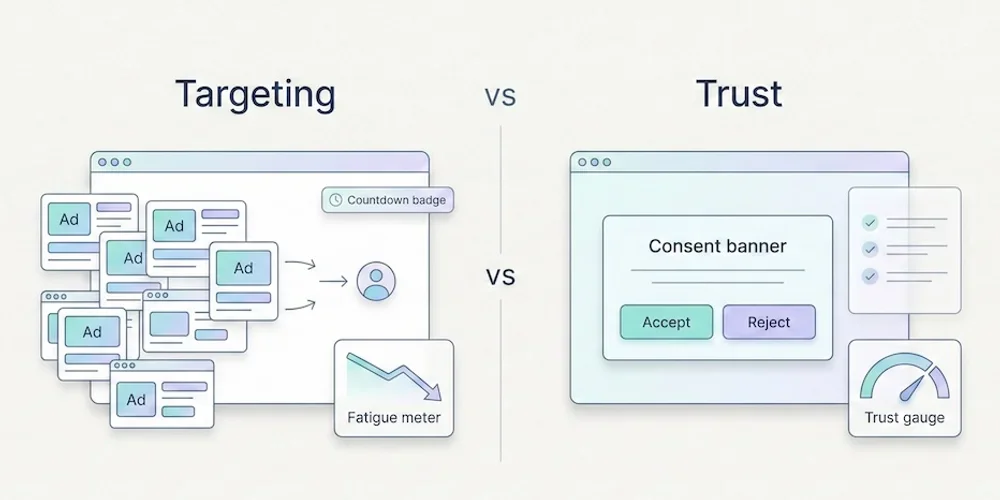
Privacy-first marketing should not be sold as a moral badge or a guaranteed conversion lift. The stronger argument is more pragmatic: trust is becoming part of the buying experience, and intrusive data practices can create friction that teams do not always measure. For European SMEs, B2B SaaS teams and agencies, this matters because growth depends on repeated interactions. A buyer may discover you through content, compare you over several visits, ask colleagues, read docs and return later. If every interaction feels extractive, the relationship weakens before sales even starts. What trust changes operationally Trust does not mean collecting no data. It means collecting data with a clear purpose, explaining it plainly and avoiding silent escalation from measurement to targeting. In practice, trust changes five workflows:analytics: measure what the team actually uses; forms: ask only for fields needed at that stage; advertising: separate measurement from retargeting; content: answer real buyer questions instead of hiding value behind gates; reporting: explain limits instead of pretending every number is perfect.Why targeting can become expensive Targeting can be useful when it is transparent, proportionate and aligned with user expectations. It becomes expensive when it drives:consent friction; duplicated tags; heavier pages; lower trust in forms and demos; noisy attribution debates; extra legal and vendor review.These costs rarely appear in ad-platform dashboards. They show up as longer sales cycles, more implementation work and weaker confidence in the numbers. A practical trust checklist Before adding a new tracking or targeting feature, ask:What decision will this data support? Can we answer the same question with less data? Will the visitor understand why this happens? Does this belong in baseline analytics or an explicit enriched setup? Who will review whether the data is still useful in three months?If the team cannot answer, delay the feature. Where Pomelo fits Pomelo should not promise that privacy-first automatically increases conversion. It should promise a better operating model: cookieless by default, minimal collection, Strict first, Extended by configuration, and reporting that makes data limits visible. That is enough. Teams do not need another vague trust slogan. They need a product that helps them govern measurement choices without slowing down every launch. SourcesCisco, 2025 Data Privacy Benchmark Study, April 2, 2025: https://investor.cisco.com/news/news-details/2025/Ciscos-2025-Data-Privacy-Benchmark-Study-Privacy-landscape-grows-increasingly-complex-in-the-age-of-AI/default.aspx Cisco, 2025 Data Privacy Benchmark Study PDF: https://www.cisco.com/c/dam/en_us/about/doing_business/trust-center/docs/cisco-privacy-benchmark-study-2025.pdf Edelman, 2025 Trust Barometer: https://www.edelman.com/trust/2025/trust-barometer Edelman, 2025 Brand Trust special report: https://www.edelman.com/trust/trust-barometer
Read article →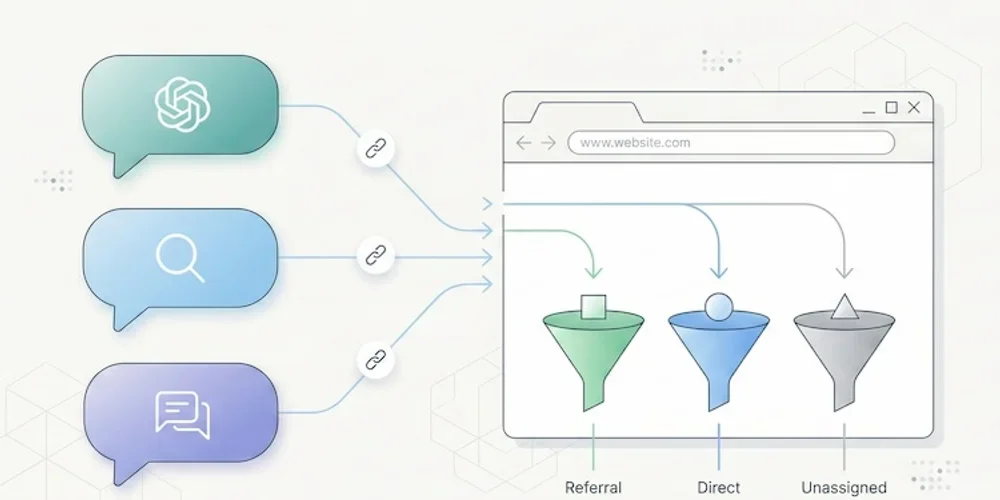
- 02 Feb, 2026
AI traffic: how to measure visits that ChatGPT, Perplexity and Claude send to your website
Something has shifted in the way people find your website. And chances are, you have no idea it's happening. Since late 2024, conversational AI platforms have moved beyond answering questions. They now cite sources, insert links, and send real visitors to real websites. ChatGPT, Perplexity, Claude, Gemini, Copilot: these tools are becoming a genuine discovery channel, one that rivals traditional search engines in the quality of traffic it delivers. The catch? Most analytics tools don't separate this traffic. It gets lumped into "referral," blends into "direct," or vanishes from reports entirely. You may already have visitors arriving through a ChatGPT recommendation, and your dashboard won't show it. This article gives you the full playbook: how to spot AI traffic, why it matters, and what to do about it. A new discovery channel, growing fast The raw numbers are still modest. But the trajectory is hard to ignore. A study by SE Ranking covering nearly 64,000 websites across 250 countries (January-April 2025) found that ChatGPT alone accounts for 78% of all AI referral traffic worldwide. Perplexity comes in at roughly 15%, Gemini at 6.4%. Claude and DeepSeek share the remainder at under 1% each, though both show compelling growth curves. (Source: SE Ranking, "AI Traffic in 2025") A separate analysis by Conductor, reported by Search Engine Land, confirms this hierarchy across 13,770 domains and 3.3 billion sessions: AI traffic averages about 1% of total site visits, with ChatGPT generating 87% of it. (Source: Search Engine Land, Nov. 2025) One percent sounds negligible. Two things make it anything but. Growth is strong, but still uneven. Between January and April 2025, ChatGPT's share of global internet traffic doubled in SE Ranking's study, from 0.08% to 0.16%. Some industry analyses also show strong year-over-year growth in AI referral traffic. These figures still need to be read by sector: they do not automatically make AI the first acquisition channel for every site. Traffic quality can be interesting. Visitors arriving from AI platforms spend an average of 9 to 10 minutes per session in SE Ranking's study, compared to 3 to 4 minutes for organic search. Claude-referred sessions in that dataset reached a very high average duration in the EU. These are signals to inspect, not a conversion guarantee: each team should verify landing pages, useful events, and conversions in its own data. The logic is straightforward: a user who clicks a link inside an AI response has already asked a specific question, received context, and chosen to visit your site from among the cited sources. Their intent is pre-qualified. They know why they're coming. Why your analytics can't see it If AI traffic is this valuable, why doesn't it show up clearly in your reports? Three technical issues create this blind spot. The missing referrer problem When someone clicks a link in Perplexity from a web browser, the HTTP Referer header typically passes perplexity.ai as the source. Your analytics tool can then classify the visit as a referral from Perplexity. But this mechanism does not always work. Depending on the context, some sessions from AI tools may not pass a usable referrer. The reasons vary: mobile apps (ChatGPT on iOS, Copilot in Windows) may open links in internal webviews, some AI agents prefetch or preview pages without triggering the analytics script, and AI browsers such as Perplexity Comet or ChatGPT Atlas do not all pass signals the same way. (Source: MarTech, Nov. 2025) The result: a significant portion of AI traffic falls into the "direct" or "unassigned" bucket in your analytics, invisible and unattributed. GA4's default classification Google Analytics 4 can classify visits from AI assistants as "referral," the same category as a link from Facebook, a forum, or a directory listing. In the setups observed when this article was first written, teams still needed their own grouping to isolate this traffic. Always verify the current GA4 interface before documenting the procedure. In practice, if you open your acquisition report in GA4 without custom configuration, ChatGPT traffic is buried among dozens of other referral sources. For a site receiving hundreds of different referrers, spotting chatgpt.com or perplexity.ai requires knowing what to look for. The bot-vs-human confusion AI platforms interact with your site in two fundamentally different ways. The first is referral traffic: a human clicks a link in an AI response and lands on your page. This is real traffic with a real visitor. The second is crawling: AI platform bots (GPTBot for OpenAI, PerplexityBot, ClaudeBot, and others) visit your site to index content and feed their models. This crawl traffic is not useful audience data. It's data harvesting. GA4 automatically filters known bots, but the list isn't comprehensive. Some newer AI bots slip through, while some legitimate human visitors from AI tools get incorrectly filtered. Cloudflare has observed crawl-to-referral ratios as high as 700:1 for Perplexity, which gives a sense of how much harvesting activity exists relative to actual human visits. (Source: Digiday, Dec. 2025) How to identify AI traffic in your tools Two approaches work, depending on what you're using. In GA4: create a dedicated "AI Traffic" channel The recommended method is to build a custom channel group that aggregates all known AI sources. Here's the process:In GA4, go to Admin > Data Settings > Channel Groups. Click the default channel group, then "Copy" to create a new one. Add a channel called "AI Traffic." Set the rule: Match type = "matches regex", then paste this pattern:(chatgpt\.com|chat\.openai\.com|perplexity\.ai|claude\.ai|gemini\.google\.com|copilot\.microsoft\.com|deepseek\.com|meta\.ai)Drag your "AI Traffic" channel above the default "Referral" channel in the priority order. This is critical: GA4 evaluates rules top-down, and if "AI Traffic" sits below "Referral," visits will be classified as referral before reaching your rule.This setup only applies to new data (no retroactive effect). Allow a few days before results appear. For a one-time analysis of historical data, create an Explore report with a filter on "Session source" using the same regex. (Source: MarTech, Nov. 2025) In a lightweight analytics tool (Plausible, Fathom, etc.) This is where a well-designed simple tool can help. In Plausible, the "Sources" report displays every identified referrer directly. If chatgpt.com or perplexity.ai appears as a source, you can inspect it without creating a custom channel first. Click the source to filter the dashboard by that origin and analyze entry pages, time on site, and triggered events. Plausible documented its own experience: in 2024, the Plausible blog saw a 2,200% surge in AI referral traffic within months, all identifiable from their standard dashboard with zero configuration. (Source: Plausible, Dec. 2024) This is a textbook case where the frugal analytics philosophy helps: when a tool is designed to surface essential data without layers of configuration, emerging signals are easier to inspect. A tool like GA4 remains powerful, but it often requires dedicated configuration to isolate a new family of sources. For a broader view of analytics tool families, see our Google Analytics, Matomo, and frugal analytics comparison. AI referral traffic vs AI crawling: two different things A common mistake is conflating referral traffic (humans clicking) with crawling (bots scraping). They deserve separate attention because they raise different questions. AI referral traffic is an opportunity. It represents a qualified, pre-informed visitor arriving with intent. Measuring it lets you optimize landing pages, adapt content, and understand how AI platforms perceive your site. AI crawling is a governance question. Bots like GPTBot, PerplexityBot, and ClaudeBot visit your site to train their models or answer user queries in real time. Some do so aggressively: Cloudflare found that GoogleBot's crawl volume (which also feeds Gemini) dwarfs that of all other AI bots combined. You can control crawling through your robots.txt file: User-agent: GPTBot Disallow: /User-agent: PerplexityBot Disallow: /User-agent: ClaudeBot Disallow: /But beware the paradox: blocking the crawl can reduce your referral traffic. If an AI can't index your content, it can't recommend it to users. This is a trade-off to make deliberately. An emerging approach uses an llms.txt file (a Markdown file placed at your site's root) to guide AI platforms toward the content you want to make accessible, without blocking all crawling. Anthropic (the company behind Claude) uses this mechanism on its own site. How to get cited by AI platforms Understanding AI traffic also means understanding what triggers it. AI platforms don't cite sites randomly. Several factors drive citations. Content structure matters. Analyses cited by Superprompt suggest that pages with clear heading hierarchies (H2, H3, lists) and direct answers are easier for AI systems to reuse. Structured FAQ sections are particularly useful because they match the question-and-answer format of AI interactions. Freshness can help. Recently updated content is often easier to use in answers that need current information. The effect still depends on topic, domain authority and how the AI platform retrieves sources. Original data attracts citations. Data tables, proprietary statistics and exclusive benchmarks can be easier to cite than generic content. This is another argument for precise, data-driven KPIs over vanity metrics. Traditional SEO remains the foundation. Several market studies connect AI visibility with conventional SEO signals: structure, authority, freshness and editorial clarity still matter. SEO doesn't depend on Google Analytics, but it remains part of the foundation for AI visibility. What this means for choosing an analytics tool AI traffic exposes an operational limit in complex analytics platforms: emerging signals often need prior configuration before they are easy to read. With GA4, you need to create a channel group, write a regex, update it regularly (new AI tools launch every month), and accept that the data won't be retroactive. It's doable, but it demands technical expertise that most small business owners and freelancers simply don't have. With a well-designed lightweight analytics tool, AI referrers can appear directly in the sources report, right alongside Google, LinkedIn, or Twitter, when the referrer is actually transmitted. That does not remove webview, direct or prefetch limits, but it makes visible signals easier to read. That's the core principle of analytical sobriety: collect less data, but make every data point immediately readable. AI traffic is not something to ignore. It is one signal of a change in how some people discover content online. Sites that measure it today will mostly have a clearer read on emerging sources, without overstating a volume that often remains small. The question is no longer whether AI platforms send traffic to your site. It's whether your measurement tool shows it to you.Frequently asked questions What percentage of my traffic comes from AI? Late-2025 studies still place identifiable AI traffic at a small share of total traffic, with large variations by sector. That only reflects identifiable traffic: when an AI session lacks a usable referrer, it can fall into "direct" and remain difficult to attribute. How do I see ChatGPT traffic in Google Analytics 4? If your GA4 interface does not yet provide an AI channel that fits your needs, create a custom channel group: go to Admin > Data Settings > Channel Groups, add an "AI Traffic" channel with a regex rule covering AI domains (chatgpt.com, perplexity.ai, claude.ai, gemini.google.com, copilot.microsoft.com). Place it above the "Referral" channel in the hierarchy. Data will only be collected from the date you create the channel. Should I block AI bots with robots.txt? It's a trade-off. Blocking AI bots (GPTBot, PerplexityBot, ClaudeBot) via robots.txt prevents your content from being indexed by these platforms, which may reduce citations and referral traffic. On the other hand, not blocking means your content feeds AI model training, raising intellectual property and consent questions. A middle-ground approach uses an llms.txt file to guide AI platforms toward the content you want them to access. Can cookieless analytics detect AI traffic? Yes, when a usable referrer is transmitted. Cookieless tools like Plausible, Fathom, or Simple Analytics can display those referrers directly in their sources report without a dedicated channel group. That is often easier to inspect, but it does not solve referrer, direct or prefetch limits. How do I optimize my content to get cited by ChatGPT or Perplexity? Five levers are worth testing: structure content with clear headings (H2/H3) and FAQ sections; keep content fresh when the topic requires it; produce original data (tables, statistics, benchmarks); maintain strong traditional SEO; and consider an llms.txt file to make structured content easier for AI crawlers to access. Effects vary by platform and topic, so document your assumptions before turning them into an editorial rule.Sources and figures were checked for the initial February 2026 publication. AI traffic shares and GA4 classifications evolve quickly: verify the current interface and documentation before turning this into an internal rule. Sources Sources checked on May 10, 2026.SE Ranking, "AI Traffic in 2025: Comparing ChatGPT, Perplexity & Other Top Platforms" Search Engine Land, "AI sends 1% of website traffic — and most of it is from ChatGPT" MarTech, "How GA4 records traffic from Perplexity Comet and ChatGPT Atlas" Plausible Analytics, "Breaking down our 2.2K% surge in AI traffic"
The Persistent Myth: Do You Actually Need Google Analytics for SEO?
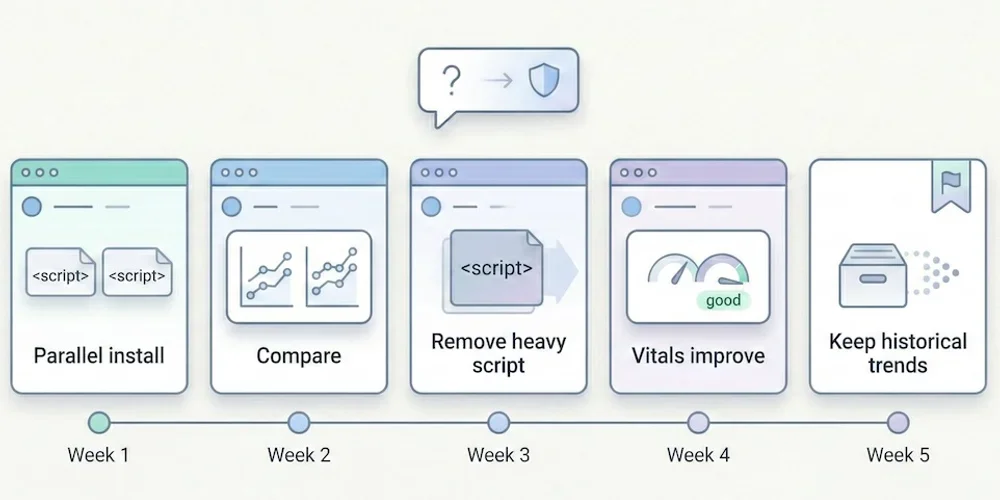
It's the first question we hear whenever we mention alternatives to Google Analytics: "But if I remove the Google script from my site, will Google punish me? Will I lose my rankings?" The short answer is: No. The longer answer is that you're probably confusing two tools with very different roles — and that, paradoxically, removing Google Analytics could actually improve your rankings. Here's why, with sources.1. The Fundamental Confusion: Analytics ≠ Search Console There are two major tools in Google's ecosystem for website owners. Many people confuse them, which keeps the myth alive. Google Search Console (GSC): Your Line to Google This is the tool for communicating with the search engine. It tells you:How Google sees your site (indexing status, crawl errors). Which keywords you rank for. How many clicks and impressions you get. Whether your site has technical issues (mobile, Core Web Vitals).This one is essential for SEO. It's free, lightweight (no script to install on your site), and it's the only reliable source of data on your actual search rankings. Good news: Search Console works independently of Google Analytics. You can use one without the other. Google Analytics (GA4): An On-Site Behavior Observer GA4 watches what visitors do after they arrive on your site. It doesn't help improve your search rankings. Its role is to measure engagement, journeys, and conversions — useful marketing information that has no impact on the search algorithm.2. Google Has Confirmed It: Analytics Is Not a Ranking Factor This isn't speculation. Google has said it explicitly, multiple times. John Mueller, Search Advocate at Google (one of the official spokespeople for the Search team), has clearly stated that using Google Analytics is not a ranking factor. He has addressed this question on Twitter/X and during Google Search Central sessions, confirming that Google Search and Google Analytics are separate products and that one doesn't influence the other. → Source: Google Search Central – How Search ranking works Gary Illyes, also a Google Search analyst, reinforced this point by explaining that the search engine doesn't use Google Analytics data for ranking, notably because not all sites install it and doing so would create an unfair bias. In other words: removing the Google Analytics script from your site sends no "negative signal" to Google. The search engine doesn't know (and doesn't care) which analytics tool you use.3. The Paradox: GA4 Can Add Weight to Your SEO Stack It is counterintuitive, but a heavy analytics script can degrade page performance, and performance can matter for SEO experience. Here's how. 3.1 Script Weight Google (the search engine) favors fast websites. Core Web Vitals — a set of web performance metrics — have been a confirmed ranking factor since 2021. The GA4 script is not always lightweight. The gtag.js tag can load multiple JavaScript libraries depending on configuration: advertising tracking, consent management and advanced collection. Public measurements put the order of magnitude around 45 KB compressed, plus network requests to collection servers. For comparison, here are indicative orders of magnitude. Real script size varies with options, caching and measurement method.Solution Script size (compressed) Ratio vs GA4GA4 (gtag.js) ~45 KB BaselineMatomo ~20 KB 2× lighterSimple Analytics ~6 KB 7× lighterFathom ~2 KB 22× lighterPlausible ~1 KB 45× lighterPirsch <1 KB 50× lighterAn independent audit by Bejamas measured the concrete impact of third-party scripts on web performance and showed that analytics scripts are among the heaviest contributors to main-thread blocking time (Total Blocking Time, one of the Core Web Vitals). → Source: Bejamas – How Popular Scripts Slow Down Your Website 3.2 The Concrete Impact on Core Web Vitals When a heavy script loads, it impacts three key metrics:LCP (Largest Contentful Paint): the time before the main content is visible. A heavy script delays rendering. INP (Interaction to Next Paint): responsiveness to clicks. A script that monopolizes the main thread degrades interactivity. CLS (Cumulative Layout Shift): visual stability. Some late-loading scripts cause layout shifts.Switching from a heavy script to a light script will not single-handedly turn a slow site into a fast one. But on an already optimized site, reducing third-party JavaScript can contribute to better Core Web Vitals. The real effect should be measured on the page, with your other scripts and network conditions. → Source: Google – Core Web Vitals & Page Experience 3.3 Slower Sites = Fewer Conversions Beyond pure SEO, speed directly impacts conversion rates. Google has published data showing that when mobile page load time goes from 1 to 3 seconds, the probability of bounce increases by 32%. Each additional second makes it worse. → Source: Think with Google – Mobile Speed Benchmarks Bottom line: switching to a lightweight analytics tool can improve load time, which supports user experience, Core Web Vitals and sometimes conversion.4. The Winning Duo for SEO in 2026 To run your search strategy effectively without the bloat, here's the ideal setup: Google Search Console (Essential — and Free) This is your source of truth for SEO. Use it to:Monitor your positions and clicks in search results. Identify which keywords bring traffic (and which ones you're gaining on). Detect indexing errors and technical issues. Track your Core Web Vitals over time.No analytics tool, no matter how powerful, can replace this data: only Google knows which keywords you actually rank for. A Frugal Analytics Tool (For Conversion Tracking) Search Console tells you where the traffic comes from, but it doesn't tell you what happens next. To know whether your SEO visitors convert into customers, you need an on-site measurement tool — but it doesn't need to be complex. The 5 essential KPIs are enough: visitors, sources, top pages, key events, conversions. A frugal analytics tool gives you those answers in seconds, without weighing down your site. What You Gain with This DuoA better technical baseline: a potentially faster site thanks to a lighter script stack. Complete SEO data: rankings (via GSC) + conversions (via frugal analytics). Simpler compliance work: a minimal audience-measurement setup is easier to document and review than a broad tracking stack. Use the CNIL audience-measurement criteria as a reference when assessing your own configuration. Time saved: two simple interfaces instead of one bloated platform.5. Real-World Examples: Who Dropped GA4 and What Happened? Several public cases document migrations from Google Analytics to lighter solutions without an obvious SEO decline. These are not universal proof: content quality, domain authority, technical health and seasonality still dominate SEO outcomes. Basecamp and Hugging Face publicly adopted Plausible as a replacement for Google Analytics. These examples mainly show that a site can measure conversions without depending on GA4. They should not be treated as a guaranteed SEO outcome for every site. The explanation is logical: Google ranks sites based on content quality, authority (backlinks), technical health (speed, mobile-friendliness), and user experience. None of these criteria depend on the brand of your visitor counter.6. How to Switch: A Practical Migration Path If you're ready to make the move, here's a low-risk approach that minimizes disruption. Week 1: Install the new tool alongside GA4 Choose a frugal analytics tool (see our comparison guide for help choosing). Install its tracking script on your site — it's typically a single line of code. Keep GA4 running simultaneously. This gives you a parallel data period to compare. Weeks 2-4: Compare the data Over 3-4 weeks, compare key metrics between GA4 and the new tool. You'll likely notice the frugal tool reports more visitors — because it doesn't depend on cookie consent. Traffic sources and top pages should align closely. Conversions should match if you've configured events properly. Week 5: Remove GA4 Once you're confident the new tool captures everything you need, remove the GA4 script from your site. You'll immediately see a performance improvement (check your Core Web Vitals in Search Console). Keep your GA4 account open for a few months if you want to reference historical data. What about historical data? Some tools (Plausible in particular) offer GA data import for historical continuity. The imported data is limited to aggregated metrics — no individual user profiles, which is consistent with the privacy-first approach. For most SMBs, this is more than enough to maintain trend visibility.Conclusion: Cut the Cord Without Fear Do not treat Google Analytics as an SEO requirement. Your search rankings depend first on content quality, technical health, user experience and site authority, not on the brand of your measurement tool. Lightening your site by replacing a heavy script with a simpler one can support performance and make privacy review easier to read, while keeping the data that truly matters through the Search Console + frugal analytics duo. The real risk isn't leaving GA4. It's continuing to fly blind because your tool is too complicated to actually use.FAQ: SEO and Google Analytics Does Google penalize sites that don't use Google Analytics? No. Google has confirmed multiple times that using Google Analytics is not a ranking factor. The search engine evaluates content quality, technical health (speed, mobile), authority (inbound links), and user experience — not the brand of the analytics tool installed. Is Search Console enough for SEO? For tracking SEO performance (positions, clicks, impressions, technical errors), yes. Search Console is the essential, irreplaceable tool. To go further (measuring conversions, understanding post-arrival behavior), a complementary analytics tool is useful — but it doesn't need to be GA4. What's the real impact of a heavy analytics script on SEO? GA4's script weighs approximately 45 KB compressed. Frugal solutions weigh between 1 and 6 KB. This difference impacts Core Web Vitals (LCP, INP), which have been a confirmed ranking factor since 2021. On an already-optimized site, switching from a heavy to a lightweight script can be enough to push performance scores from "needs improvement" to "good." Can I use Search Console without Google Analytics? Yes, absolutely. The two tools work independently. You can connect Search Console to some frugal solutions (Plausible and Pirsch offer this integration) to see your SEO data directly in your analytics dashboard. If GA4 doesn't help with SEO, what is it for? GA4 is a user behavior measurement and marketing attribution tool. It's designed for teams that need detailed conversion funnels, behavioral cohorts, and integrations with the Google advertising ecosystem (Google Ads). For pure SEO, it adds nothing that Search Console doesn't already provide — and its weight can actually hurt your rankings.
- 19 Jan, 2026
Stop Sending PDF Reports Your Clients Don't Read
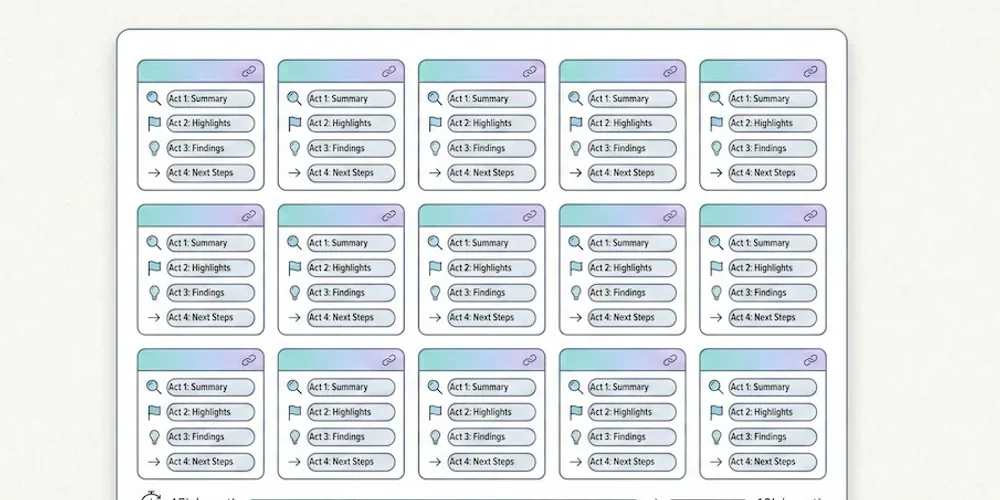
It's the end of the month. For every freelancer or project manager at an agency, it's time for the dreaded ritual: monthly reporting. You export PDFs from Google Analytics, take screenshots, add three comments in an email, and hit send. Time spent: 2 to 4 hours. The reality? Your client opens the PDF, glances at the first chart, has no idea why the "Engagement Rate" dropped by 0.4%, and closes the document. You've lost half a day. And they didn't perceive the value of your work.1. The Problem with "Accounting-Style" Reports Why it doesn't work The classic mistake is trying to prove you've been working by showing lots of numbers. "Look, there are 45 pages of charts, so clearly I've been busy." But your client (often an SMB owner) isn't paying you for charts. They're paying for results and peace of mind. Sending them a complex report is like handing the problem back to them. They don't know what to do with it, and they end up questioning your usefulness. What the research says According to HubSpot's surveys on agency practices, reporting is consistently cited as one of the most time-consuming and least client-valued tasks. The paradox is cruel: the more time you spend on the report, the less it gets read — because its very length discourages reading. Research by Databox among marketing professionals shows that most clients want short, results-oriented reporting, not exhaustive audits. The most satisfied clients are those who receive a summary of 5 to 10 metrics maximum, accompanied by a clear recommendation. → Sources: HubSpot – State of Marketing Report, Databox – Reporting Best Practices2. The Method: Less Data, More Story For a report to be read, understood, and appreciated, it needs to tell a simple story in 4 acts. This is Data Storytelling applied to client reporting. Act 1 — The "One-Liner" (The Weather Report) Start your reporting email with a single sentence that summarizes the month. Your client should understand the trend without opening any attachment.Bad: "Here are this month's statistics." Good: "Record month for traffic (+20%), but slight dip in qualified leads — we know why and we're fixing it."This sentence is the ultimate test. If you can't summarize the month in one line, you haven't found the insight yet. Go back to the numbers. Act 2 — The 3 Macro KPIs (The Dashboard) Don't include everything. Only show the goals defined at the start of the contract, and report on progress. Three metrics are enough in the vast majority of cases. For a brochure site or blog, these are typically the 5 essential KPIs — but in client reporting, condense further: total traffic, number of leads/sales, and the "star metric" of the month (the one that moved the most, for better or worse). Present these numbers with comparison to the previous month and the target. A 3-row table beats a 40-page PDF every time.Metric Target Last Month This Month TrendUnique visitors 5,000 4,200 5,100 ✅ +21%Form submissions 30 28 22 ⚠️ -21%Cost per lead (if Ads) < $15 $12 $18 ❌ +50%Act 3 — "What We Did" → "What It Produced" This is where you sell your work — but by connecting it to results, not listing tasks.Bad: "We published 4 blog posts, optimized 3 pages, and adjusted keywords." Good: "The GDPR article (published on the 15th) generated 450 qualified visits from LinkedIn → 8 form submissions. The 3 optimized pages moved from page 3 to page 1 for their target keywords."The principle is to systematically link the action to the impact. If an action hasn't produced measurable results yet, say so honestly ("impact expected in 4-6 weeks, we're monitoring"). Act 4 — The Plan for Next Month This is the most important part — and the most often forgotten. A report shouldn't just look in the rearview mirror. It should sell what's next."Since LinkedIn traffic is growing (+40% over 2 months), next month we'll double the posting frequency." "The drop in leads is coming from a form that's too long (5 fields instead of 3). We're simplifying it next week."This final act reassures your client about two things: you understand what's happening, and you have a plan. That's what builds loyalty — far more than a 45-page PDF.3. Before/After: Same Month, Two Reports To make the method concrete, here's the same period presented two ways. ❌ The "Accounting" Report (What You Might Be Doing)3-line email ("Here's this month's report, let me know if you have questions"). 38-page PDF attached, exported from GA4. Uncommented charts: bounce rate, session duration, user flows, demographic reports. Production time: 3.5 hours. Probability the client reads it fully: ~5%. Client perception: "I don't understand, but I suppose things are fine."✅ The "Frugal" Report (The 4-Act Method)Structured email of 15 lines maximum (One-Liner + 3 KPIs + Actions/Results + Plan). A 3-5 row table embedded in the email (no attachment). Optional: a link to a shared real-time dashboard (Plausible, Fathom, etc. allow this). Production time: 45 minutes. Probability the client reads it: ~80%. Client perception: "My agency has things under control. They understand my business."The gain is triple: you spend 3x less time, the client understands 10x better, and your perceived value increases. That's a virtuous cycle.4. Your Tool Shapes Your Report There's a reason the "Accounting" report persists: the tool produces it. Google Analytics generates multi-page PDF reports because it has dozens of reports. When your tool is an overengineered machine, your reporting inherits that complexity. The reverse is also true. When your analytics tool shows a dashboard that fits on one screen — visitors, sources, top pages, conversions — your reporting flows naturally from it. You don't export 40 charts: you take a screenshot and comment on it. This is one of the strongest arguments for switching to a frugal analytics tool when managing multiple clients: reporting time drops mechanically because there's nothing to "filter." The tool only shows what matters. Some solutions (Plausible, Fathom) even offer read-only shareable dashboards: you give your client a link, they can check their stats whenever they want, without bothering you. The monthly report then becomes a strategic commentary email, not a data export.5. The Multi-Client Challenge For an agency or freelancer managing 10, 20, or 30 sites, the reporting problem multiplies. Spending 3 hours per client = 30 to 90 hours per month of pure reporting. That's unsustainable — and it's time you're not spending on strategy, execution, or acquiring new clients. The solution comes from three levers:Standardize the format. Use the same 4-act template for all clients. Only the numbers change. Create a reusable email template with placeholders for the One-Liner, the 3 KPIs, the Actions/Results, and the Plan. Once the structure is muscle memory, you'll fill it in 20 minutes per client. Choose a multi-site tool. Frugal solutions typically let you manage all your clients from a single interface, with one dashboard per site. The analytics comparison guide details site limits by plan. Being able to switch between clients in one click (instead of logging into separate GA4 accounts) is a massive time-saver. Automate the sharing, not the analysis. Instead of exporting PDFs, share a link to the real-time dashboard and send a strategic commentary email. The client has 24/7 access to the numbers, and your value-add is in the analysis, not the extraction. This also reduces "where are my stats?" emails between reporting cycles.The compounding effect When you standardize reporting across 15 clients and switch to a frugal tool with shareable dashboards, the math changes dramatically. Instead of 15 × 3 hours = 45 hours/month, you're looking at 15 × 40 minutes = 10 hours/month. That's 35 hours reclaimed — nearly a full work week — that you can reinvest in billable work, business development, or simply not burning out. More importantly, your clients get better reporting. A 10-line email they actually read beats a 40-page PDF they ignore. Your retention improves because clients feel understood, not buried under data they didn't ask for.Conclusion: Sell Intelligence, Not Spreadsheets A good analytics tool shouldn't serve as a PDF generator. It should help you find the insight — the key trend, the opportunity, the red flag — that you'll share with your client in 3 sentences. If your tool is too complicated, you spend your time searching for data. If it's simple, you spend your time analyzing it. That analysis is what justifies your fee — not the number of pages in the PDF. In 2026, an agency's value is no longer in extracting data. It's in translating data into business decisions. And for that, you need to start by measuring only what matters.FAQ: Client Reporting How much time should I spend on monthly reporting per client? With the 4-act method, plan for 30 to 60 minutes per client. If you regularly exceed 2 hours, it's a signal that your analytics tool is too complex or that you haven't standardized your format. The goal is for time spent analyzing to exceed time spent extracting. Should I fully automate reports? No. Full automation (scheduled exports, auto-sent emails) produces noise. Your client receives a PDF without context and doesn't know what to do with it. The ideal is a hybrid: data is accessible automatically (shared dashboard), and your value-add is the monthly strategic commentary — which you write yourself. Which KPIs should I show an e-commerce client? For e-commerce, the 3 macro KPIs are: revenue generated by the site, conversion rate (visitors → buyers), and customer acquisition cost (if running ads). Everything else is operational detail you manage internally. Your client wants to know how much the site earned, not how many people clicked "Add to Cart." My client insists on a detailed GA4 report. What should I do? Educate them gradually. Send the frugal 4-act format alongside the PDF they're asking for. After 2-3 months, ask which one they actually read. In 90% of cases, they'll admit they only read your email — and you can then drop the PDF.
- 12 Jan, 2026
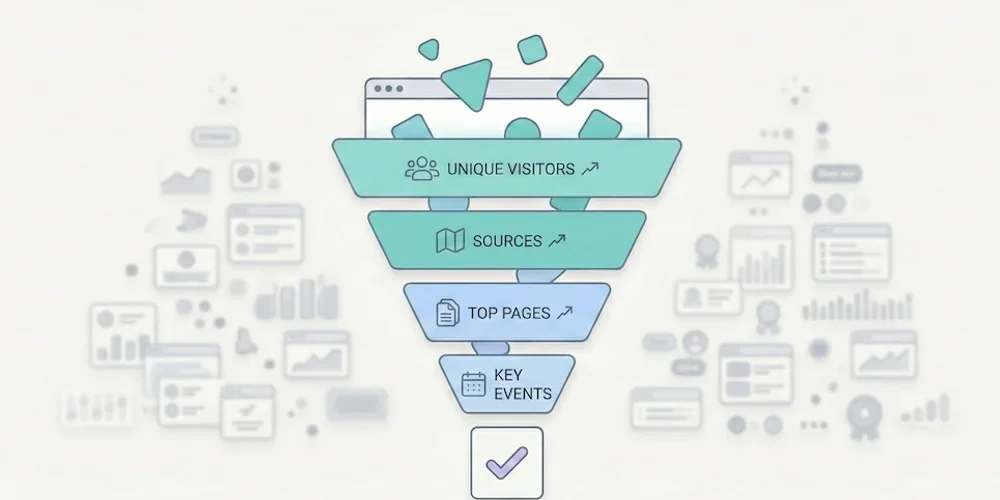
The "Less is More" Method: 5 Metrics Are All You Need to Run a Profitable Website
Opening your web analytics tool often feels like popping the hood of a modern car without being a mechanic: you can see it's complex, you hope everything's working, but you have no idea what to touch. That's normal. According to Eurostat, 44% of Europeans lack basic digital skills. It's not your fault if you can't make sense of your traffic reports — it's because the tools are designed for experts, not for business owners. → Source: Eurostat – Digital skills of individuals The good news? To grow your business, you don't need to become an expert. You just need to apply the Pareto principle: ignore 80% of the noise and focus on the 20% of metrics that impact your revenue.1. Why Measuring Everything Means Measuring Nothing The classic SMB mistake is thinking: "I'll record everything just in case." The result is a "Christmas tree" dashboard: bounce rate, average session duration, pages per visit, user flows, predefined events, real-time reports… When everything blinks, nothing matters. We've detailed this phenomenon in our article on data obesity: information overload produces paralysis, not decisions. Choice overload applies to metrics too. To adopt a frugal approach, filter your data with one question: "If this number changed tomorrow, would I change how I work?"If the answer is no → it's noise. Remove it from your dashboard. If the answer is yes → it's a KPI (Key Performance Indicator). Keep it.When you apply this filter rigorously, nearly every SMB arrives at the same 5 metrics. No more, no less.2. The Only 5 Metrics You Need Here's the ideal setup for a brochure site, a blog, or a small online store. These 5 KPIs cover the entire visitor journey: from discovery to conversion. KPI 1 — Unique Visitors (Your Real Audience) The number of distinct people who visited your site over a given period (not clicks, not "sessions" — people).The business question: "Is my audience growing? Are more people finding me?" Reading frequency: Weekly. Compare week over week to see the trend, not day by day (daily fluctuations are noise). The trap: Don't confuse "unique visitors" and "pageviews." If one person visits 10 pages, that's 1 visitor and 10 pageviews. It's the visitor count that measures your actual reach.KPI 2 — Traffic Sources (Where Do They Come From?) How your audience breaks down by channel: Google (SEO), social media, direct access, email, paid ads, referrals.The business question: "Where should I invest my time and money?" Why it's critical: According to Eurostat, 60% of EU businesses are on social media, but many are flying blind. This metric tells you whether the hours spent on LinkedIn, Instagram, or TikTok are actually paying off — or if SEO is doing the real work. The trap: Make sure your campaigns are tagged with UTMs. Without UTMs, traffic from your newsletters, social posts, or ad campaigns gets bucketed into "Direct" or "Referral," which corrupts your analysis.→ Source: Eurostat – Social media use by enterprises KPI 3 — Top 5 Pages (What Actually Interests People) Your 5 most visited pages, ranked by unique visitors.The business question: "What topics attract my prospects?" What you often discover: The "Service A" page (the one you spent weeks on) never gets read, while an old blog post or FAQ page attracts everyone. These surprises are gold: they tell you what your market actually wants to know. How to act: If a page attracts lots of traffic but doesn't convert, add a clear call-to-action. If a page converts well but has little traffic, invest in promotion (SEO, social, paid).KPI 4 — Key Events (Engagement) The concrete actions visitors take: clicking "Call," downloading a PDF, watching a video, adding to cart.The business question: "Is my site engaging, or are people just passing through?" Why this beats "engagement rate": GA4's automatic metrics (engagement rate, session duration) are ambiguous and hard to interpret. An explicit event ("clicked the Quote button") is crystal clear and directly tied to business value. How to set up: Most frugal analytics tools let you define custom events in a few clicks, with no Tag Manager required. Identify the 3-5 actions that matter on your site and track only those.KPI 5 — Conversions (The Bottom Line) The number of forms submitted, calls triggered, or sales completed. This is the only number that matters at the end of the month.The business question: "How much revenue did this site generate this week?" The trap: Many sites don't track conversions at all. The contact form sends an email, but nobody counts how many forms are submitted per week. Without this data, you can't tell whether your site is a profitable investment or a cost center. How to set up: Define a "goal" in your analytics tool (form submission, "Buy" button click, confirmation page visit). It's the most important metric and often the simplest to implement.3. The Minimalist Dashboard Here's what your weekly review should look like. One table, 5 rows, 2 minutes of reading.KPI This Week Last Week TrendUnique visitors 1,230 1,050 ✅ +17%Top source Google (62%) Google (58%) ✅ SEO growingTop page /blog/gdpr-article /services ℹ️ New content performingKey events 45 "Quote" clicks 38 ✅ +18%Conversions (forms) 12 9 ✅ +33%Reading time: 30 seconds. Possible decision: "SEO and blog content are working — keep going. Form submissions are up — no need to change the contact page." That's it. No charts to interpret, no segments to configure. If you're a freelancer or agency, this is also the perfect basis for effective client reporting.4. Quick Diagnosis: How to Act This diagnostic table covers the most common scenarios. Find your situation and apply the recommendation.Scenario Diagnosis ActionLots of visitors (#1) but few conversions (#5) Your offer isn't clear, or your form is off-putting Simplify the contact page (fewer fields). Add a visible CTA on high-traffic pages.Few visitors (#1) but high conversion rate (#5) Your site converts well, but nobody can find it Invest in acquisition: SEO (content), targeted ads, or social media. The site is ready.High social traffic (#2) but few conversions (#5) You're attracting "tourists" who aren't your target Shift your social content strategy to attract prospects, not just curious browsers. Or accept that social serves awareness, not conversion.Top page = homepage (#3) and nothing else Visitors aren't going deeper Your navigation is confusing or your internal content isn't compelling. Improve internal linking and CTAs.Many "Quote" clicks (#4) but few form submissions (#5) The form is too long or broken Test the form yourself on mobile. Reduce the number of fields. Check it works across browsers.Traffic dropped for 2 weeks Technical or seasonal issue Check Search Console (indexing errors?). Check your analytics script (still installed?). If everything's fine, it's likely seasonal — compare to the previous year.One blog post dominates the Top 5 (#3) That topic interests your market Create more content on this subject. Add a relevant CTA to that article. Offer a lead magnet (PDF, newsletter) to readers.5. Metrics to Ignore (and Why) For completeness, here are the indicators you can safely remove from your dashboard. Bounce rate. If a visitor arrives on your contact page, finds your phone number in 10 seconds, and calls, they "bounced" — but that's a total success. Bounce rate measures a technical behavior, not a business outcome. Since GA4, it's been replaced by "engagement rate," an equally ambiguous metric. Average session duration. A visitor who spends 8 minutes on your site — are they fascinated or lost? Impossible to tell without context. This metric is a classic vanity metric. Pages per session. Same problem. More pages = better engagement? Or confusing navigation? The number alone tells you nothing. Demographic data (age, gender). In many analytics stacks, these data points rely on profiling or advertising features that trigger consent and privacy review. And in the vast majority of cases, they do not change an SMB's business decisions.6. Reading Frequency: The Discipline of Simplicity Running a website shouldn't take more than 15 minutes per week.Weekly: Check your 5 KPIs. Identify one trend and one action. Monthly: Compare this month to last month. Prepare the client report if you're at an agency. Quarterly: Zoom out. Are traffic sources shifting? Are conversions trending up? Should you adjust strategy?The temptation to avoid: checking stats every day. Daily fluctuations are statistical noise. 200 visitors on Monday and 150 on Tuesday means nothing. Only the weekly or monthly trend matters.Conclusion: The Discipline of Simplicity Go back to the fundamentals. Print this list of 5 KPIs, configure your tool to show only these, and ignore the rest. If your current tool can't deliver these 5 answers in under 30 seconds, it might be time for a change. Our analytics tool comparison can help you choose. Analytics shouldn't be a chore. It's a decision tool — and like any good tool, it should be simple to use.FAQ: Essential Metrics Should I track the "Bounce Rate"? No. If a visitor arrives, finds your phone number in 10 seconds, and calls, they "bounced" technically — but it's a business success. Bounce rate doesn't distinguish a satisfied visitor from a disappointed one. Focus on conversions (KPI #5), which measure the actual result. How often should I check my stats? Once a week, 10-15 minutes maximum. Checking every day creates unnecessary anxiety over fluctuations that have no statistical significance. Trends are read over weeks, not days. Are these 5 KPIs enough for e-commerce? For a small e-commerce site (under 500 orders/month), yes. KPI #5 (Conversions) becomes "Number of sales + Revenue." For larger e-commerce with multi-channel attribution needs, you'll want additional metrics (average order value, cart abandonment rate, cost per acquisition by channel). How do I set up conversion tracking without Tag Manager? Most frugal analytics tools offer built-in event tracking: you define a CSS selector (e.g., "click on the .btn-contact button") directly in the interface, with no code or Tag Manager required. Check your tool's documentation for the exact procedure. My boss wants a report with 20 metrics. How do I convince them? Send them the 5 KPI table for 4 weeks, adding a "Recommendation of the Week" line based on these metrics alone. When they realize they make better decisions with 5 metrics than with 20, the debate is over. The ultimate test: ask them to name the 20 metrics from memory. If they can't, they don't need them.