Tag: Frugal analytics
All blog posts with this tag.
- 28 Feb, 2026
AI traffic: how to measure visits that ChatGPT, Perplexity and Claude send to your website
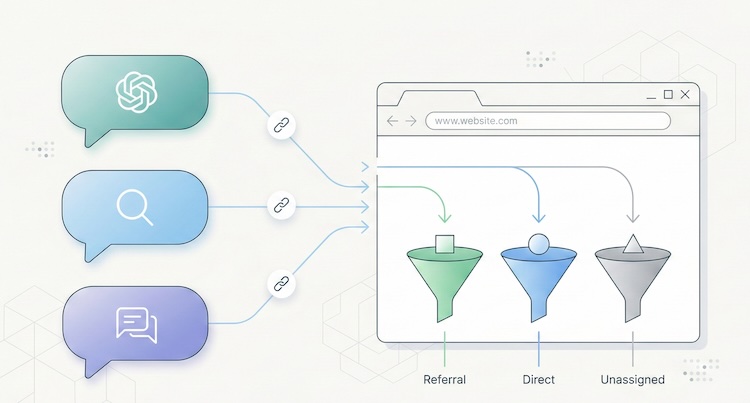
Something has shifted in the way people find your website. And chances are, you have no idea it's happening. Since late 2024, conversational AI platforms have moved beyond answering questions. They now cite sources, insert links, and send real visitors to real websites. ChatGPT, Perplexity, Claude, Gemini, Copilot: these tools are becoming a genuine discovery channel, one that rivals traditional search engines in the quality of traffic it delivers. The catch? Most analytics tools don't separate this traffic. It gets lumped into "referral," blends into "direct," or vanishes from reports entirely. You may already have visitors arriving through a ChatGPT recommendation, and your dashboard won't show it. This article gives you the full playbook: how to spot AI traffic, why it matters, and what to do about it. A new discovery channel, growing fast The raw numbers are still modest. But the trajectory is hard to ignore. A study by SE Ranking covering nearly 64,000 websites across 250 countries (January-April 2025) found that ChatGPT alone accounts for 78% of all AI referral traffic worldwide. Perplexity comes in at roughly 15%, Gemini at 6.4%. Claude and DeepSeek share the remainder at under 1% each, though both show compelling growth curves. (Source: SE Ranking, "AI Traffic in 2025") A separate analysis by Conductor, reported by Search Engine Land, confirms this hierarchy across 13,770 domains and 3.3 billion sessions: AI traffic averages about 1% of total site visits, with ChatGPT generating 87% of it. (Source: Search Engine Land, Nov. 2025) One percent sounds negligible. Two things make it anything but. The growth rate is staggering. Between January and April 2025, ChatGPT's share of global internet traffic doubled, from 0.08% to 0.16%. Year-over-year growth in AI referral traffic exceeds 500% in some segments. And Gartner projects a 25% decline in traditional search volume by late 2026, driven by conversational AI agents. The traffic quality is exceptional. Visitors arriving from AI platforms spend an average of 9 to 10 minutes per session on the sites they visit, compared to 3 to 4 minutes for organic search. SE Ranking found that Claude-referred sessions in the EU average a remarkable 67 minutes, suggesting extraordinarily deep engagement. AI referral traffic converts at roughly 1.5x the rate of social traffic, according to aggregated industry data. The logic is straightforward: a user who clicks a link inside an AI response has already asked a specific question, received context, and chosen to visit your site from among the cited sources. Their intent is pre-qualified. They know why they're coming. Why your analytics can't see it If AI traffic is this valuable, why doesn't it show up clearly in your reports? Three technical issues create this blind spot. The missing referrer problem When someone clicks a link in Perplexity from a web browser, the HTTP Referer header typically passes perplexity.ai as the source. Your analytics tool can then classify the visit as a referral from Perplexity. But this mechanism frequently fails. According to SparkToro, 60% of AI-driven sessions lack a usable referrer header. The reasons are varied: mobile apps (ChatGPT on iOS, Copilot in Windows) open links in internal webviews that don't pass referrer data. Some AI agents prefetch or preview pages without triggering the analytics script. And ChatGPT's built-in Atlas browser, launched in late 2025, behaves differently from standard browsers altogether. (Source: MarTech, Nov. 2025) The result: a significant portion of AI traffic falls into the "direct" or "unassigned" bucket in your analytics, invisible and unattributed. GA4's default classification Google Analytics 4 treats AI traffic as "referral," the same category as a link from Facebook, a forum, or a directory listing. There is no dedicated "AI" channel in GA4's default setup. Google has signaled plans to add one, but implementation hasn't materialized yet. In practice, if you open your acquisition report in GA4 without custom configuration, ChatGPT traffic is buried among dozens of other referral sources. For a site receiving hundreds of different referrers, spotting chatgpt.com or perplexity.ai requires knowing what to look for. The bot-vs-human confusion AI platforms interact with your site in two fundamentally different ways. The first is referral traffic: a human clicks a link in an AI response and lands on your page. This is real traffic with a real visitor. The second is crawling: AI platform bots (GPTBot for OpenAI, PerplexityBot, ClaudeBot, and others) visit your site to index content and feed their models. This crawl traffic is not useful audience data. It's data harvesting. GA4 automatically filters known bots, but the list isn't comprehensive. Some newer AI bots slip through, while some legitimate human visitors from AI tools get incorrectly filtered. Cloudflare has observed crawl-to-referral ratios as high as 700:1 for Perplexity, which gives a sense of how much harvesting activity exists relative to actual human visits. (Source: Digiday, Dec. 2025) How to identify AI traffic in your tools Two approaches work, depending on what you're using. In GA4: create a dedicated "AI Traffic" channel The recommended method is to build a custom channel group that aggregates all known AI sources. Here's the process:In GA4, go to Admin > Data Settings > Channel Groups. Click the default channel group, then "Copy" to create a new one. Add a channel called "AI Traffic." Set the rule: Match type = "matches regex", then paste this pattern:(chatgpt\.com|chat\.openai\.com|perplexity\.ai|claude\.ai|gemini\.google\.com|copilot\.microsoft\.com|deepseek\.com|meta\.ai)Drag your "AI Traffic" channel above the default "Referral" channel in the priority order. This is critical: GA4 evaluates rules top-down, and if "AI Traffic" sits below "Referral," visits will be classified as referral before reaching your rule.This setup only applies to new data (no retroactive effect). Allow a few days before results appear. For a one-time analysis of historical data, create an Explore report with a filter on "Session source" using the same regex. (Source: MarTech, Nov. 2025) In a lightweight analytics tool (Plausible, Fathom, etc.) This is where a well-designed simple tool outperforms a complex one. In Plausible, the "Sources" report displays every identified referrer directly. If chatgpt.com or perplexity.ai appears as a source, you see it instantly, without setup, without regex, without channel groups. Click the source to filter the entire dashboard by that origin and analyze entry pages, time on site, and triggered events. Plausible documented its own experience: in 2024, the Plausible blog saw a 2,200% surge in AI referral traffic within months, all identifiable from their standard dashboard with zero configuration. (Source: Plausible, Dec. 2024) This is a textbook case where the frugal analytics philosophy pays off: when a tool is designed to surface essential data without layers of configuration, emerging signals become visible immediately. A tool like GA4, which requires technical expertise for every new traffic source, creates a systematic delay in trend detection. For a detailed breakdown of how these tools compare, see our Plausible vs Fathom vs Simple Analytics comparison. AI referral traffic vs AI crawling: two different things A common mistake is conflating referral traffic (humans clicking) with crawling (bots scraping). They deserve separate attention because they raise different questions. AI referral traffic is an opportunity. It represents a qualified, pre-informed visitor arriving with intent. Measuring it lets you optimize landing pages, adapt content, and understand how AI platforms perceive your site. AI crawling is a governance question. Bots like GPTBot, PerplexityBot, and ClaudeBot visit your site to train their models or answer user queries in real time. Some do so aggressively: Cloudflare found that GoogleBot's crawl volume (which also feeds Gemini) dwarfs that of all other AI bots combined. You can control crawling through your robots.txt file: User-agent: GPTBot Disallow: /User-agent: PerplexityBot Disallow: /User-agent: ClaudeBot Disallow: /But beware the paradox: blocking the crawl can reduce your referral traffic. If an AI can't index your content, it can't recommend it to users. This is a trade-off to make deliberately. An emerging approach uses an llms.txt file (a Markdown file placed at your site's root) to guide AI platforms toward the content you want to make accessible, without blocking all crawling. Anthropic (the company behind Claude) uses this mechanism on its own site. How to get cited by AI platforms Understanding AI traffic also means understanding what triggers it. AI platforms don't cite sites randomly. Several factors drive citations. Content structure matters. Pages with clear heading hierarchies (H2, H3, lists) that directly answer specific questions are roughly 40% more likely to be cited, according to analysis from Superprompt. Structured FAQ sections are particularly effective: they match the question-and-answer format of AI interactions exactly. Freshness is a strong signal. Unlike Google, which tends to favor established, older content, AI platforms prefer recently updated material. Pages updated within the last 30 days receive roughly 3x more AI citations on average. Original data attracts citations. Data tables, proprietary statistics, and exclusive benchmarks get cited about 4x more than generic content. This is another argument for precise, data-driven KPIs over vanity metrics. Traditional SEO remains the foundation. Multiple converging studies suggest that 77% of AI optimization stems directly from strong conventional SEO. Sites ranking in Google's top 10 are significantly more likely to be cited by LLMs. SEO doesn't depend on Google Analytics, but it remains the bedrock on which AI visibility is built. What this means for choosing an analytics tool AI traffic exposes a structural weakness in complex analytics platforms: their inability to surface an emerging signal without prior configuration. With GA4, you need to create a channel group, write a regex, update it regularly (new AI tools launch every month), and accept that the data won't be retroactive. It's doable, but it demands technical expertise that most small business owners and freelancers simply don't have. With a well-designed lightweight analytics tool, AI referrers appear naturally in the sources report, right alongside Google, LinkedIn, or Twitter. No setup, no regex, no blind spots. That's the core principle of analytical sobriety: collect less data, but make every data point immediately readable. AI traffic is not a passing phenomenon. It's the early stage of a structural shift in how people discover content online. The sites measuring it today will have a competitive edge tomorrow, not because the volume is enormous, but because the quality of this traffic makes it a powerful conversion lever. The question is no longer whether AI platforms send traffic to your site. It's whether your measurement tool shows it to you.Frequently asked questions What percentage of my traffic comes from AI? On average, about 1% of a site's total traffic originates from AI platforms (ChatGPT, Perplexity, Gemini, etc.), according to Conductor's November 2025 study of 13,770 domains. This figure can be higher for low-traffic sites or niche B2B properties. Critically, that 1% only reflects identifiable traffic: SparkToro found that 60% of AI sessions lack a referrer header and fall into "direct," meaning actual AI traffic is likely 2 to 3 times higher than what your dashboard shows. How do I see ChatGPT traffic in Google Analytics 4? GA4 doesn't yet have a native "AI" channel. You need to create a custom channel group: go to Admin > Data Settings > Channel Groups, add an "AI Traffic" channel with a regex rule covering AI domains (chatgpt.com, perplexity.ai, claude.ai, gemini.google.com, copilot.microsoft.com). Place it above the "Referral" channel in the hierarchy. Data will only be collected from the date you create the channel. Should I block AI bots with robots.txt? It's a trade-off. Blocking AI bots (GPTBot, PerplexityBot, ClaudeBot) via robots.txt prevents your content from being indexed by these platforms, which may reduce citations and referral traffic. On the other hand, not blocking means your content feeds AI model training, raising intellectual property and consent questions. A middle-ground approach uses an llms.txt file to guide AI platforms toward the content you want them to access. Can cookieless analytics detect AI traffic? Yes, and often better than GA4. Cookieless tools like Plausible, Fathom, or Simple Analytics display AI referrers directly in their sources report, with no configuration needed. The absence of setup layers (channel groups, regex, filters) means new traffic sources are visible immediately. It's a structural advantage of the frugal approach for detecting emerging signals. How do I optimize my content to get cited by ChatGPT or Perplexity? Five key levers: structure content with clear headings (H2/H3) and FAQ sections; keep content fresh (AI platforms favor recency); produce original data (tables, statistics, benchmarks); maintain strong traditional SEO (sites ranking well in Google are cited more by AI); and consider an llms.txt file to make your structured content easily accessible to AI crawlers. Pages that directly answer specific questions in a clear format consistently earn the most citations.Data verified February 2026. AI traffic market shares are evolving rapidly. This article will be updated every six months.
- 07 Feb, 2026
Plausible vs Fathom vs Simple Analytics: the 2026 privacy-first analytics comparison
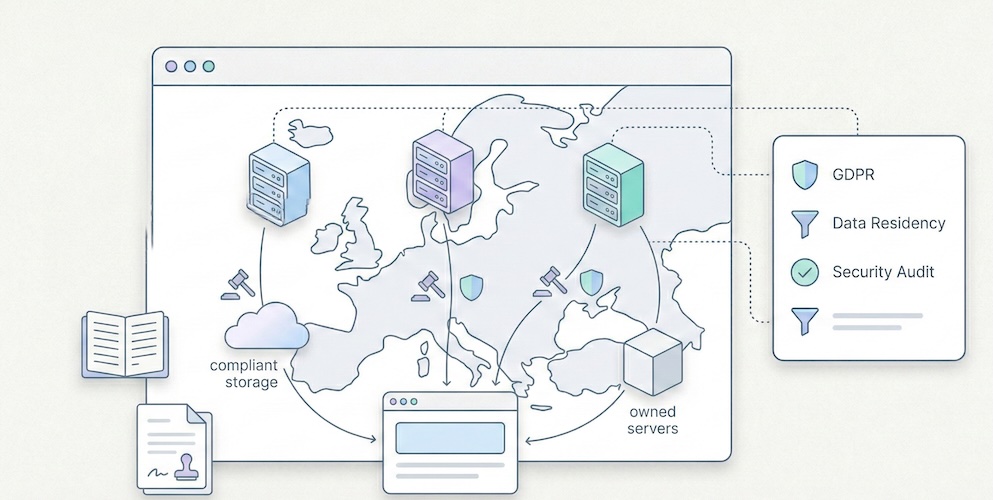
You have decided to leave Google Analytics behind. You understand that "free" comes at a real cost, that GA4's complexity exceeds your actual needs, and that GDPR compliance deserves more than a poorly configured cookie banner. Good. You are part of a fast-growing movement. Now comes the hard part: among the privacy-first alternatives, which one actually fits your situation? Three names keep coming up: Plausible, Fathom and Simple Analytics. They are the most cited, most mature and most credible options in the "frugal analytics" segment. But their differences, often invisible in marketing copy, have very real consequences on your bill, your compliance posture and your daily workflow. This comparison does not aim to crown a universal winner. It provides the factual elements you need to make an informed choice. We verified pricing on official pages, documented actual features, and added two outsiders often overlooked in these discussions: Pirsch and Umami. What these three solutions share Before diving into differences, let us establish common ground. Plausible, Fathom and Simple Analytics share a foundation that radically separates them from Google Analytics: None of them use cookies by default. They do not build advertising profiles. Their scripts weigh less than 5 KB (compared to roughly 45 KB for GA4, according to HTTP Archive measurements). They display all essential metrics on a single page, with no nested menus and no training required. On the legal front, all three claim GDPR compliance without a cookie banner. In practice, the strength of that claim varies, and that is one of the points we will detail below. Finally, all three are independent companies with no major venture capital, funded by their subscriptions. That is a strong signal of long-term sustainability. Real pricing, compared side by side The entry price does not tell the full story. What matters is the cost at comparable volume. Here are the rates verified on each solution's official page as of February 2026. Monthly pricing grid (USD, monthly billing)Monthly volume Plausible (Starter) Fathom Simple Analytics (Simple)10,000 pageviews $9 $15 $15100,000 pageviews $9 (same tier) $15 ~$19200,000 pageviews $14 (Growth) $25 ~$29500,000 pageviews ~$19 (Business) $45 ~$491,000,000 pageviews Custom $60 CustomSources: plausible.io/pricing, usefathom.com/pricing, simpleanalytics.com/pricing. Rates verified February 2026. Key takeaways: Plausible is the cheapest option at low volume ($9/month for 10k pageviews). But pricing rises quickly: the Growth plan at $14 and the Business plan at $19 unlock additional features (more sites, team access, funnels). Fathom offers a single feature set across all tiers, with pricing based solely on pageview volume, starting at $15/month. No free plan. No discounts. Their stated philosophy: the same price for everyone, no promotions ever. Simple Analytics offers a free plan (limited to 30 days of history) and a Simple plan at $15/month. The Team plan ($40/month) adds collaboration and API access. Their billing adjusts automatically based on the three-month rolling average of your traffic. Two outsiders worth knowing Pirsch (based in Germany) offers one of the lowest entry prices on the market: $6/month for 10,000 pageviews, $10/month for 100,000 pageviews. It includes white-labelling and up to 50 domains. Source: pirsch.io/pricing. Umami is open source and fully self-hostable at no cost. It is the only solution in this comparison with zero licensing fees, provided you manage hosting yourself. For those who prefer a managed service, Umami Cloud starts at $9/month. Source: umami.is. Data hosting and location This is the critical point for GDPR compliance. The question is not just "where are the servers?" but "who operates the infrastructure and under which jurisdiction?"Solution Data location Infrastructure Legal entityPlausible European Union (Hetzner, Germany) Owned by European companies Plausible Insights OÜ (Estonia)Fathom Servers in Germany (via AWS EU) Amazon Web Services Conva Ventures Inc. (Canada)Simple Analytics Netherlands European-owned servers Simple Analytics B.V. (Netherlands)Pirsch Germany German servers Emvi Software GmbH (Germany)Umami (Cloud) Variable by plan Vercel/Cloud Umami Software Inc. (USA)Plausible emphasises that its entire infrastructure is operated by European companies. As of early 2026, they report over 16,000 paying subscribers, including 600+ enterprise accounts. Source: plausible.io/enterprise-web-analytics. Fathom uses AWS in the EU region (Frankfurt), but the legal entity is Canadian. Canada benefits from an adequacy decision by the European Commission, which simplifies data transfers. However, for organisations with strict data sovereignty requirements, this is not equivalent to a fully European entity. Simple Analytics is the most explicit about data location: data exclusively in the Netherlands, proprietary servers, no US-based subprocessors. This is the strongest argument for organisations subject to strict sovereignty policies. Pirsch, based and hosted in Germany, offers a comparable alternative in terms of European data localisation. The privacy question All three solutions call themselves "privacy-first". But the technical details matter. Plausible uses a hash of the visitor's IP address combined with the User-Agent and a daily salt to identify unique visitors. The raw IP address is never stored. The hash is renewed daily, which prevents long-term tracking. This is a form of pseudonymisation. Fathom uses a similar hashing approach but adds a routing layer through what they call "unique signatures". Like Plausible, the raw IP is not retained. Simple Analytics stands apart by claiming to collect no personal data whatsoever, including in hashed form. No IP hash, no User-Agent recorded. Their unique visitor counting relies on a different mechanism based on referrers and URLs. This is the most radical approach to data minimisation. This difference has a direct consequence: Simple Analytics can legitimately claim not to process personal data within the meaning of the GDPR, which strengthens the case for consent exemption. For Plausible and Fathom, the question is more nuanced: a hashed IP, even if non-reversible, could be considered pseudonymised data. In practice, data protection authorities (including the CNIL in France and the ICO in the UK) tend to accept these approaches if they meet exemption criteria (no cross-referencing, limited retention, strictly statistical purpose). For more on consent exemption conditions, see our dedicated article: Audience measurement, GDPR and cookie banner exemption. Features: what each one does (and does not do) All these solutions have chosen simplicity. But "simple" does not mean identical. Here are the differences that matter in daily use. Feature comparison tableFeature Plausible Fathom Simple AnalyticsSingle-page dashboard Yes Yes YesCustom events Yes Yes YesGoals / Conversions Yes (advanced funnels) Yes YesMulti-step funnels Yes (Business plan) No NoGoogle Search Console integration Yes No NoE-commerce tracking (revenue) Yes (Business plan) Yes NoGA4 data import Yes Yes NoExport API Yes Yes Yes (Team plan)Email reports Yes Yes YesDashboard sharing Yes (public/private link) Yes (shareable link) YesMulti-site 1 (Starter) / 3+ (Growth) 50 included 5 (Free) / 10+ (Simple)Team members 1 (Starter) / 3 (Growth) 1 (base plan) 1 (Simple) / 2+ (Team)Data retention 3-5 years by plan Unlimited 30 days (Free) / 3-5 yearsOpen source Yes (Community Edition) No NoSelf-hosting Yes (CE, reduced features) No NoWhite-label No (except Enterprise) No NoKey highlights: Plausible is the most feature-rich of the three. The Google Search Console integration is a significant advantage for SEO: it lets you see search queries directly in the analytics dashboard, without switching tools. Multi-step funnels (Business plan) bring it closer to more advanced tools. And being open source reassures organisations that want to audit the code. Fathom stands out with its unlimited data retention policy and the inclusion of 50 sites from the base plan. For a freelancer or agency managing many low-traffic sites, this is a real economic advantage. Their infrastructure is built for scale: they claim to handle sites with one billion pageviews per month. Simple Analytics bets everything on simplicity and absolute privacy. Their "Mini Websites" feature lets you see the exact pages that referred your site (for example, a specific tweet), which other solutions do not offer. Their built-in AI tool lets you query your analytics in natural language. Script weight and performance impact For a website, every kilobyte of JavaScript affects loading time and Core Web Vitals. This is a criterion that should not be overlooked, especially if SEO is a priority.Solution Script weight Estimated impactPlausible < 1 KB NegligibleFathom ~2 KB NegligibleSimple Analytics ~6 KB Very lowPirsch < 1 KB (or server-side) Negligible to zeroGoogle Analytics (GA4) ~45 KB Measurable (LCP, FID)All solutions in this comparison have a negligible performance impact, especially compared to GA4. The advantage goes to Plausible and Pirsch, whose scripts are lightest. Pirsch also offers server-side integration (via API or SDK), which eliminates client-side JavaScript entirely. To understand in detail why analytics script weight matters for SEO, see our article: Myth: you need Google Analytics for SEO. Which tool for which profile? Rather than declaring a winner, here is a decision guide by real-world situation. You are an indie developer or maker with a SaaS You manage one or two projects, traffic is moderate (< 100k pageviews/month), and you want a tool that installs in 30 seconds. Best pick: Plausible (Starter at $9/month) for the best value at the first tier, open source, and Search Console integration. Alternative: Pirsch ($6/month) if budget is very tight, or Umami (free) if you are comfortable with self-hosting. You are a freelancer or agency managing 10-30 client sites Volume per site is low, but the number of sites is high. You need separate dashboards and simple reporting. Best pick: Fathom ($15/month, 50 sites included). No competitor includes as many sites in the base plan. Unlimited data retention means you never lose client history. Alternative: Pirsch, which also offers 50 domains from the first plan. You are an SME with strict compliance obligations (DPO, processing register) The question is not price but demonstrating compliance to your DPO or supervisory authority. Best pick: Simple Analytics, for the "zero personal data" argument. This is the easiest position to defend in a data processing register. Alternative: Plausible, whose 100% European hosting on European-owned infrastructure (not AWS) strengthens the sovereignty case. You are an organisation that needs funnels, e-commerce tracking or advanced analysis You have outgrown a minimalist dashboard. You need multi-step conversion tracking. Best pick: Plausible (Business plan). It is the only solution in this comparison that offers advanced funnels and e-commerce revenue tracking while staying within the privacy-first paradigm. For a broader view including GA4 and Matomo, see our general comparison: Google Analytics, Matomo and frugal analytics: a 2026 guide to choosing. Total cost: beyond the sticker price The monthly fee is only part of the equation. Here are the hidden costs (or avoided costs) to factor into your calculation. Costs avoided compared to GA4: no training required (GA4 often requires days of training), no consultant for configuration, no Consent Management Platform to maintain if you qualify for the consent exemption, no legal risk from data transfers to the United States. Migration cost: Plausible and Fathom let you import Google Analytics history. Simple Analytics does not. If historical continuity matters to you, this is a consideration. Self-hosting cost (Plausible CE, Umami): free in licensing, but factor in maintenance time, updates, and server cost (roughly $5 to $20/month for a VPS depending on volume). And Plausible Community Edition does not include all cloud features (funnels, e-commerce, Sites API). To go deeper on the real cost of analytics, our article on data obesity explains the economic consequences of over-collection: Data obesity: why your SME does not need Big Data. Final summary tableCriterion Plausible Fathom Simple Analytics PirschEntry price $9/month $15/month Free (limited) $6/monthEntry volume 10k pvs 100k pvs Unlimited (Free) 10k pvsSites included 1-10+ 50 5-20+ 50Data location EU (Hetzner) EU (AWS Frankfurt) Netherlands GermanyLegal entity Estonia (EU) Canada Netherlands (EU) Germany (EU)IP hash Yes (daily) Yes No YesOpen source Yes (CE) No No Yes (partial)Retention 3-5 years Unlimited 30d - 5 years UnspecifiedGA4 import Yes Yes No YesFunnels Yes (Business) No No Yes (basic)GSC integration Yes No No YesScript < 1 KB ~2 KB ~6 KB < 1 KBFAQ Plausible, Fathom or Simple Analytics: which is cheapest? It depends on volume. For under 10,000 pageviews per month, Pirsch is cheapest ($6/month). Among the three main solutions, Plausible is most affordable at low volume ($9/month for 10k pvs). At 100,000 pageviews, Plausible and Fathom converge around $15/month. Beyond that, Plausible generally remains cheaper, but its features are spread across multiple plans (Starter, Growth, Business). Is Plausible truly GDPR compliant without a cookie banner? Plausible is designed to work without cookies. Their identification method uses a daily-rotated IP hash, with no raw address stored. Under the criteria set by the CNIL for consent exemption (and similar guidance from the ICO and other European DPAs), this approach is accepted when strictly limited to audience measurement with no cross-referencing with other processing. However, the "personal data" status of an IP hash is subject to ongoing legal debate. The prudent approach is to consult your DPO and document your analysis in your processing register. Is Fathom a good fit for agencies managing many client sites? Yes, this is one of its strongest points. Fathom includes up to 50 sites in every plan, with separate dashboards. Unlimited data retention and automated email reports make it well suited for multi-client management. However, Fathom does not offer white-labelling or per-user permission management on the standard plan. What is the difference between Plausible Cloud and Plausible Community Edition? Plausible Cloud is the hosted, managed service run by the Plausible team (from $9/month). Plausible Community Edition (CE) is the open-source version, self-hostable for free. But CE does not include all cloud features: marketing funnels, e-commerce revenue tracking and the Sites API are excluded. CE is suited for developers who want basic analytics on their own server. Are there solutions even cheaper than these three? Yes. Umami is entirely free to self-host (open source, MIT licence). Pirsch starts at $6/month. And for very small sites, Simple Analytics offers a free plan with 30 days of retention. Beyond these options, it is also worth considering that "cheapest" is not always most economical: ease of installation, infrastructure reliability and company sustainability have real value. A tool that disappears or locks your dashboard when you exceed your quota costs more than a slightly higher subscription.Last updated: February 2026. Pricing and features verified on official solution websites. This article will be updated at minimum every six months.

- 05 Jan, 2026
Stop Sending PDF Reports Your Clients Don't Read
It's the end of the month. For every freelancer or project manager at an agency, it's time for the dreaded ritual: monthly reporting. You export PDFs from Google Analytics, take screenshots, add three comments in an email, and hit send. Time spent: 2 to 4 hours. The reality? Your client opens the PDF, glances at the first chart, has no idea why the "Engagement Rate" dropped by 0.4%, and closes the document. You've lost half a day. And they didn't perceive the value of your work.1. The Problem with "Accounting-Style" Reports Why it doesn't work The classic mistake is trying to prove you've been working by showing lots of numbers. "Look, there are 45 pages of charts, so clearly I've been busy." But your client (often an SMB owner) isn't paying you for charts. They're paying for results and peace of mind. Sending them a complex report is like handing the problem back to them. They don't know what to do with it, and they end up questioning your usefulness. What the research says According to HubSpot's surveys on agency practices, reporting is consistently cited as one of the most time-consuming and least client-valued tasks. The paradox is cruel: the more time you spend on the report, the less it gets read — because its very length discourages reading. Research by Databox among marketing professionals shows that most clients want short, results-oriented reporting, not exhaustive audits. The most satisfied clients are those who receive a summary of 5 to 10 metrics maximum, accompanied by a clear recommendation. → Sources: HubSpot – State of Marketing Report, Databox – Reporting Best Practices2. The Method: Less Data, More Story For a report to be read, understood, and appreciated, it needs to tell a simple story in 4 acts. This is Data Storytelling applied to client reporting. Act 1 — The "One-Liner" (The Weather Report) Start your reporting email with a single sentence that summarizes the month. Your client should understand the trend without opening any attachment.Bad: "Here are this month's statistics." Good: "Record month for traffic (+20%), but slight dip in qualified leads — we know why and we're fixing it."This sentence is the ultimate test. If you can't summarize the month in one line, you haven't found the insight yet. Go back to the numbers. Act 2 — The 3 Macro KPIs (The Dashboard) Don't include everything. Only show the goals defined at the start of the contract, and report on progress. Three metrics are enough in the vast majority of cases. For a brochure site or blog, these are typically the 5 essential KPIs — but in client reporting, condense further: total traffic, number of leads/sales, and the "star metric" of the month (the one that moved the most, for better or worse). Present these numbers with comparison to the previous month and the target. A 3-row table beats a 40-page PDF every time.Metric Target Last Month This Month TrendUnique visitors 5,000 4,200 5,100 ✅ +21%Form submissions 30 28 22 ⚠️ -21%Cost per lead (if Ads) < $15 $12 $18 ❌ +50%Act 3 — "What We Did" → "What It Produced" This is where you sell your work — but by connecting it to results, not listing tasks.Bad: "We published 4 blog posts, optimized 3 pages, and adjusted keywords." Good: "The GDPR article (published on the 15th) generated 450 qualified visits from LinkedIn → 8 form submissions. The 3 optimized pages moved from page 3 to page 1 for their target keywords."The principle is to systematically link the action to the impact. If an action hasn't produced measurable results yet, say so honestly ("impact expected in 4-6 weeks, we're monitoring"). Act 4 — The Plan for Next Month This is the most important part — and the most often forgotten. A report shouldn't just look in the rearview mirror. It should sell what's next."Since LinkedIn traffic is growing (+40% over 2 months), next month we'll double the posting frequency." "The drop in leads is coming from a form that's too long (5 fields instead of 3). We're simplifying it next week."This final act reassures your client about two things: you understand what's happening, and you have a plan. That's what builds loyalty — far more than a 45-page PDF.3. Before/After: Same Month, Two Reports To make the method concrete, here's the same period presented two ways. ❌ The "Accounting" Report (What You Might Be Doing)3-line email ("Here's this month's report, let me know if you have questions"). 38-page PDF attached, exported from GA4. Uncommented charts: bounce rate, session duration, user flows, demographic reports. Production time: 3.5 hours. Probability the client reads it fully: ~5%. Client perception: "I don't understand, but I suppose things are fine."✅ The "Frugal" Report (The 4-Act Method)Structured email of 15 lines maximum (One-Liner + 3 KPIs + Actions/Results + Plan). A 3-5 row table embedded in the email (no attachment). Optional: a link to a shared real-time dashboard (Plausible, Fathom, etc. allow this). Production time: 45 minutes. Probability the client reads it: ~80%. Client perception: "My agency has things under control. They understand my business."The gain is triple: you spend 3x less time, the client understands 10x better, and your perceived value increases. That's a virtuous cycle.4. Your Tool Shapes Your Report There's a reason the "Accounting" report persists: the tool produces it. Google Analytics generates multi-page PDF reports because it has dozens of reports. When your tool is an overengineered machine, your reporting inherits that complexity. The reverse is also true. When your analytics tool shows a dashboard that fits on one screen — visitors, sources, top pages, conversions — your reporting flows naturally from it. You don't export 40 charts: you take a screenshot and comment on it. This is one of the strongest arguments for switching to a frugal analytics tool when managing multiple clients: reporting time drops mechanically because there's nothing to "filter." The tool only shows what matters. Some solutions (Plausible, Fathom) even offer read-only shareable dashboards: you give your client a link, they can check their stats whenever they want, without bothering you. The monthly report then becomes a strategic commentary email, not a data export.5. The Multi-Client Challenge For an agency or freelancer managing 10, 20, or 30 sites, the reporting problem multiplies. Spending 3 hours per client = 30 to 90 hours per month of pure reporting. That's unsustainable — and it's time you're not spending on strategy, execution, or acquiring new clients. The solution comes from three levers:Standardize the format. Use the same 4-act template for all clients. Only the numbers change. Create a reusable email template with placeholders for the One-Liner, the 3 KPIs, the Actions/Results, and the Plan. Once the structure is muscle memory, you'll fill it in 20 minutes per client. Choose a multi-site tool. Frugal solutions typically let you manage all your clients from a single interface, with one dashboard per site. The analytics comparison guide details site limits by plan. Being able to switch between clients in one click (instead of logging into separate GA4 accounts) is a massive time-saver. Automate the sharing, not the analysis. Instead of exporting PDFs, share a link to the real-time dashboard and send a strategic commentary email. The client has 24/7 access to the numbers, and your value-add is in the analysis, not the extraction. This also reduces "where are my stats?" emails between reporting cycles.The compounding effect When you standardize reporting across 15 clients and switch to a frugal tool with shareable dashboards, the math changes dramatically. Instead of 15 × 3 hours = 45 hours/month, you're looking at 15 × 40 minutes = 10 hours/month. That's 35 hours reclaimed — nearly a full work week — that you can reinvest in billable work, business development, or simply not burning out. More importantly, your clients get better reporting. A 10-line email they actually read beats a 40-page PDF they ignore. Your retention improves because clients feel understood, not buried under data they didn't ask for.Conclusion: Sell Intelligence, Not Spreadsheets A good analytics tool shouldn't serve as a PDF generator. It should help you find the insight — the key trend, the opportunity, the red flag — that you'll share with your client in 3 sentences. If your tool is too complicated, you spend your time searching for data. If it's simple, you spend your time analyzing it. That analysis is what justifies your fee — not the number of pages in the PDF. In 2026, an agency's value is no longer in extracting data. It's in translating data into business decisions. And for that, you need to start by measuring only what matters.FAQ: Client Reporting How much time should I spend on monthly reporting per client? With the 4-act method, plan for 30 to 60 minutes per client. If you regularly exceed 2 hours, it's a signal that your analytics tool is too complex or that you haven't standardized your format. The goal is for time spent analyzing to exceed time spent extracting. Should I fully automate reports? No. Full automation (scheduled exports, auto-sent emails) produces noise. Your client receives a PDF without context and doesn't know what to do with it. The ideal is a hybrid: data is accessible automatically (shared dashboard), and your value-add is the monthly strategic commentary — which you write yourself. Which KPIs should I show an e-commerce client? For e-commerce, the 3 macro KPIs are: revenue generated by the site, conversion rate (visitors → buyers), and customer acquisition cost (if running ads). Everything else is operational detail you manage internally. Your client wants to know how much the site earned, not how many people clicked "Add to Cart." My client insists on a detailed GA4 report. What should I do? Educate them gradually. Send the frugal 4-act format alongside the PDF they're asking for. After 2-3 months, ask which one they actually read. In 90% of cases, they'll admit they only read your email — and you can then drop the PDF.

- 12 Dec, 2025
The "Less is More" Method: 5 Metrics Are All You Need to Run a Profitable Website
Opening your web analytics tool often feels like popping the hood of a modern car without being a mechanic: you can see it's complex, you hope everything's working, but you have no idea what to touch. That's normal. According to Eurostat, 44% of Europeans lack basic digital skills. It's not your fault if you can't make sense of your traffic reports — it's because the tools are designed for experts, not for business owners. → Source: Eurostat – Digital skills of individuals The good news? To grow your business, you don't need to become an expert. You just need to apply the Pareto principle: ignore 80% of the noise and focus on the 20% of metrics that impact your revenue.1. Why Measuring Everything Means Measuring Nothing The classic SMB mistake is thinking: "I'll record everything just in case." The result is a "Christmas tree" dashboard: bounce rate, average session duration, pages per visit, user flows, predefined events, real-time reports… When everything blinks, nothing matters. We've detailed this phenomenon in our article on data obesity: information overload produces paralysis, not decisions. Choice overload applies to metrics too. To adopt a frugal approach, filter your data with one question: "If this number changed tomorrow, would I change how I work?"If the answer is no → it's noise. Remove it from your dashboard. If the answer is yes → it's a KPI (Key Performance Indicator). Keep it.When you apply this filter rigorously, nearly every SMB arrives at the same 5 metrics. No more, no less.2. The Only 5 Metrics You Need Here's the ideal setup for a brochure site, a blog, or a small online store. These 5 KPIs cover the entire visitor journey: from discovery to conversion. KPI 1 — Unique Visitors (Your Real Audience) The number of distinct people who visited your site over a given period (not clicks, not "sessions" — people).The business question: "Is my audience growing? Are more people finding me?" Reading frequency: Weekly. Compare week over week to see the trend, not day by day (daily fluctuations are noise). The trap: Don't confuse "unique visitors" and "pageviews." If one person visits 10 pages, that's 1 visitor and 10 pageviews. It's the visitor count that measures your actual reach.KPI 2 — Traffic Sources (Where Do They Come From?) How your audience breaks down by channel: Google (SEO), social media, direct access, email, paid ads, referrals.The business question: "Where should I invest my time and money?" Why it's critical: According to Eurostat, 60% of EU businesses are on social media, but many are flying blind. This metric tells you whether the hours spent on LinkedIn, Instagram, or TikTok are actually paying off — or if SEO is doing the real work. The trap: Make sure your campaigns are tagged with UTMs. Without UTMs, traffic from your newsletters, social posts, or ad campaigns gets bucketed into "Direct" or "Referral," which corrupts your analysis.→ Source: Eurostat – Social media use by enterprises KPI 3 — Top 5 Pages (What Actually Interests People) Your 5 most visited pages, ranked by unique visitors.The business question: "What topics attract my prospects?" What you often discover: The "Service A" page (the one you spent weeks on) never gets read, while an old blog post or FAQ page attracts everyone. These surprises are gold: they tell you what your market actually wants to know. How to act: If a page attracts lots of traffic but doesn't convert, add a clear call-to-action. If a page converts well but has little traffic, invest in promotion (SEO, social, paid).KPI 4 — Key Events (Engagement) The concrete actions visitors take: clicking "Call," downloading a PDF, watching a video, adding to cart.The business question: "Is my site engaging, or are people just passing through?" Why this beats "engagement rate": GA4's automatic metrics (engagement rate, session duration) are ambiguous and hard to interpret. An explicit event ("clicked the Quote button") is crystal clear and directly tied to business value. How to set up: Most frugal analytics tools let you define custom events in a few clicks, with no Tag Manager required. Identify the 3-5 actions that matter on your site and track only those.KPI 5 — Conversions (The Bottom Line) The number of forms submitted, calls triggered, or sales completed. This is the only number that matters at the end of the month.The business question: "How much revenue did this site generate this week?" The trap: Many sites don't track conversions at all. The contact form sends an email, but nobody counts how many forms are submitted per week. Without this data, you can't tell whether your site is a profitable investment or a cost center. How to set up: Define a "goal" in your analytics tool (form submission, "Buy" button click, confirmation page visit). It's the most important metric and often the simplest to implement.3. The Minimalist Dashboard Here's what your weekly review should look like. One table, 5 rows, 2 minutes of reading.KPI This Week Last Week TrendUnique visitors 1,230 1,050 ✅ +17%Top source Google (62%) Google (58%) ✅ SEO growingTop page /blog/gdpr-article /services ℹ️ New content performingKey events 45 "Quote" clicks 38 ✅ +18%Conversions (forms) 12 9 ✅ +33%Reading time: 30 seconds. Possible decision: "SEO and blog content are working — keep going. Form submissions are up — no need to change the contact page." That's it. No charts to interpret, no segments to configure. If you're a freelancer or agency, this is also the perfect basis for effective client reporting.4. Quick Diagnosis: How to Act This diagnostic table covers the most common scenarios. Find your situation and apply the recommendation.Scenario Diagnosis ActionLots of visitors (#1) but few conversions (#5) Your offer isn't clear, or your form is off-putting Simplify the contact page (fewer fields). Add a visible CTA on high-traffic pages.Few visitors (#1) but high conversion rate (#5) Your site converts well, but nobody can find it Invest in acquisition: SEO (content), targeted ads, or social media. The site is ready.High social traffic (#2) but few conversions (#5) You're attracting "tourists" who aren't your target Shift your social content strategy to attract prospects, not just curious browsers. Or accept that social serves awareness, not conversion.Top page = homepage (#3) and nothing else Visitors aren't going deeper Your navigation is confusing or your internal content isn't compelling. Improve internal linking and CTAs.Many "Quote" clicks (#4) but few form submissions (#5) The form is too long or broken Test the form yourself on mobile. Reduce the number of fields. Check it works across browsers.Traffic dropped for 2 weeks Technical or seasonal issue Check Search Console (indexing errors?). Check your analytics script (still installed?). If everything's fine, it's likely seasonal — compare to the previous year.One blog post dominates the Top 5 (#3) That topic interests your market Create more content on this subject. Add a relevant CTA to that article. Offer a lead magnet (PDF, newsletter) to readers.5. Metrics to Ignore (and Why) For completeness, here are the indicators you can safely remove from your dashboard. Bounce rate. If a visitor arrives on your contact page, finds your phone number in 10 seconds, and calls, they "bounced" — but that's a total success. Bounce rate measures a technical behavior, not a business outcome. Since GA4, it's been replaced by "engagement rate," an equally ambiguous metric. Average session duration. A visitor who spends 8 minutes on your site — are they fascinated or lost? Impossible to tell without context. This metric is a classic vanity metric. Pages per session. Same problem. More pages = better engagement? Or confusing navigation? The number alone tells you nothing. Demographic data (age, gender). To get these, you need profiling that requires consent and complicates compliance. And in the vast majority of cases, these data points don't change an SMB's business decisions.6. Reading Frequency: The Discipline of Simplicity Running a website shouldn't take more than 15 minutes per week.Weekly: Check your 5 KPIs. Identify one trend and one action. Monthly: Compare this month to last month. Prepare the client report if you're at an agency. Quarterly: Zoom out. Are traffic sources shifting? Are conversions trending up? Should you adjust strategy?The temptation to avoid: checking stats every day. Daily fluctuations are statistical noise. 200 visitors on Monday and 150 on Tuesday means nothing. Only the weekly or monthly trend matters.Conclusion: The Discipline of Simplicity Go back to the fundamentals. Print this list of 5 KPIs, configure your tool to show only these, and ignore the rest. If your current tool can't deliver these 5 answers in under 30 seconds, it might be time for a change. Our analytics tool comparison can help you choose. Analytics shouldn't be a chore. It's a decision tool — and like any good tool, it should be simple to use.FAQ: Essential Metrics Should I track the "Bounce Rate"? No. If a visitor arrives, finds your phone number in 10 seconds, and calls, they "bounced" technically — but it's a business success. Bounce rate doesn't distinguish a satisfied visitor from a disappointed one. Focus on conversions (KPI #5), which measure the actual result. How often should I check my stats? Once a week, 10-15 minutes maximum. Checking every day creates unnecessary anxiety over fluctuations that have no statistical significance. Trends are read over weeks, not days. Are these 5 KPIs enough for e-commerce? For a small e-commerce site (under 500 orders/month), yes. KPI #5 (Conversions) becomes "Number of sales + Revenue." For larger e-commerce with multi-channel attribution needs, you'll want additional metrics (average order value, cart abandonment rate, cost per acquisition by channel). How do I set up conversion tracking without Tag Manager? Most frugal analytics tools offer built-in event tracking: you define a CSS selector (e.g., "click on the .btn-contact button") directly in the interface, with no code or Tag Manager required. Check your tool's documentation for the exact procedure. My boss wants a report with 20 metrics. How do I convince them? Send them the 5 KPI table for 4 weeks, adding a "Recommendation of the Week" line based on these metrics alone. When they realize they make better decisions with 5 metrics than with 20, the debate is over. The ultimate test: ask them to name the 20 metrics from memory. If they can't, they don't need them.

- 06 Dec, 2025
Why the Era of 'Data Obesity' Is Paralyzing Small Businesses (And How to Break Free)
We were sold a dream. The "Big Data" dream. For the past decade, the promise made to SMB owners, freelancers, and marketing managers has been the same: "The more data you collect about your visitors, the better you'll sell." The reality in 2025? It's often the opposite. Tools have become bloated, data piles up unread, and decisions are slower than before. This is what we call data obesity: the accumulation of data that doesn't serve decisions, but costs you in time, money, compliance, and performance. In short:Too much data kills decisions: information overload clutters dashboards and paralyzes action. The "Vanity Metrics" trap: you track flattering curves instead of focusing on what actually drives revenue. A triple cost: technical (slower site), legal (GDPR), and trust (visitors refusing tracking). The solution exists: frugal analytics — measure less, decide better.1. The "Dashboard Nobody Looks At" Syndrome Open your current analytics tool. In under 10 seconds, can you tell:whether your week was good? which page generated the most leads? which traffic source is performing best?If the answer is no, you're not alone. You're in the overwhelming majority. Big Data Isn't for SMBs According to Eurostat, only 8% of EU enterprises analyze Big Data. That number drops even further for small businesses. The "Big Data for everyone" promise didn't hold: SMBs don't have the teams, budgets, or time to exploit massive, complex datasets. → Source: Eurostat – Big Data analysis by enterprises Yet these same SMBs end up with tools designed for 20-person data teams. GA4 offers hundreds of reports, dozens of dimensions, customizable explorations. For a 2-person marketing team (or a solo founder), it's like getting an airliner cockpit when all you need is a car dashboard. The Choice That Paralyzes The abundance of options, reports, and dimensions creates user fatigue. This is a well-documented phenomenon in behavioral science: choice overload. The more options you have, the less capable you are of choosing — and the less satisfied you are with your choice when you make one. → Source: The Decision Lab – Choice Overload Bias Applied to analytics: more information ≠ better decisions. On the contrary, too much data leads to inaction. You close the tab and fly blind.2. The Race for "Vanity Metrics" In many small businesses, the metrics sitting at the top of dashboards are also the ones least useful for decision-making:pageviews (without knowing which pages convert), total session count (without distinguishing prospects from bots), bounce rate (an ambiguous metric, often misinterpreted), visitors by country (rarely actionable for a local business).These metrics flatter the ego — "we had 10,000 visits this month!" — but they say nothing about a site's actual performance. The 3-Question Test For a small business, a useful dashboard should answer three questions:How many people are discovering my site? (acquisition) Which pages generate the most inquiries or sales? (performance) What does that represent each week? (results)If your tool can't answer these immediately, it's pulling you away from your main goal: understanding what works so you can grow your business. We've detailed which metrics to keep (and which to ignore) in our guide to The "5 KPIs" Method.3. The Hidden Cost of Complexity Data obesity doesn't just cost time. It has three concrete costs that most businesses underestimate. 3.1 The Technical Cost: A Slower Website Traditional analytics tools often ship heavy scripts that degrade Core Web Vitals — the web performance metrics Google uses as a ranking factor. An independent audit by Bejamas shows that third-party scripts (analytics, chat widgets, marketing pixels) can significantly slow down page loads, with analytics scripts often leading in main-thread blocking time. → Source: Bejamas – How Popular Scripts Slow Down Your Website The GA4 script weighs approximately 45 KB compressed. Frugal alternatives weigh between 1 and 6 KB — 7 to 45 times lighter. As we explain in our article on SEO without Google Analytics, this difference directly impacts Core Web Vitals and therefore potentially your search rankings. Slower sites = fewer conversions = less revenue. 3.2 The Legal Cost: GDPR Risk The more signals you collect — precise geolocation, cross-page navigation, technical fingerprinting, per-page session duration — the higher your legal exposure. Every piece of data collected is a piece of data to protect, to document in your processing registry, and to justify during an audit. European Data Protection Authorities — including the French CNIL — explicitly provide a consent exemption for audience measurement tools that meet strict frugality conditions. Tools that collect the bare minimum can operate without cookie banners, without prior consent, and with a dramatically reduced compliance burden. → Source: CNIL – Audience measurement solutions We've detailed the conditions for this exemption in our dedicated guide. This is probably the most underappreciated argument for frugal analytics: by collecting less, you mechanically simplify your compliance. 3.3 The Trust Cost: Visitors Who Refuse Another side effect of traditional analytics: cookie banners. According to data from European regulators, cookie refusal rates have risen significantly since enforcement began in earnest. Estimates suggest that a site using a classic cookie banner loses between 30% and 50% of its actual data. → Source: CNIL – Cookie action plan impact evaluation In some sectors, ad blockers and script blockers amplify the loss further. Result: your dashboard is lying to you. It only shows a fraction of your real audience — sometimes only 50 to 60%. A cookieless tool, by design, doesn't depend on consent. It measures 100% of visits from the moment of arrival. That's a business argument, not just a legal one.4. The Solution: Frugal Analytics Frugal analytics isn't about measuring less out of laziness or ideology. It's about measuring better, by focusing on what:concretely helps you make decisions, respects visitor privacy, doesn't slow down your site, doesn't create legal friction.What It Changes in PracticeBefore (Data Obesity) After (Frugal Analytics)200+ metrics available 5-7 actionable KPIsDashboard opened once a month (and closed immediately) Dashboard checked weekly, understood in 30 secondsMandatory cookie banner, 40% data loss Cookieless, 100% of visits measured45 KB script, Core Web Vitals impact 1-6 KB script, negligible impactComplex GDPR compliance (CMP, registry, proxying) Consent exemption, simplified compliance40-page monthly report 10-line results-oriented reportFrugal analytics is the equivalent of seasonal cooking: fewer ingredients, better chosen, better prepared. The result is superior to accumulation. The Core PrinciplesCollect only what drives decisions. If a data point wouldn't change your actions, don't collect it. Simplify to democratize. A dashboard the founder understands is worth more than a report only the data analyst can interpret. Respect by design. Compliance shouldn't be a bolt-on ("let's proxy GA4 to get compliant") but a prerequisite ("let's choose a tool that's compliant natively"). Measure performance, not people. Aggregated trends (popular pages, traffic sources, conversion rates) are more useful and less risky than individual-level tracking.5. Where to Start If you're convinced your current analytics is too complex, here are the first three steps. Step 1: Identify your 5 KPIs. Use the 5 KPIs method to define the only metrics that matter for your business. If an indicator doesn't pass the test "would I change how I work if this number moved?", remove it. Step 2: Evaluate your current tool. Compare it honestly against the alternatives. Our analytics tool comparison details the strengths, weaknesses, and pricing of each family (GA4, Matomo, frugal). Step 3: Test. Most frugal solutions install in 2 minutes (one script to paste) and offer a free trial. Run both tools in parallel for a month. Compare: which one gives you an answer faster?Conclusion: Put Your Analytics on a Diet The era of collecting data "just in case" is behind us. Regulation, web performance, and common sense all converge on the same conclusion: less data, better chosen, is better for everyone — for the business, for visitors, and for the web. For 2026, the best strategy for an SMB isn't adding dashboards — it's removing them. Less noise. Less friction. More concrete decisions. Frugal analytics means putting data in service of the business, not the other way around.FAQ: Understanding Frugal Analytics What is frugal analytics? An approach to audience measurement that limits collection to the strict minimum needed to make business decisions. It's built on three principles: collect only what drives action, prefer aggregated data over individual profiles, and choose tools that are compliant by design (no cookies, no user profiles). Which metrics should I absolutely keep? Unique visitors, traffic sources, top pages, key events (CTA clicks, form submissions), and conversions. These 5 metrics are enough to steer a brochure site, a blog, or a small e-commerce store. Everything else is bonus — or noise. Can you do frugal analytics with GA4? Technically yes, but it requires advanced expertise: disabling granular collection, configuring consent mode, proxying data for GDPR compliance, and building custom reports limited to essential KPIs. For most SMBs, it's simpler and lower-risk to choose a natively frugal tool. Is frugal analytics enough for e-commerce? For a small e-commerce site (under 1,000 orders/month), yes. The 5 essential KPIs cover acquisition, engagement, and conversion. For e-commerce with multi-channel attribution, retargeting, or advanced segmentation needs, a more comprehensive tool (Matomo, GA4) will be necessary — but the frugality principle still applies: start with the essentials, and add complexity only if it's justified. How many businesses actually use Big Data? According to Eurostat, only 8% of EU enterprises analyze Big Data. For SMBs, the number is even lower. The vast majority of small businesses don't have the teams, tools, or need to collect data massively. Frugal analytics is the approach suited to this reality.